Lighthouse REMOTE-2 PN Series Operating Manual
248083310-1 Rev 34 248083310-1 Rev 3
Connect
Interface and
Power Cables
After the ethernet and AC Power cables have been completed, they are
ready for connecting the REMOTE-2 PN Series to AC power and data-
gathering equipment. Proceed as follows:
Connections
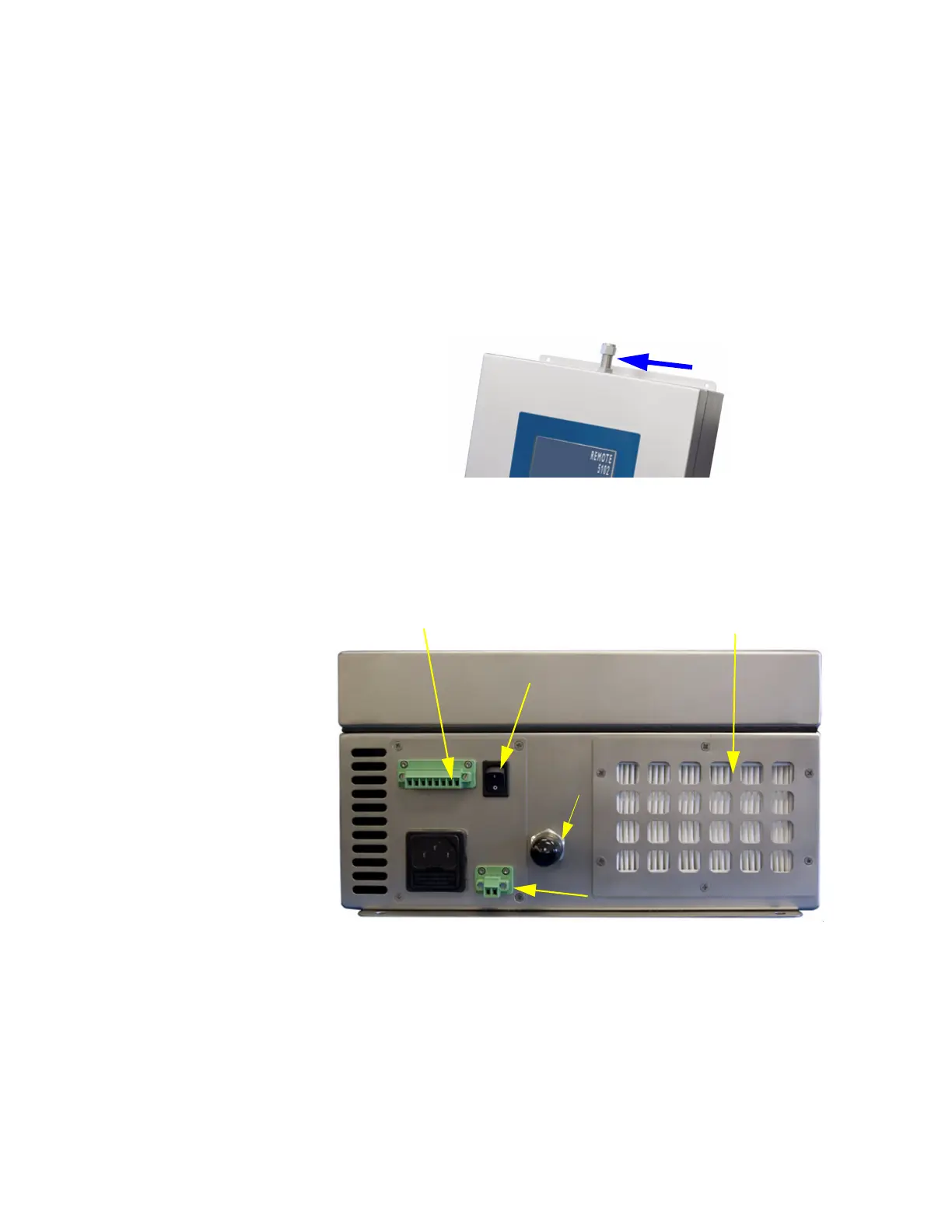
The top of the instrument has the inlet line, which supplies sample air
to the sensor. Using the compression fittings is required to allow wipe-
down of the instrument.
Figure 3-4 Instrument Top Connections
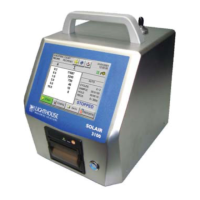
The photo below shows the bottom connectors for the REMOTE-2 PN
Series.
Figure 3-5 Instrument Bottom Connections
Communication Port
The communication port uses 4-20mA protocol. To connect the counter
to a PC requires an RS-232 adapter kit. Please contact your Lighthouse
Sales Representative for this kit.
Inlet
HEPA
4-20mA
Outlet
fitting
Filter
AC IN
Power Switch
Remote Pump
Switch


 To Next Page