EasyManua.ls Logo

Lightware HDMI-TPS-TX210 - 2.2. Rear Views

Lightware HDMI-TPS-TX210
159 pages
Print Icon
To Next Page IconTo Next Page
To Previous Page IconTo Previous Page
Loading...
ī˜–ī˜’ī˜„ī˜“ī™–ī™“ī™ˆī™™ī™‡ī™˜ī˜„ī˜³ī™šī™‰ī™–ī™šī™ī™‰ī™›ī˜„ ī˜¬ī˜Øī˜±ī˜­ī˜‘ī˜øī˜“ī˜·ī˜‘ī˜øī˜¼ī˜–ī˜”ī˜”ī˜„ī™—ī™‰ī™–ī™ī™‰ī™—ī˜„ī©ī˜„ī˜¹ī™—ī™‰ī™–ī˜‹ī™—ī˜„ī˜±ī™…ī™’ī™™ī™…ī™ī˜„ ī˜•ī˜š
ī˜„ī™”ī™”ī™ī™ī™‰ī™ˆī˜„ī™Šī™ī™–ī™‘ī™›ī™…ī™–ī™‰ī˜„ī™”ī™…ī™‡ī™ī™…ī™‹ī™‰ī˜žī˜„ī™šī˜•ī˜’ī˜—ī˜’ī˜–ī™†ī˜—īžī™ īžī˜°ī˜Øī˜§ī˜„ī™—ī™“ī™Šī™˜ī™›ī™…ī™–ī™‰ī˜žī˜„ī™šī˜–ī˜’ī˜™ī˜’ī˜›ī™†ī˜–
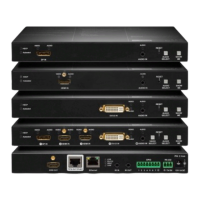
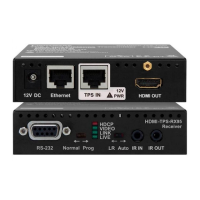
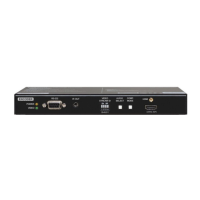
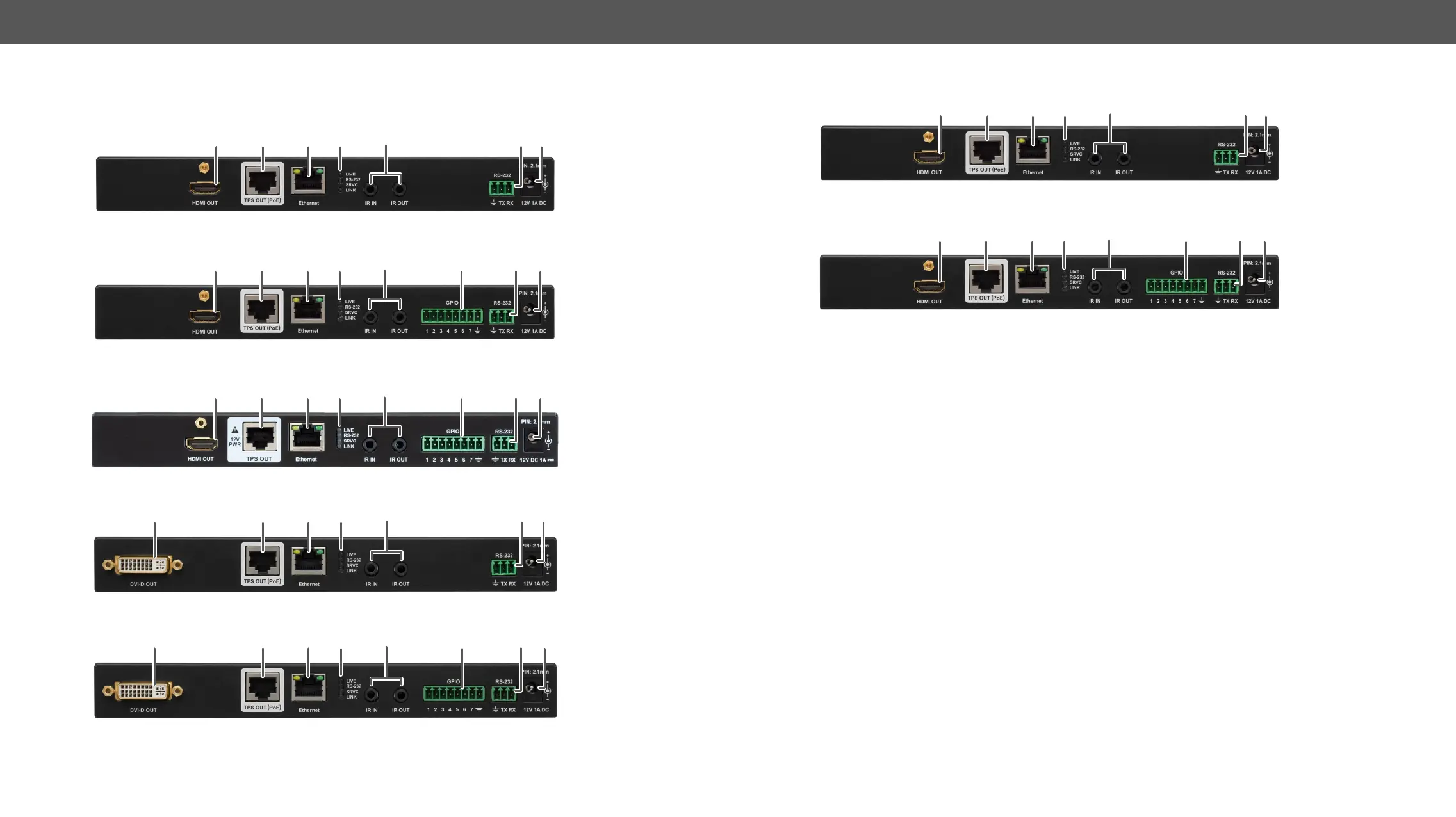
ī˜–ī˜’ī˜–ī˜’ī£Rear Views
HDMI-TPS-TX210
HDMI-TPS-TX220
HDMI-TPS-TX226
DVI-HDCP-TPS-TX210
DVI-HDCP-TPS-TX220
9
1
3
4 5
6
8
971
3
4 5 6 8
971
3
4 5 6 8
9
2
3
4 5 6
8
9
7
2 3
4
5
6
8
DP-TPS-TX210
DP-TPS-TX220, SW4-TPS-TX240 and SW4-TPS-TX240-Plus
9
1
3
4 5
6
8
971
3
4 5 6 8
1
HDMI output ī˜°ī™“ī™‡ī™…ī™ī˜„ī˜¬ī˜Øī˜±ī˜­ī˜„ī™“ī™™ī™˜ī™”ī™™ī™˜ī˜„ī™›ī™ī™˜ī™Œī˜„ī™˜ī™Œī™‰ī˜„ī™—ī™…ī™‘ī™‰ī˜„ī˜„ī˜“ī˜ŗī˜„ī™‡ī™“ī™’ī™˜ī™‰ī™’ī™˜ī˜„ī™…ī™—ī˜„ī™˜ī™Œī™‰ī˜„ī˜øī˜“ī˜·ī˜„ī™“ī™™ī™˜ī™”ī™™ī™˜ī˜’
2
DVI-D output ī˜°ī™“ī™‡ī™…ī™ī˜„ī˜Øī˜ŗī˜­ī˜‘ī˜Øī˜„ī™“ī™™ī™˜ī™”ī™™ī™˜ī˜„ī™›ī™ī™˜ī™Œī˜„ī™˜ī™Œī™‰ī˜„ī™—ī™…ī™‘ī™‰ī˜„ī˜„ī˜“ī˜ŗī˜„ī™‡ī™“ī™’ī™˜ī™‰ī™’ī™˜ī˜„ī™…ī™—ī˜„ī™˜ī™Œī™‰ī˜„ī˜øī˜“ī˜·ī˜„ī™“ī™™ī™˜ī™”ī™™ī™˜ī˜’
3
TPS output ī˜°ī™“ī™‡ī™ī™ī™’ī™‹ī˜„ ī˜¶ī˜®ī˜˜ī˜™ī˜„ ī™‡ī™“ī™’ī™’ī™‰ī™‡ī™˜ī™“ī™–ī˜„ ī™Šī™“ī™–ī˜„ ī˜¬ī˜Øī˜¦ī™…ī™—ī™‰ī˜ø
TM
ī˜„ ī™—ī™ī™‹ī™’ī™…ī™ī˜„ ī™˜ī™–ī™…ī™’ī™—ī™‘ī™ī™—ī™—ī™ī™“ī™’ī˜’ī˜„
Maximum CATx cable distances can be found in the Maximum
Extension Distances section.
4
Ethernet ī˜°ī™“ī™‡ī™ī™ī™’ī™‹ī˜„ī˜¶ī˜®ī˜‘ī˜˜ī˜™ī˜„ī™‡ī™“ī™’ī™’ī™‰ī™‡ī™˜ī™“ī™–ī˜„ī™Šī™“ī™–ī˜„ī™‡ī™“ī™’īž¤ī™‹ī™™ī™–ī™ī™’ī™‹ī˜„ī™˜ī™Œī™‰ī˜„ī™ˆī™‰ī™šī™ī™‡ī™‰ī˜„ī™™ī™—ī™ī™’ī™‹ī˜„ī˜°ī™ī™‹ī™Œī™˜ī™›ī™…ī™–ī™‰ī˜„
ī˜Øī™‰ī™šī™ī™‡ī™‰ī˜„ī˜§ī™“ī™’ī™˜ī™–ī™“ī™ī™ī™‰ī™–ī˜„ī˜Œī˜°ī˜Øī˜§ī˜ī˜ī˜„ī™“ī™–ī˜„ī™™ī™”ī™ˆī™…ī™˜ī™ī™’ī™‹ī˜„ī™ī™˜ī˜„ī™™ī™—ī™ī™’ī™‹ī˜„ī˜°ī™ī™‹ī™Œī™˜ī™›ī™…ī™–ī™‰ī˜„ī˜Øī™‰ī™šī™ī™‡ī™‰ī˜„ī˜¹ī™”ī™ˆī™…ī™˜ī™‰ī™–ī˜„
ī˜Œī˜°ī˜Øī˜¹ī˜ī˜’ī˜„ī˜„ī™’ī™ī˜„ī™˜ī™Œī™ī™–ī™ˆī˜‘ī™”ī™…ī™–ī™˜ī™ī˜„ī™‡ī™“ī™’ī™˜ī™–ī™“ī™ī˜„ī™—ī™ī™—ī™˜ī™‰ī™‘ī˜„ī™‡ī™…ī™’ī˜„ī™™ī™—ī™‰ī˜„ī™˜ī™Œī™ī™—ī˜„ī™”ī™“ī™–ī™˜ī˜„ī™˜ī™“ī˜„ī™‡ī™“ī™’ī™˜ī™–ī™“ī™ī˜„ī™˜ī™Œī™‰ī˜„
device.
5
Status LEDs ī˜øī™Œī™‰ī˜„ī˜°ī˜©ī˜Øī™—ī˜„ī™‹ī™ī™šī™‰ī˜„ī™Šī™‰ī™‰ī™ˆī™†ī™…ī™‡ī™ī˜„ī™…ī™†ī™“ī™™ī™˜ī˜„ī™˜ī™Œī™‰ī˜„ī™…ī™‡ī™˜ī™™ī™…ī™ī˜„ī™—ī™˜ī™…ī™˜ī™‰ī˜„ī™“ī™Šī˜„ī™˜ī™Œī™‰ī˜„ī™ˆī™‰ī™šī™ī™‡ī™‰ī˜’ī˜„ī˜·ī™‰ī™‰ī˜„ī™˜ī™Œī™‰ī˜„
details in the ī˜¶ī™‰ī™…ī™–ī˜„ī˜“ī™…ī™’ī™‰ī™ī˜„ī˜°ī˜©ī˜Øī™— section.
6
IR IN and OUT ī˜—ī˜‘ī™”ī™“ī™ī™‰ī˜„ ī˜øī˜¶ī˜·ī˜„ ī™‡ī™“ī™’ī™’ī™‰ī™‡ī™˜ī™“ī™–ī˜ī˜„ ī™…ī™ī™—ī™“ī˜„ ī™ī™’ī™“ī™›ī™’ī˜„ ī™…ī™—ī˜„ ī˜—ī˜’ī˜™ī˜„ ī™‘ī™‘ī˜„ ī˜Œī˜•ī˜“ī˜œī±ī˜ī˜„ ī™Žī™…ī™‡ī™ī˜„ ī™”ī™ī™™ī™‹ī˜„ ī™Šī™“ī™–ī˜„
ī™“ī™”ī™˜ī™ī™“ī™’ī™…ī™ī˜„ī˜­ī˜¶ī˜„ī™–ī™‰ī™‡ī™‰ī™ī™šī™‰ī™–ī˜„ī˜Œī˜­ī˜¶ī˜„ī˜­ī˜²ī˜ī˜„ī™…ī™’ī™ˆī˜„ī™˜ī™–ī™…ī™’ī™—ī™‘ī™ī™˜ī™˜ī™‰ī™–ī˜„ī˜Œī˜­ī˜¶ī˜„ī˜³ī˜¹ī˜øī˜ī˜„ī™‡ī™“ī™’ī™’ī™‰ī™‡ī™˜ī™ī™“ī™’ī˜’ī˜„ī˜“ī™ī™’ī˜„
ī™…ī™—ī™—ī™ī™‹ī™’ī™‘ī™‰ī™’ī™˜ī™—ī˜„ī™‡ī™…ī™’ī˜„ī™†ī™‰ī˜„ī™Šī™“ī™™ī™’ī™ˆī˜„ī™ī™’ī˜„ī™˜ī™Œī™‰ī˜„ī˜­ī˜¶ī˜„ī˜§ī™“ī™’ī™’ī™‰ī™‡ī™˜ī™“ī™– section.
7
GPIO ī˜œī˜‘ī™”ī™“ī™ī™‰ī˜„ ī˜“ī™Œī™“ī™‰ī™’ī™ī™œī˜„ ī™‡ī™“ī™’ī™’ī™‰ī™‡ī™˜ī™“ī™–ī˜„ ī™Šī™“ī™–ī˜„ ī™‡ī™“ī™’īž¤ī™‹ī™™ī™–ī™…ī™†ī™ī™‰ī˜„ ī™‹ī™‰ī™’ī™‰ī™–ī™…ī™ī˜„ ī™”ī™™ī™–ī™”ī™“ī™—ī™‰ī˜„ ī™ī™’ī™”ī™™ī™˜ī˜“
ī™“ī™™ī™˜ī™”ī™™ī™˜ī˜„ ī™”ī™“ī™–ī™˜ī™—ī˜’ī˜„ ī˜“ī™ī™’ī˜„ ī™…ī™—ī™—ī™ī™‹ī™’ī™‘ī™‰ī™’ī™˜ī˜„ ī™‡ī™…ī™’ī˜„ ī™†ī™‰ī˜„ ī™Šī™“ī™™ī™’ī™ˆī˜„ ī™ī™’ī˜„ ī™˜ī™Œī™‰ī˜„ ī˜«ī˜“ī˜­ī˜³ī˜„ ī˜‘ī˜„ ī˜«ī™‰ī™’ī™‰ī™–ī™…ī™ī˜„
ī˜“ī™™ī™–ī™”ī™“ī™—ī™‰ī˜„ī˜­ī™’ī™”ī™™ī™˜ī˜“ī˜³ī™™ī™˜ī™”ī™™ī™˜ī˜„ī˜“ī™“ī™–ī™˜ī™— section.
8
RS-232 connector ī˜—ī˜‘ī™”ī™“ī™ī™‰ī˜„ī˜“ī™Œī™“ī™‰ī™’ī™ī™œī˜„ī™‡ī™“ī™’ī™’ī™‰ī™‡ī™˜ī™“ī™–ī˜„ī™Šī™“ī™–ī˜„ī™‡ī™“ī™’ī™˜ī™–ī™“ī™ī™ī™ī™’ī™‹ī˜„ī™˜ī™Œī™‰ī˜„ī™ˆī™‰ī™šī™ī™‡ī™‰ī˜„ī™›ī™ī™˜ī™Œī˜„ī˜°ī˜Øī˜§ī˜„ī™“ī™–ī˜„ī™˜ī™Œī™ī™–ī™ˆī˜‘
ī™”ī™…ī™–ī™˜ī™ī˜„ī™‡ī™“ī™’ī™˜ī™–ī™“ī™ī˜„ī™—ī™ī™—ī™˜ī™‰ī™‘ī™—ī˜ī˜„ī™“ī™–ī˜„ī™˜ī™Œī™ī™–ī™ˆī˜‘ī™”ī™…ī™–ī™˜ī™ī˜„ī™ˆī™‰ī™šī™ī™‡ī™‰ī˜„ī™‡ī™“ī™’ī™˜ī™–ī™“ī™ī˜’ī˜„ī˜“ī™ī™’ī˜„ī™…ī™—ī™—ī™ī™‹ī™’ī™‘ī™‰ī™’ī™˜ī˜„
can be found in the ī˜¶ī˜·ī˜‘ī˜–ī˜—ī˜–ī˜„ī˜§ī™“ī™’ī™’ī™‰ī™‡ī™˜ī™“ī™– section.
9
12V DC connector ī˜•ī˜–ī˜ŗī˜„ ī˜Øī˜§ī˜„ ī™ī™’ī™”ī™™ī™˜ī˜„ ī™Šī™“ī™–ī˜„ ī™ī™“ī™‡ī™…ī™ī˜„ī™”ī™“ī™›ī™‰ī™–ī™ī™’ī™‹ī˜’ī˜„ī˜Ŗī™“ī™–ī˜„ī™‘ī™“ī™–ī™‰ī˜„ī™ˆī™‰ī™˜ī™…ī™ī™ī™—ī˜„ī™—ī™‰ī™‰ī˜„ī™˜ī™Œī™‰ī˜„ ī˜•ī˜–ī˜ŗī˜„ ī˜Øī˜§ī˜„
Connection section or see all the available ī˜“ī™“ī™›ī™‰ī™–ī™ī™’ī™‹ī˜„ī˜³ī™”ī™˜ī™ī™“ī™’ī™—.
ļ„¢




Table of Contents

Other manuals for Lightware HDMI-TPS-TX210

Related product manuals