Link HD System Manual
Document # -HD System Man Iss 1.1 Issue 1.1 06/11/2007
Page 11 of 31
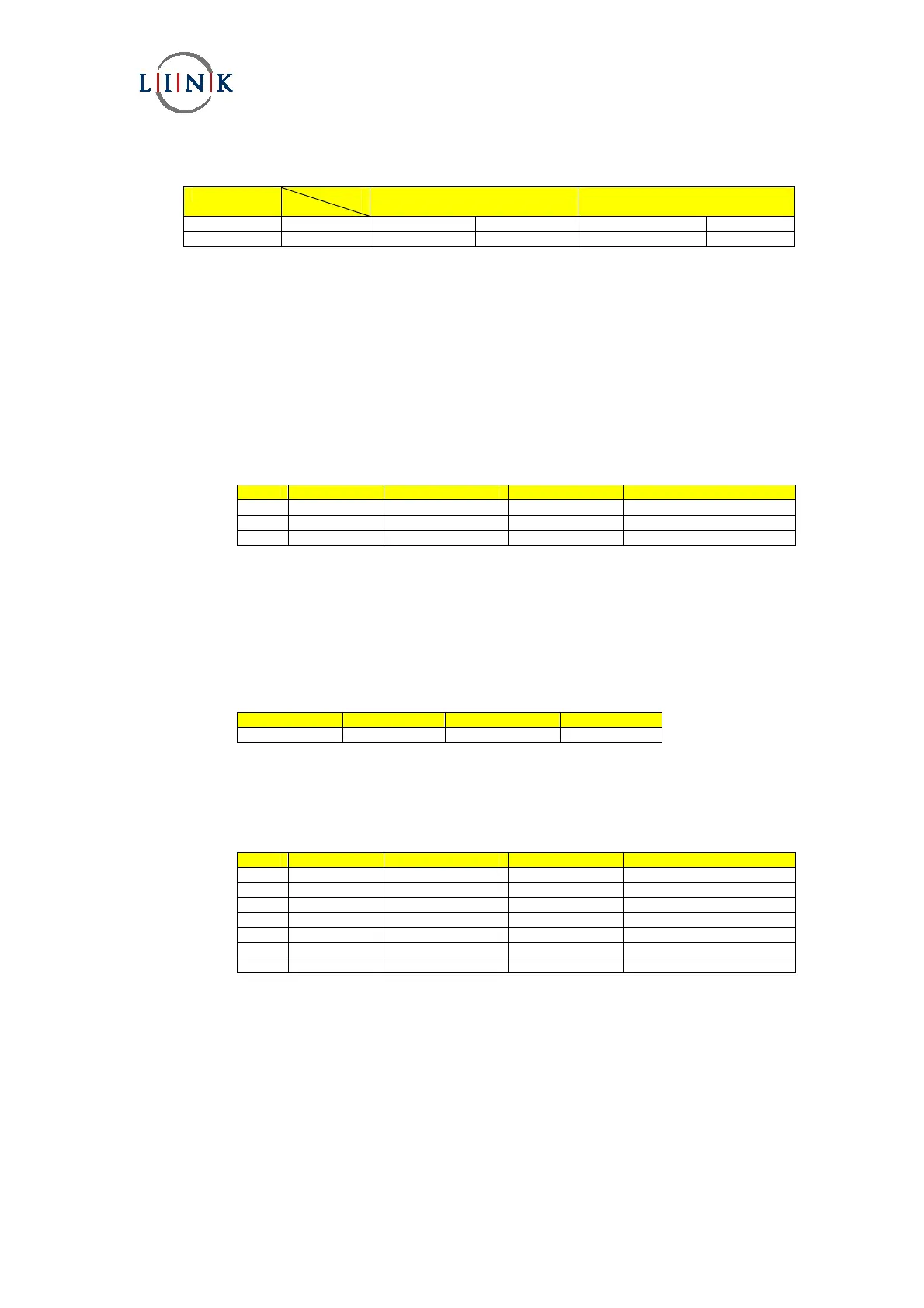
The Table below defines the corresponding bit rates for LMS-T operation for both 10MHz and 20MHz operation.
Modulation GI
CR
1/8
10MHz 20MHz
1/16
10MHz 20MHz
QPSK 2/3 9.2 18.4 9.7 19.5
16QAM 2/3 18.4 36.8 19.5 39
These rates can be confirmed by checking the Advanced/Multiplexer/Bit Rate menu.
It should be noted that this corresponds to the total data rate which includes the video, audio and any user data.
Due to the improvement that LMS-T has over DVB-T these settings give approximately 50% improvement of bit rates for the
same level of ruggedness of the RF link.
For example DVB-T 16QAM, 1/32 GI, 1/2 CR gives 12Mbits whereas LMS-T 16QAM gives 18Mbits
2.1.3.3 ASI Operation
The L1403 can be used as an MPEG2 HD encoder providing an ASI output. The modulator and RF Up converter are not
required in this operating mode.
This provides ASI streams up to 65Mbits.
Step Menu Sub Menu Option Setting
1 Advanced Unit Mode ASI
2 Advanced Mux Bit Rate As Required
3 Advanced Encoder Bit Rate As Required
The encoder bit rate cannot be set above the Mux bit rate, if an attempt is made to exceed the mux setting the encoder
value will clamp to the highest allowed rate.
2.1.3.4 Video Input Format
It is important that the encoder is configured to match the incoming video format. The rates MUST match otherwise the
encoder may appear to operate correctly but then fail with changing video images.
Menu Sub Menu Option Setting
Advanced Video HD Input Unit As required
Please see Section 3.1.1 for Video formats supported by the L1403 encoder.
2.1.3.5 Audio Input Format
Step Menu Sub Menu Option Setting
1 Advanced Audio A or B Audio Encoding as required
2 Advanced Audio A or B Input As Required
3 Advanced Audio A or B Bit Rate As Required
4 Advanced Audio A or B Mode As Required
5 Advanced Audio A or B Line / Mic As required
6 Advanced Audio A or B Phantom Pwr If Mic selected
7 Advanced Audio A or B Mic or Line Level *Set level ~160
* Note: This version of software does not have logarithmic control of audio levels, therefore the setting of the level is very
coarse !


 To Next Page