Rev: 08.30.22 Page 35 CCD-0006500
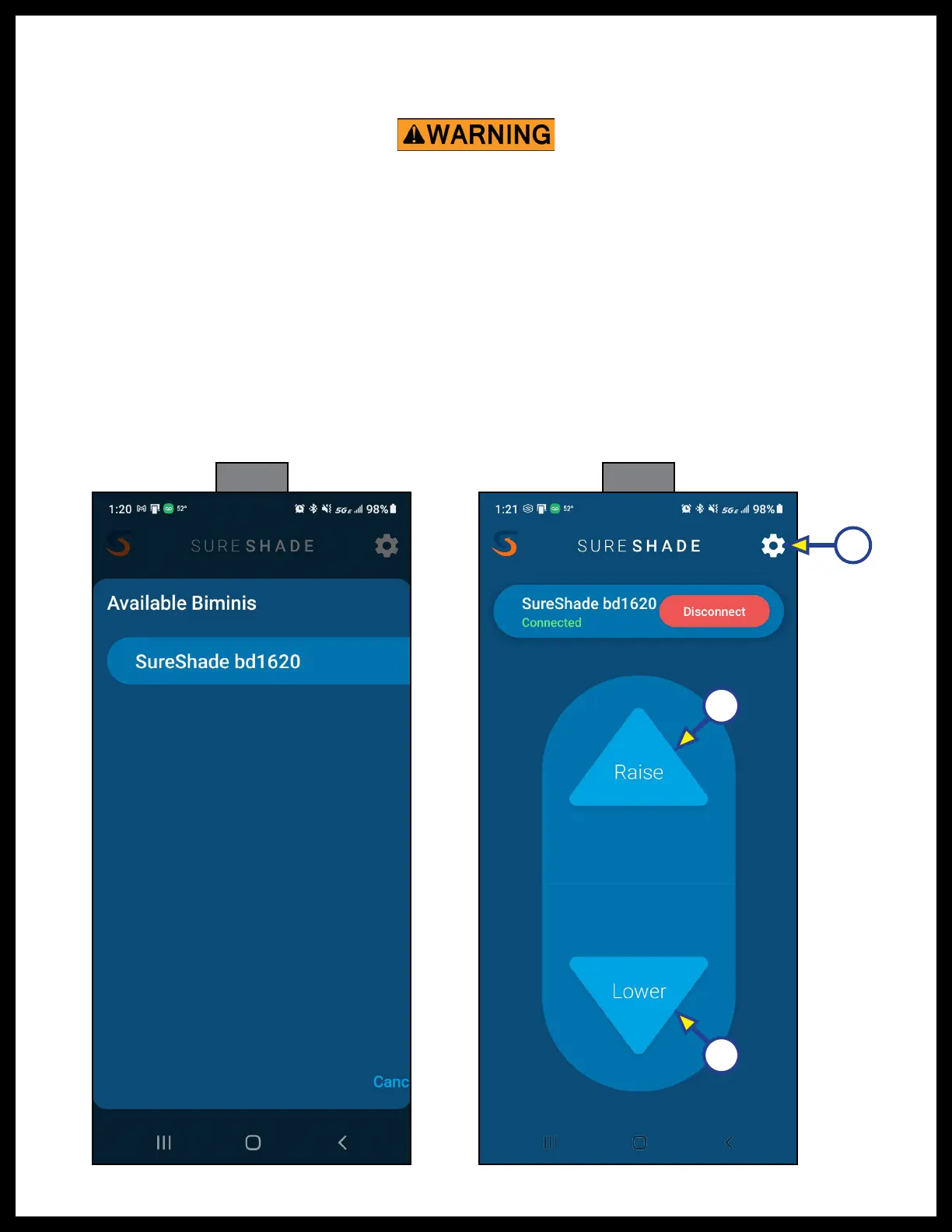
H. Select the desired bimini from the Available Biminis list (Fig. 36).
I. The touch controller will begin pairing itself with the smart device.
J. The controller and the paired smart device are now connected and the Raise and Lower buttons
are now active (Fig. 37).
Fig. 36 Fig. 37
A
B
C
K. Tap and hold the Raise button (Fig. 37A) to extend the bimini top.
NOTE: Do NOT fully open the power bimini without the canvas top installed or failure of the system
willresult.
L. Tap and hold the Lower button (Fig. 37B) to retract the bimini top.
M. Alternately operate the app's Raise and Lower buttons to place the bimini top in various positions
to ensure a good Bluetooth connection.
2. To disconnect and unpair the iOS smart device from the connected controller, do as follows:
A. With the app open to the Raise and Lower button screen (Fig. 37), tap the gear icon (Fig. 37C) to
access the Settings screen (Fig. 38).
Do NOT open the bimini top in strong winds. Opening the top in strong winds could result in severe
product damage. Only open the bimini top under normal wind conditions.



 To Next Page