ISO 9001 CERTIFIED www.liteputer.com.tw
Lite-Puter
CX-12 [EUM-E]
16
Chapter 7 A/B CROSS FADERS Scene switching
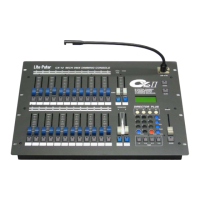
"A/B CROSS FADER"
2 set of individual scene control VR
In SEQUENCE mode, use A/B CROSSFADER to execute the manual chase
function.
7-1 To save the SEQUENCE to A / B CROSS FADER
EX
:
To load the Sequence to A CROSS FADER
STEP-1 Press【LOAD key on below of A CROSS FADER 】+【P 1】keys together
to save the current sequence into A CROSS FADER.
7-2 To load A / B CROSS FADER data
Function 1
:
press the Load key on below of A/B CROSS FADER
The Fader time of A/B CROSS FADER control by SPEED VR key, according to 7-1,
to load the saving data from the SEQUENCE by A CROSS FADER.
STEP-1 Adjust【SPEED / FADE VR】key, and press【FADE】to confirmed the speed
setting, adjust the speed VR key, and press FADE key for modification
STEP-2 Press【A CROSS FADER VR】to the top, and press【LOAD】key for loading
Function 2: use A/B CROSS FADER VR
According to the setting procedures of above, use the【A CROSS FADER VR】key
for further setting
7-3 To pause the A / B CROSS FADER
Adjust the 【A CROSS FADER VR】key to the “0%” value, and press【LOAD】key
to pause / stop


 To Next Page