Connect ID 40-55 DR+
User guide
10
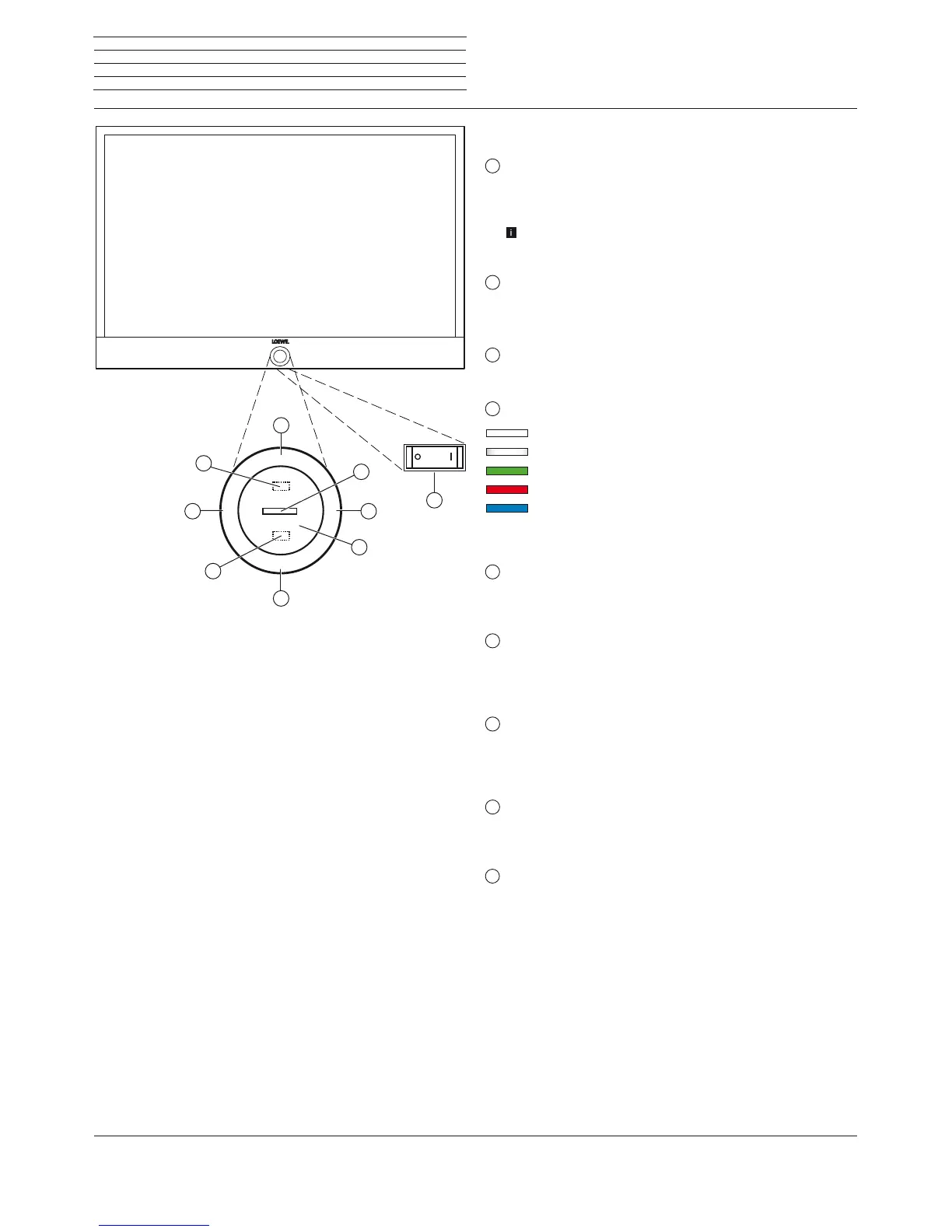
Functions of the operating elements
1
Mains switch:
The mains switch is located on the bottom of the set.
Always return the TV set to Standby mode before switching it off
with the main switch.
The TV set will be completely separated from mains only when
you unplug the mains cable.
2
On/Off key:
Switching on in standby mode
Switching off to the standby mode
3
IR receiver:
Infrared receiver for receiving the remote control commands.
4
Display:
white: TV set in standby
white, intermittent: TV set starts
green: TV set switched on
red: timer recording active
blue:
TV set in standby and background opera-
tion active (EPG data updating, software
update or DR+ streaming server function)
5
Infrared transmitter:
When showing 3D content, the 3D glasses Loewe Active
Glasses 3D are controlled via the infrared sensor.
6
Key M:
TV set in standby mode: switch TV set on in TV mode
TV set switched on: call direct control on TV set
in direct control on TV set: up
7
Key R:
TV set in standby mode: switch TV set on in radio mode
TV set switched on: toggle TV mode and radio mode
Direct control on TV set: down
8
Key +:
increase volume
Direct control on TV set: to the right
9
Key – :
reduce volume
Direct control on TV set: to the left
Operating controls on the TV set
M
R
+
-
4
1
8
9
2
3
7
6
5











 To Next Page