Connect ID 40-55 DR+
User guide
136
Loewe Apps
6. Install Loewe Assist Media App
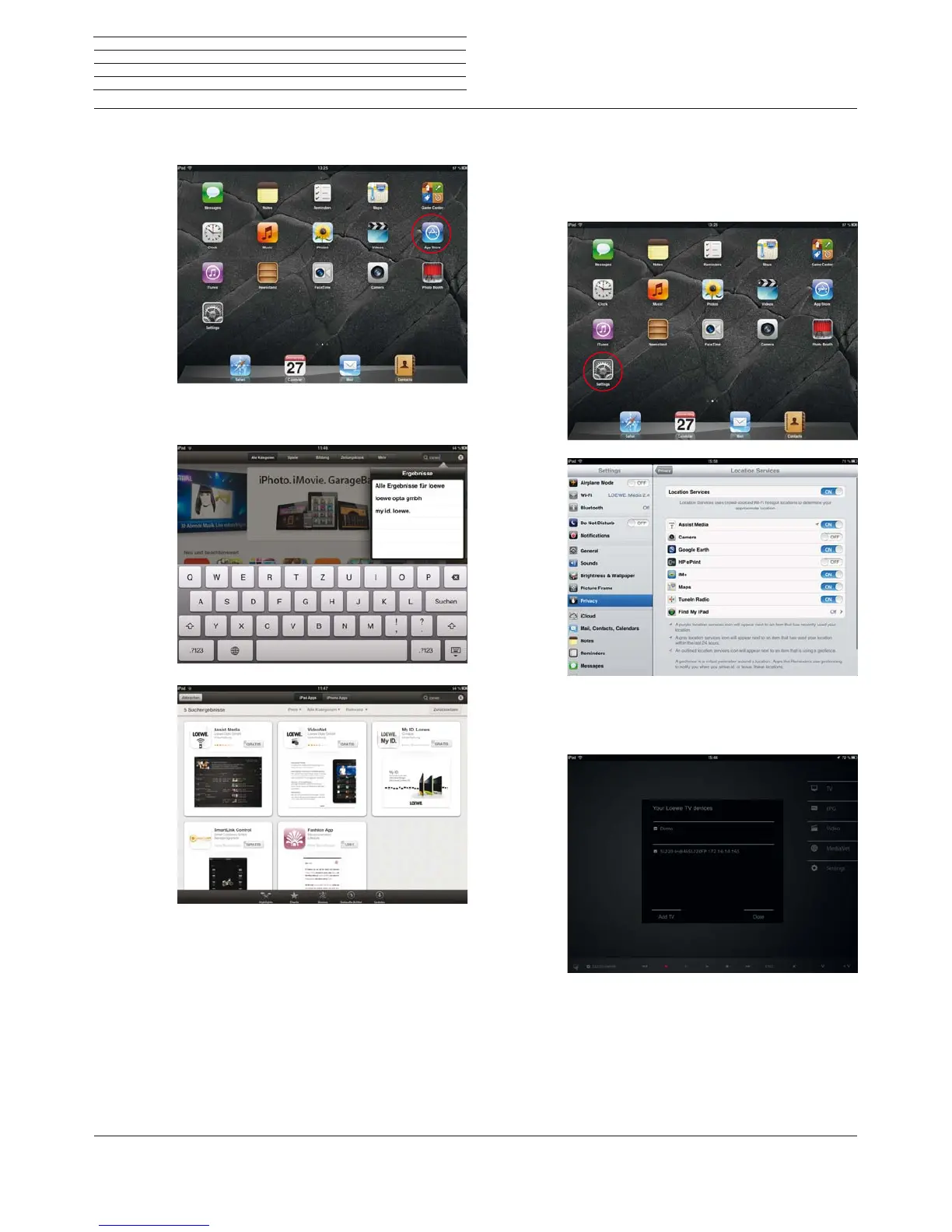
Open the App Store.
Enter the keyword Loewe in the browse list on the right
above. Start searching by pressing on Search.
Install the Assist Media App by pressing on FOR
FREE. Follow the instructions on the installation of
the app.
7. Install the Assist Media App
Activate the location services for the apps Assist
Media and Maps in your iPad under Settings ט Data
protection ט Location service. This is essential for
using country-specific functions. Thus, you can use
the maxdome video service, for example.
Open the Assist Media app on your iPad. It scans your
home network for Loewe TV sets. Follow the instruc-
tions and select the desired TV set.
In another step, you choose which station list the
app shall load: the unsorted main list or one of your
personal lists. Thereafter, loading of the EPG starts.
The app is available to you after a few minutes of load-
ing time. Further EPG data packages are loaded in the
background.











 To Next Page