Home
LONGER
3D Printers
LK4 Pro
Page 41 (2)Broken Material Detection)
LONGER LK4 Pro - 2)Broken Material Detection
46 pages
Manual
Save Page as PDF
To Next Page
To Next Page
To Previous Page
To Previous Page
Loading...
www
.longer3d.com
info@l
onger3d.com
39
(
2
)
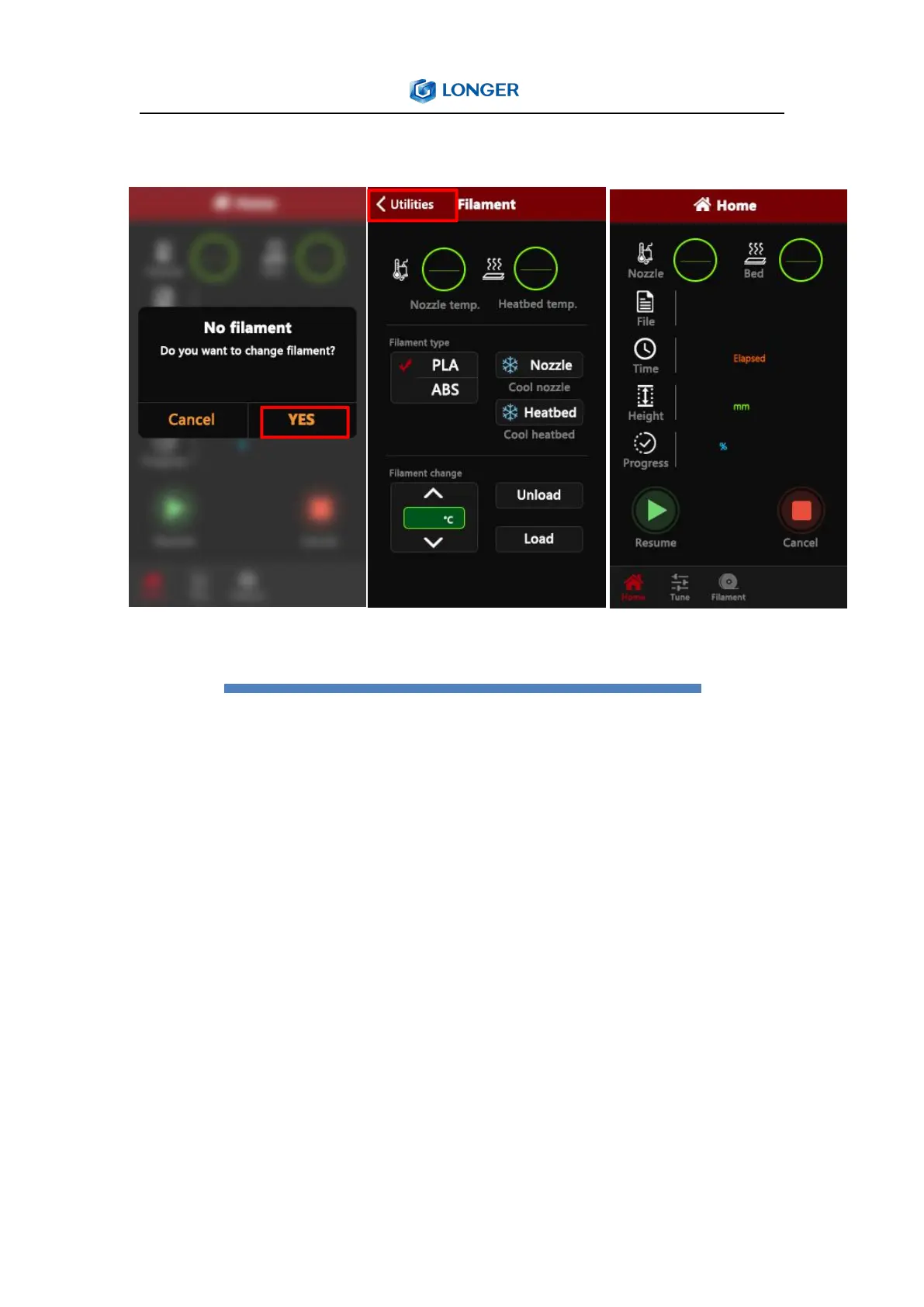
Broke
n
material
de
tection
At
t
his
p
oint,
pull
the
T
eflon
tube
out
of
the
extruder
end,
take
out
t
he
m
aterial,
ref
ill
the
consumables
to
the
nozzle,
click
YES,
after
replacing
the
material,
click
Utilities,
and
fi
nally
click
Print
to
start,
the
model
will
pri
nt.
40
42
Table of Contents
Main Page
Table of Contents
2
Product Information
5
Model Parameter
5
Machine Introduction
6
Nozzle Module Exploded View
6
Machine Assembly
7
Gantry Installation
7
X-Axis Installation
8
Mounting the X-Axis Beam
11
Install the Gantry Upper Beam
11
Mounting Screw
11
Install Teflon Tube
12
Install the Z-Axis Limit Switch
13
Mounting Aluminum Substrate
13
Wiring
14
Screen Wiring
14
Mounting Rack
15
Assembly Completed
15
5) Power Regulation
16
6)Leveling Method
17
B. Machine Operation
18
1)Machine Control Interface Description
18
2)Home Interface
20
3)Move Interface
21
4)Tune Interface
22
5)Utilities Interface
24
6)Print Interface
27
C. Cura Installation and Operation Software
28
1)Slice Software Offline Printing Instructions
31
2)Software Parameter Setting
34
D. Operation for Online Printing
37
E. Resume Printing and Filament Run-Out Detection Function
40
1)Power Failure
40
2)Broken Material Detection
41
F. FAQ Manual
42
Question1: How to Update the Firmware
42
Question 2:What if the Filament Does Not Discharge from the Machine
43
Question 3
44
Question 4: What Should I Do if I Cannot Resume Printing after Power Shutdown
45
Question 5
45
Question 6
46
Other manuals for LONGER LK4 Pro
Instruction Manual
16 pages
Related product manuals
LONGER LK4
9 pages
LONGER LK4 X
38 pages
LONGER LK2
39 pages
LONGER LK1
25 pages
LONGER LK 4
2 pages
LONGER LK5Pro
9 pages
LONGER LK 5 PRO
33 pages
LONGER LK 4 PRO
2 pages
LONGER Cube2
27 pages
LONGER Orange30
39 pages
LONGER Orange10
34 pages



 To Next Page