LOUP ELECTRONICS
•
1-877-489-5687
•
WWW.LOUPELECTRONICS.COM
11
sENsOR sETuP
AssIgN fLOW ONLy ROWs
If specic population sensors are being used for monitoring ow
only, these sensors can be dened as such through the “Sensor
Setup” menu. To get to this screen select “Menu - Population &
Rate Settings - Sensor Setup”.
e Sensor Setup screen will display all current population
sensors learned to the system. Simply select the Row number to
toggle it between being On (Green), Flow (Orange), or O (Red).
All runs that are dened as ow will not be factored into the Live
Population reading. You may also select the “Flow” option from
the selectables and display ow information the top screen.
cOVERcROP/DuAL PRODucT sETuP
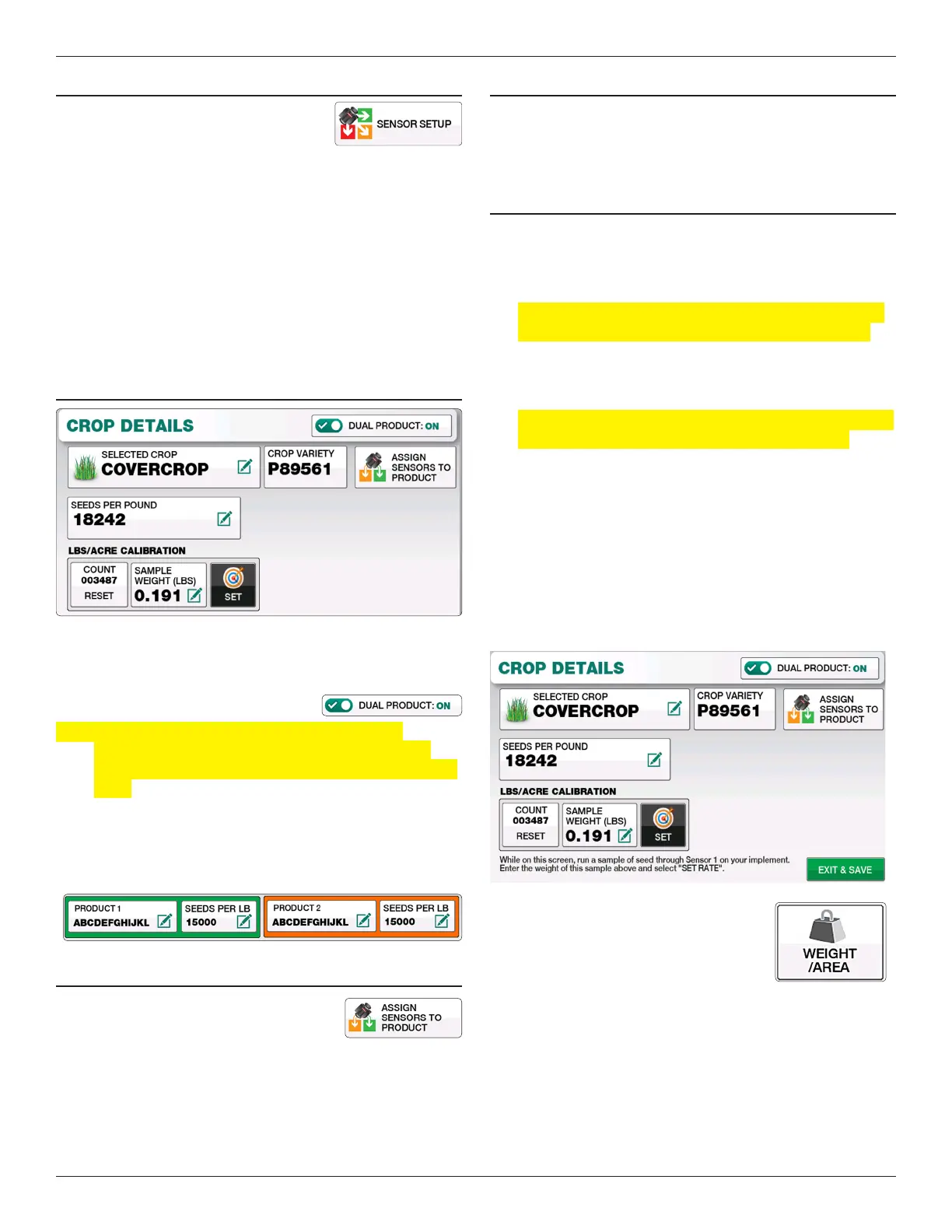
e Dual Product feature can be enabled when planting
Covercrop. With Covercrop selected on the Crop Details screen,
toggle the “Dual Product” option to “ON” to bring up the dual
product settings.
Note: e Dual Product feature is only available when
Covercrop is selected. All other crops can be toggled
between seed and fertilizer runs within the Sensor Setup
page.
You will now be given two product windows in which you can
dene product names and Seeds/Pound information. Simply
select the buttons for Product name and Seeds/lb to enter the
appropriate names.
AssIgN sENsORs TO PRODucT
To dene which of your learned population
sensors are set to Product 1 or Product 2,
select the “Assign Sensors to Product”
button. e following page will allow you to toggle between each
product you’ve dened.
cOVERcROP LB/Ac cALIBRATION
e LBS/Acre Calibration allows you to determine the Seeds/LB
for various covercrop mixtures. is process involved catching a
sample of seed and weighing that sample.
cALIBRATION sTEPs:
1. Calibration is done on the rst population sensor learned to
the Elite’s memory. Situate a bag or container to catch seed
from this sensor.
Note: If calibrating with Dual Products ON, use the rst
population sensor dened as Product 1 and Product 2.
2. Select “Covercrop” from the Crop Selection Page. At the
bottom ensure the “Count” is reset to 0.
Note: If calibrating with Dual Products ON, you will have
two saparate calibration windows for each product.
3. Meter a sample of seed into the container. Be sure to meter
this sample at your normal tractor speed. As you travel,
the COUNT window will increase for the number of seeds
detected.
4. Weigh the sample of seed and enter that weight on the
“Sample Weight” window. Select “Set” to apply the
calibration. You’ll notice when setting the rate, the “Seeds
Per Pount” automatically change based on the sample
weight.
At this point, you can use the ”Weight/
Area” selectable on the main operate
screen to see your application rate.


 To Next Page