LOUP ELITE DRILL/PLANTER MONITOR
•
OPERATION MANUAL
8
3. It is likely your system will not be congured for the
maximum possible sensors or even certain types of sensors
the Loup Elite is capable of.
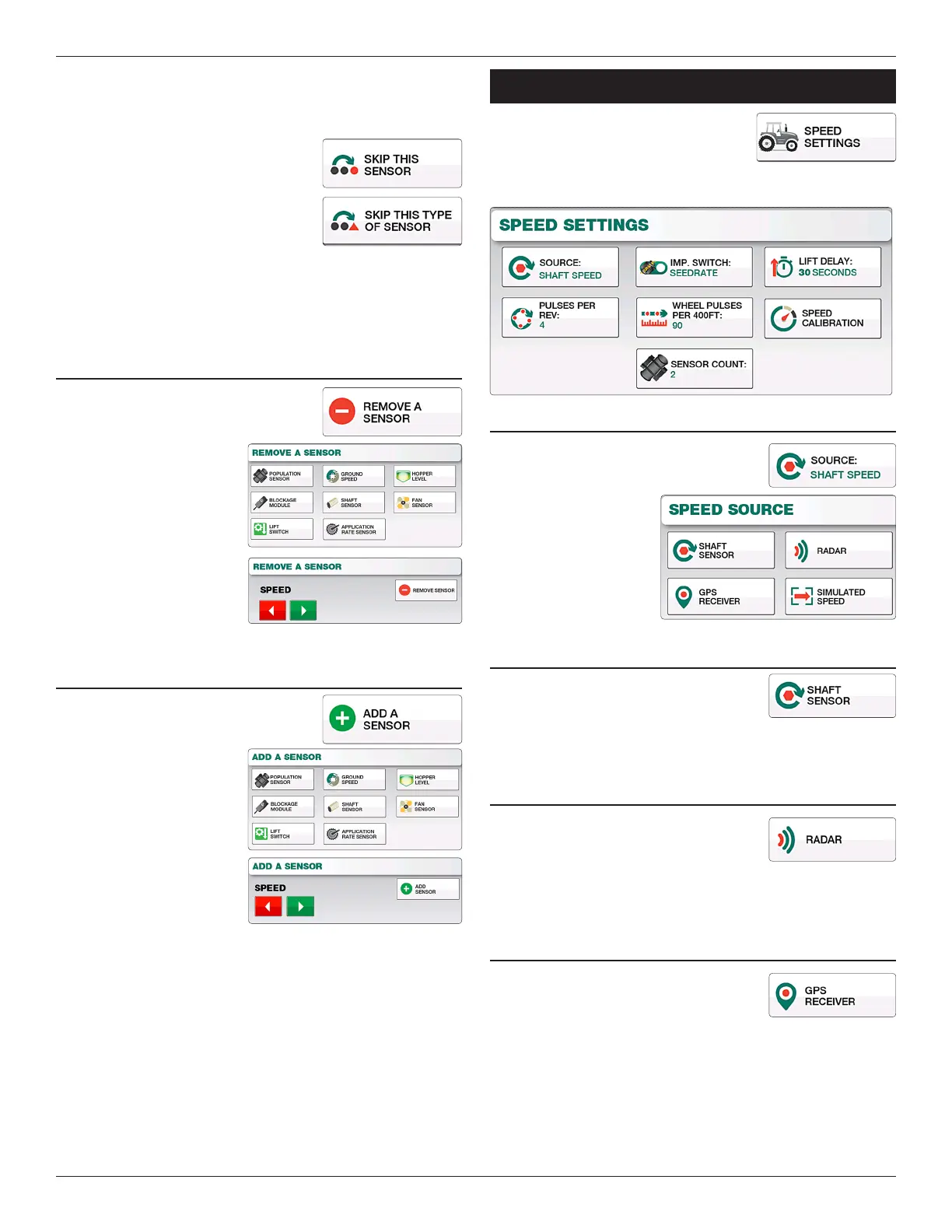
Use the “Skip is Sensor” button to
advance ahead one sensor at a time.
Use the “Skip is Type of Sensor”
to advance to the next category of
sensor.
4. When you’ve reached the end of the list of sensors, you will
be prompted with “Manual Learn Complete”. Push “Ok” to
nish.
REMOVE A sENsOR
Select this option to remove a sensor from
your existing system.
1. Select the type of sensor
you wish to remove.
2. Use the Le and Right
Arrows to navigate to the
sensor number you wish
to remove.
3. Select the “Remove
Sensor” button to
complete the removal.
ADD A sENsOR
Select this option to add a new sensor to
your existing system.
1. Select the type of sensor
you wish to add.
2. Use the Le and Right
arrow buttons to navigate
to the sensor number you
wish to add.
3. Select the “Add Sensor”
button to complete the
sensor addition.
Speed SeTTingS
Located by selecting “Menu” and “Speed
Settings”, these settings control the type
of speed input being used as well as
calibrating the speed displayed on the main screen.
sPEED TyPE/sOuRcE
Select the “Source” button to change the
type of Speed Input you’d like to use. You
may choose between Sha
Speed, Radar, GPS, and
Simulated Speed.
sHAfT sPEED sENsOR
Uses the sha rotation sensor located on
the drill to obtain ground speed. Unless
otherwise congured this is also used as the
li switch for acres accumulation.
RADAR sPEED
If your tractor is equiped with radar, you
may select this option as your source
for ground speed. Depending on your
implement conguration a li switch may be needed when using
radar, this is to ensure accurate accumulation of eld acres.
gPs sPEED
Uses a GPS receiver for your source
of ground speed. Depending on your
conguration a li switch may be needed
when using GPS, this is to ensure accurate accumulation of eld
acres.


 To Next Page