LOUP ELITE DRILL/PLANTER MONITOR
•
OPERATION MANUAL
12
Blockage SeTTingS
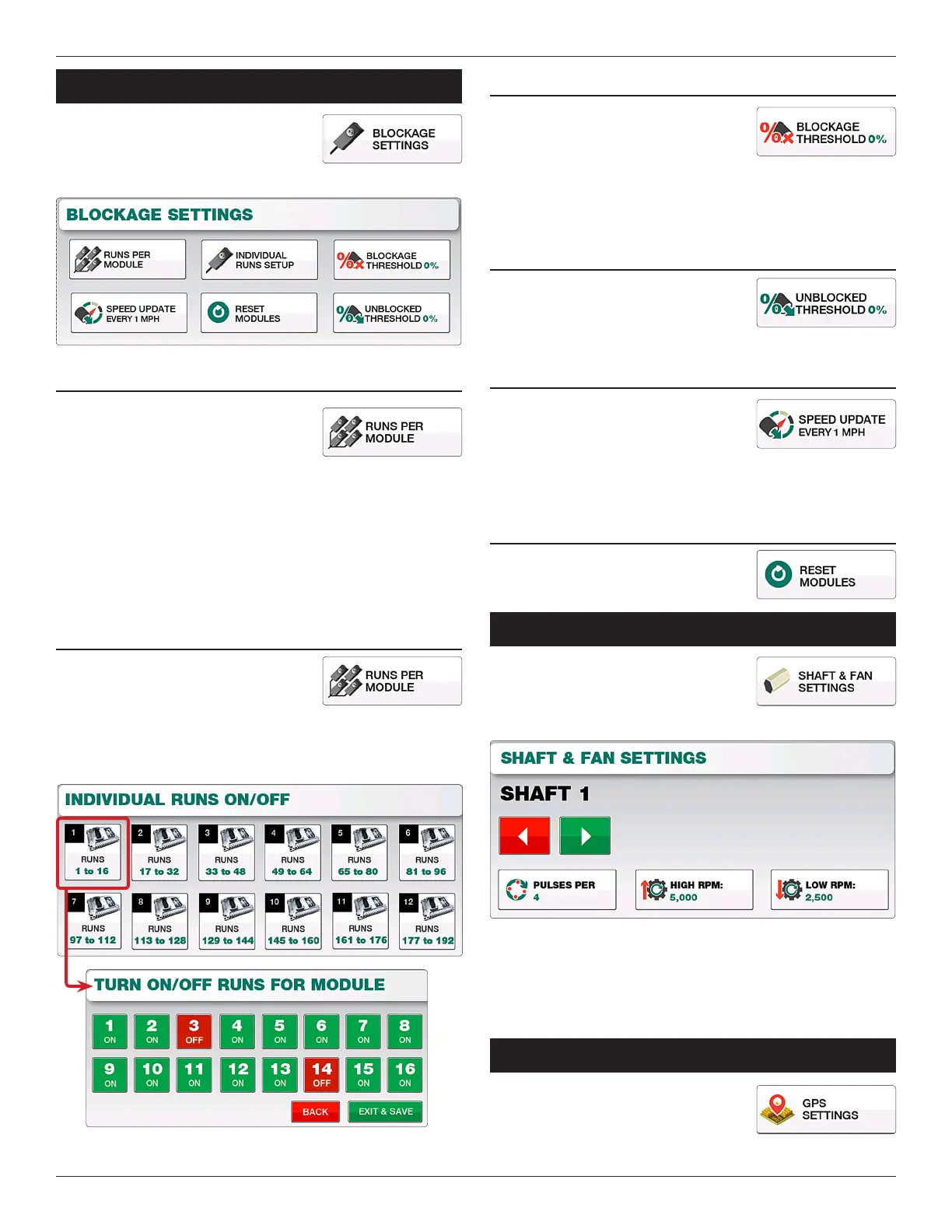
Located by selecting “Menu” and
“Blockage Settings”, this screen is used to
dene how many runs are per module,
individual runs on/o, blockage thresholds and more.
RuNs PER MODuLE
e Runs Per Module screen is used to
dene the number Blockage Sensors that
are connected to each Module. Simply
select the module you wish to change and
enter the appropriate number of runs associated with it.
e number of modules you can edit on this screen depends
on the number of modules learned for your particular drill, the
maximum number of modules being 12.
Default Runs Per Module = 16
INDIVIDuAL RuNs sETuP
e Individual Runs Setup screen allows
you to turn specic blockage sensors
associated with a module On or O. Select
the module you wish to adjust and from the follwing screen
toggle the sensors of your choice to On or O. When nished
select “Exit & Save”.
BLOckAgE THREsHOLD
e Blockage reshold denes the limit
of product ow the blockage sensors
need to see before an alarm is activated.
Lowering this number will require less product before an alarm
sounds while a higher number requires more product prior to an
alarm.
uNBLOckED THREsHOLD
e Unblocked reshold is not changable
and is automatically linked to the Blockage
reshold.
sPEED uPDATE
e Speed Update toggles between
“Auto”, “ 1 MPH”, and “2 MPH”. Under
the “Auto” setting, blockage is calculated
in accordance to the current speed. Leave this setting as “Auto”
unless otherwise specied by Loup Electronics.
REsET MODuLEs
Resets all currently learned blockage
modules to their default factory settings.
ShaFT & Fan SeTTingS
Sha & Fan Settings is located by selecting
“Menu” and “Sha & Fan Settings”, this
menu can only be accessed if at lead one
sha or fan sensor is learned to the monitor’s memory.
Within this menu, use the Le and Right arrow buttons to
navigate to the Sha or Fan sensor you wish to modify. You can
then update the Pulses per Revolution, High RPM and Low RPM
alarm points for each sensor. Select “Exit & Save” to apply any
changes made.
gpS SeTTingS
Located by selecting “Menu” and “GPS
Settings” this menu denes any GPS
osets, Baudrate, Speed corrections or the
current GPS status.


 To Next Page