LOUP ELECTRONICS
•
1-877-489-5687
•
WWW.LOUPELECTRONICS.COM
13
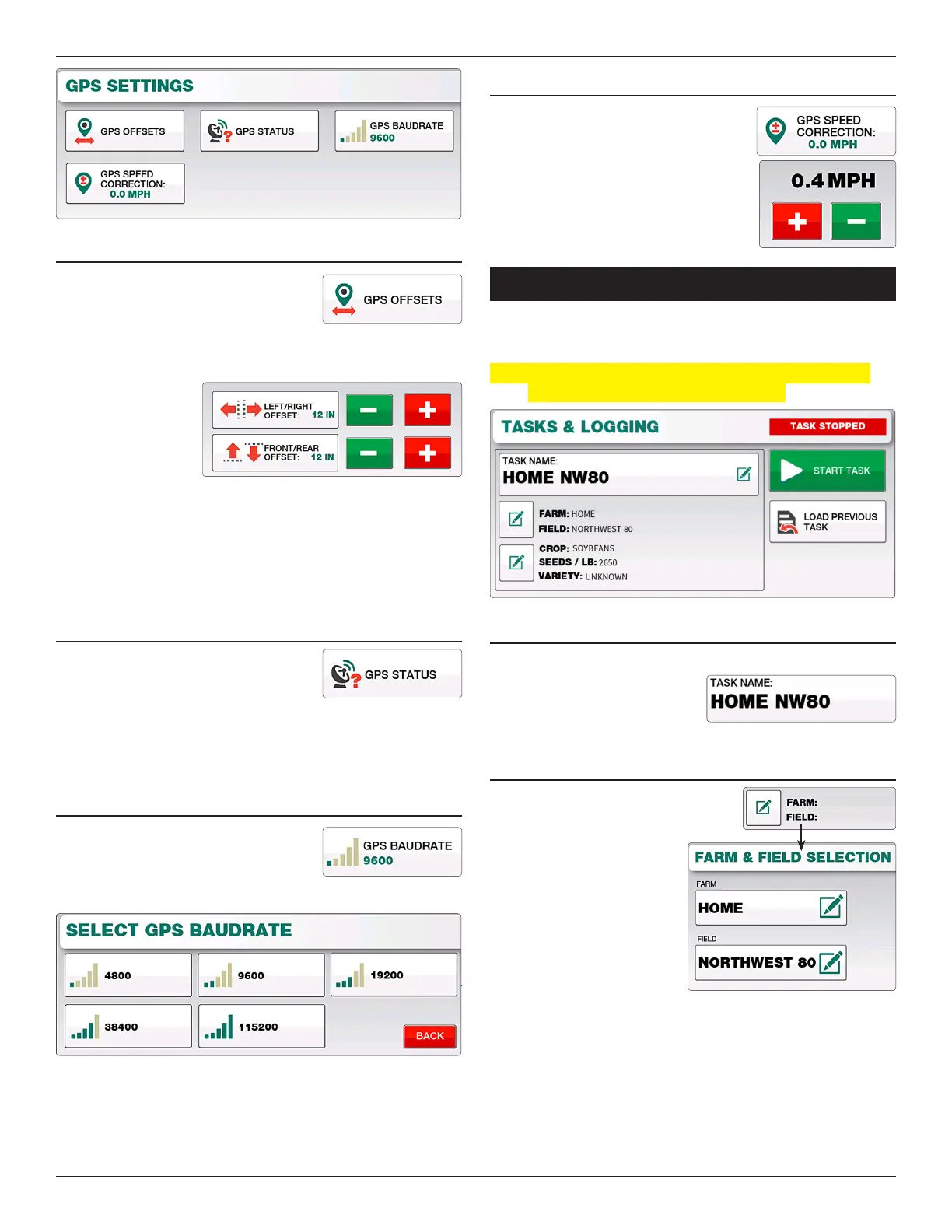
gPs OffsETs
e GPS Osets screen is used to modify
the forward/rearward and le/right
position of the GPS receiver. Depending
on what direction you need to oset, enter either a posative or
negative value in inches into the appropriate eld.
Forward Oset:
Posative (+)
Number
Rearward Oset:
Negative (-) Number
Right Oset:
Posative (+) Number
Le Oset:
Negative (-) Number
gPs sTATus
e GPS Status screen gives a diagnostics
report of the current Latitude, Longitude,
Number of Sats connected and the Type/
Quality of the GPS Fix. If the GPS Icon on the top of screen is
Yellow or Red, check this status page to help identify GPS signal
issues.
gPs BAuDRATE
Sets the baudrate at which the console
communicates with the GPS receiver you
are using. Availble speeds are 4800, 9600,
19200, 38400, and 115200.
gPs sPEED cORREcTION
If your GPS is displaying an incorrect
speed reading, use this screen to add the
desired correction in MPH.
TaSkS & logging
e Tasks screen is located by selecting “Menu” and “Tasks &
Logging”.
Note: is feature is not enabled by default. To unlock this
feature please contact Loup Electronics.
ENTERINg A TAsk NAME
Begin a new task by rst entering the task name you desire. Select
the task name button and using
the keyboard enter the name you
wish followed by the enter key.
fARM & fIELD NAMEs
e current Farm and Field name
associated with the task your starting is
displayed below the task name.
To change select the “Edit”
button next to the Farm and
Field names. is will bring
you to the Farm and Field
information screen where you
can change each value. Select
“Exit & Save” when complete
to return to the Tasks screen.
HOME
NORTHWEST 80


 To Next Page