Channel Calibration
MXD70 pH / Redox
Setup and Operating Guide
- 37 -
Channel Calibration
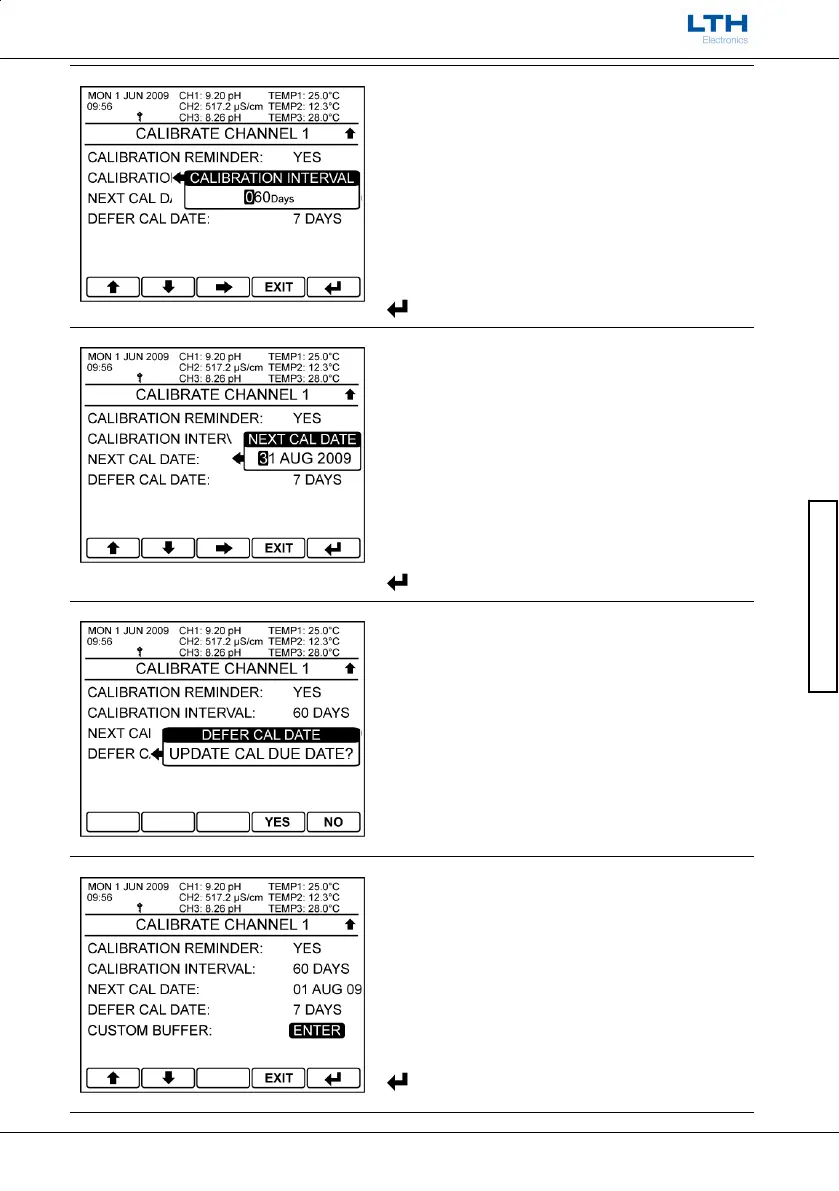
Calibration Interval
Sets the interval time for the calibration alarm.
The Next Cal Date will update to show the date of the
next calibration alarm.
/ – Increase / Decrease Digit
– Select Next Digit
EXIT
– Cancel
– Save Value
Next Calibration Date
Sets the exact date of the next calibration alarm.
The Calibration Interval will update to show the
number of days to the next calibration date.
/ – Increase / Decrease Digit or Text
– Select Next Item
EXIT
– Cancel
– Save Entry
Defer Calibration Date
Turns off the alarm and increases the calibration
interval by an extra 7 days.
Only appears once the calibration interval has
expired.
YES
– Increase Interval
NO
– Cancel
Custom Buffer Entry
Enters the custom buffer setup menu.
Only available when the pH calibration principle is
set to auto.
/ – Select Option
EXIT
– Return to Select Calibration Channel
– Enter pH Manual Slope Calibration



 To Next Page