Configuration
User Interface Guide
- 17 -
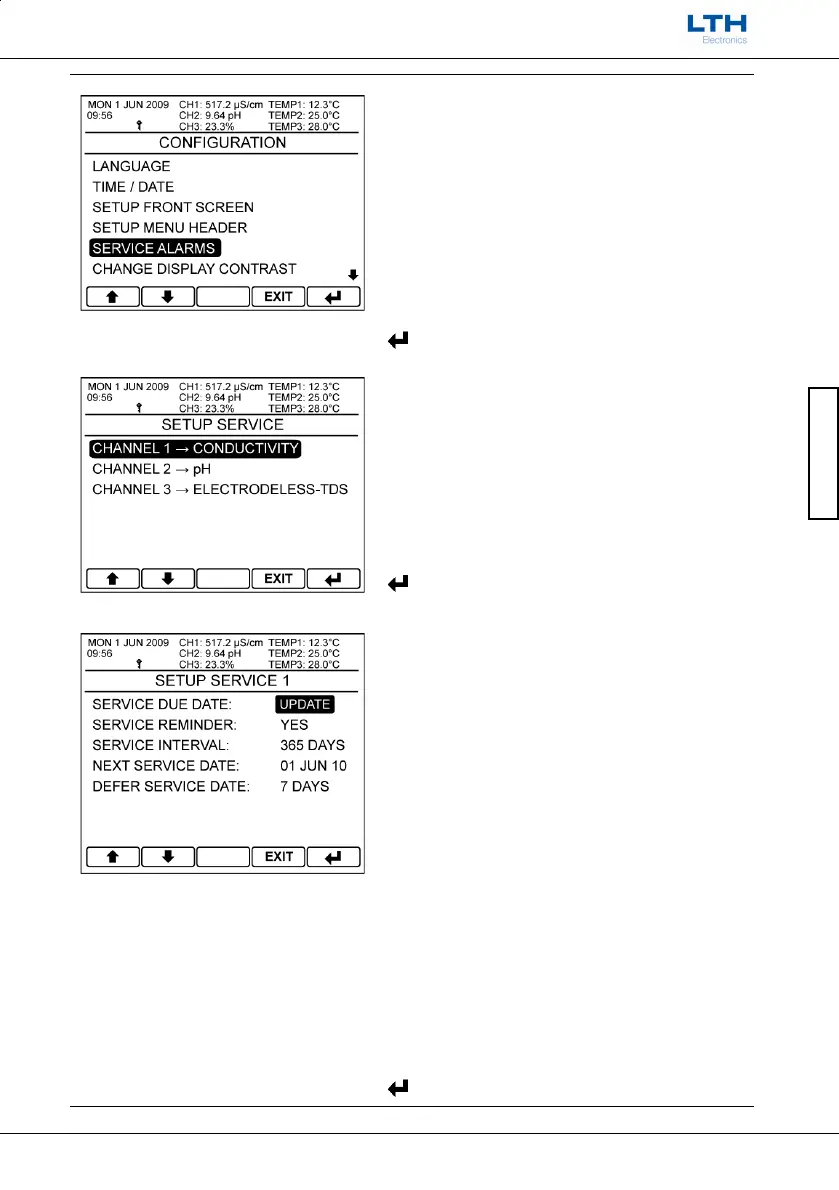
Service Alarms
The MXD70 Series has an inbuilt Service Alarm for
each channel which will activate when the
maintenance engineer’s service interval has expired.
Note. By default the alarms are disabled and can only
be setup using the service access code which can be
obtained from LTH Electronics.
Select Service Alarm Channel
Select which service alarm the user wishes to edit.
– Return to Configuration Menu
Setup Service Alarm
Service alarm configuration:
Service Due Date: Update – Automatically
increment the next service date by the service
interval. Requires service security code prior to use.
Service Reminder – Turn the service alarm on or
off. Requires service security code prior to use.
Service Interval – Set the Service Interval. Requires
service security code prior to use.
Next Service Date –
Sets the exact service date.
Requires service security code prior to use.
Defer Service Date – Only appears once the service
interval has expired. Increases the service interval
by an
extra 7 days. Requires standard security code
prior to use.
– Return to Select Service Alarm Menu



 To Next Page