Modbus Setup
Modbus RS485 Interface
Operating Guide
- 11 -
Modbus Setup
Modbus Setup
Main Menu
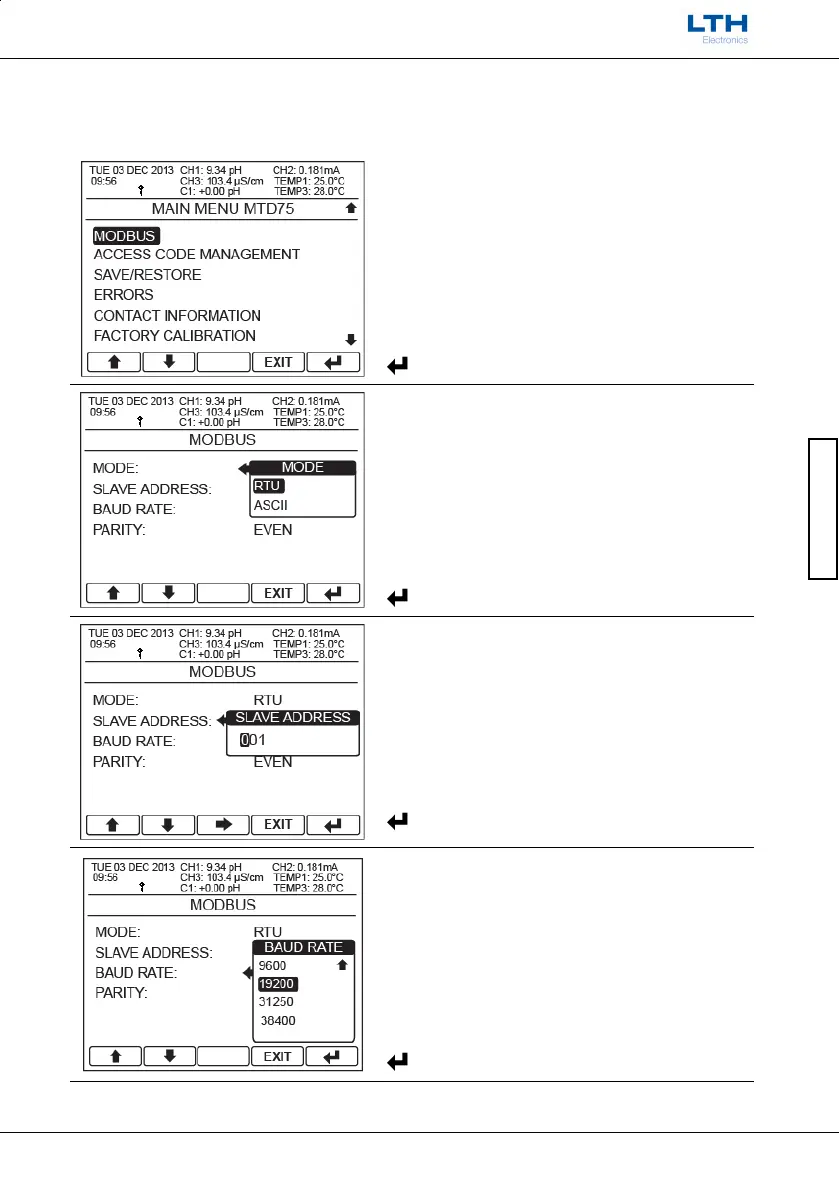
From the front screen press the menu button to
show the main menu options and select
Configuration.
/ – Select Option
EXIT
– Return to Front Screen
– Enter Option
Mode
Set the Modbus communication mode format to
either RTU or ASCII.
/ – Select Option
EXIT
– Cancel
– Save Selection
Slave Address
Set the slave address used to address the instrument.
Can be set from 1 to 247.
/ – Increase / Decrease Digit
– Select Next Digit
EXIT
– Cancel
– Save Value
Baud Rate
Set the communication Baud rate.
Available options: 300, 600, 1200, 2400, 4800, 9600,
19200, 31250 and 38400 bits per second.
/ – Select Option
EXIT
– Cancel
– Save Selection



 To Next Page