Digital Video Recorder Quick Start Guide
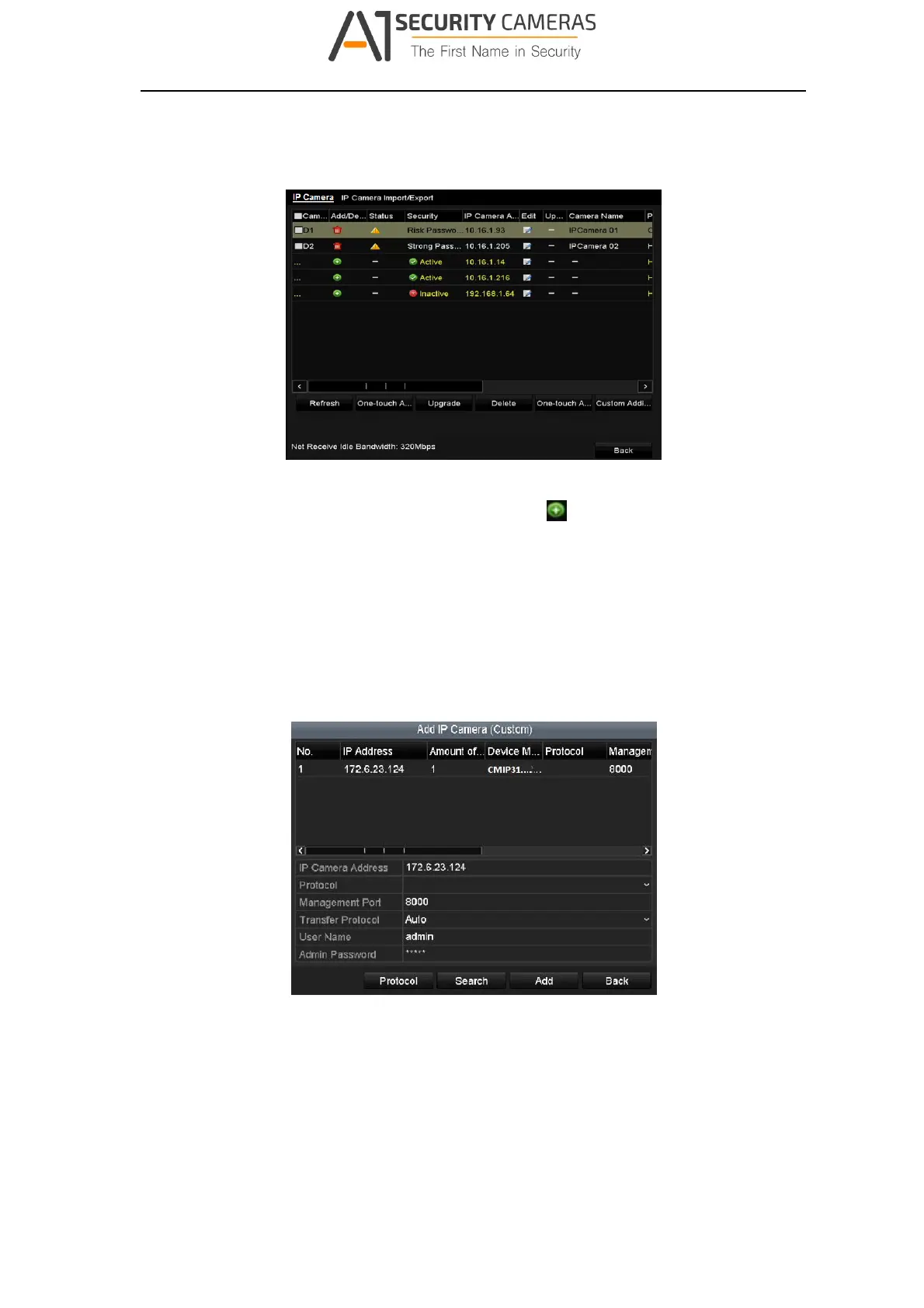
Step 1 Select the Add IP Camera option from the right‐click menu in live view mode or
click Menu> Camera> Camera to enter the IP camera management interface.
Figure 3‐22 Add IP Came r a
Step 2 Select the IP camera from the list and click the button to add the camera
(with the same admin password of the DVR’s).
Step 3 (Optional) Check the checkbox of Enable H.265 (For Initial Access) for the
connected IP camera supporting H.265. Then the IP camera will be encoded with
H.265.
OPTION 2:
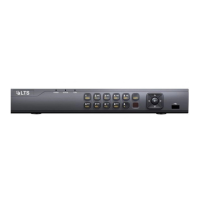
Step 1 Click the Custom Adding button to pop up the Add IP Camera (Custom) interface.
Figure 3‐23 Add IP Came r a
Step 2 Select the detected IP camera and click the Add button to add it directly, and you
can click the Search button to refresh the online IP camera manually.
OPTION 3:
26
Available from A1 Security Cameras
www.a1securitycameras.com email: sales@a1securitycameras.com



 To Next Page