Digital Video Recorder Quick Start Guide
No. Name Function Description
And in auto sequence view mode, the buttons can be used
to pause or resume auto sequence.
6 IR Receiver
Receiver for IR remote.
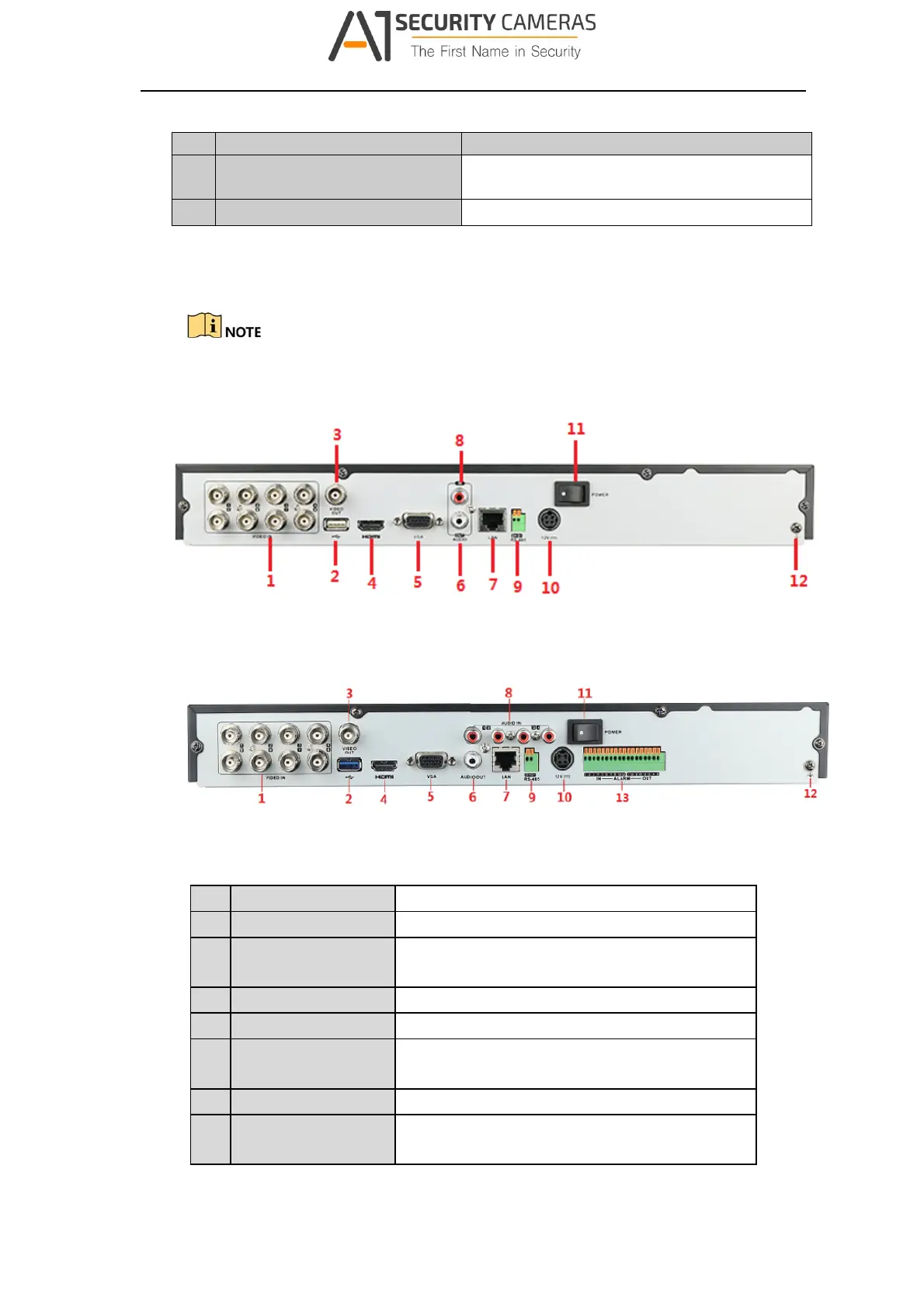
1.2 Rear Panel
The rear panel vaires according to different models. Please refer to the actual product.
Rear Panel 1
Figure 1‐2 Rear Panel of LTD83XXK‐ET/ETC
Rear Panel 2
Figure 1‐3 Rear Panel of LTD85XXK‐ST
Table 1‐2 De script ion of Rear Panel
No. Item Description
1 VIDEO IN
BNC interface for TVI and analog video input.
2 USB Port
Universal Serial Bus (USB) port for additional
devices.
3 VIDEO OUT
BNC connector for video output.
4 HDMI
HDMI video output connector.
5 VGA
DB15 connector for VGA output. Display local video
output and menu.
6 AUDIO OUT
RCA connector.
7
LAN Network
Interface
Connector for network
8
Available from A1 Security Cameras
www.a1securitycameras.com email: sales@a1securitycameras.com









 To Next Page