Digital Video Recorder Quick Start Guide
3.12 Playback
The recorded video files and pictures on the hard disk can be played back in the
following modes: instant playback, all‐day playback for the specified channel, and
playback by normal/event/smart/tag/system logs/sub‐periods/external file
search/picture.
Step 1 Enter playback interface.
Menu > Playback
Or select Playback from the right‐click menu.
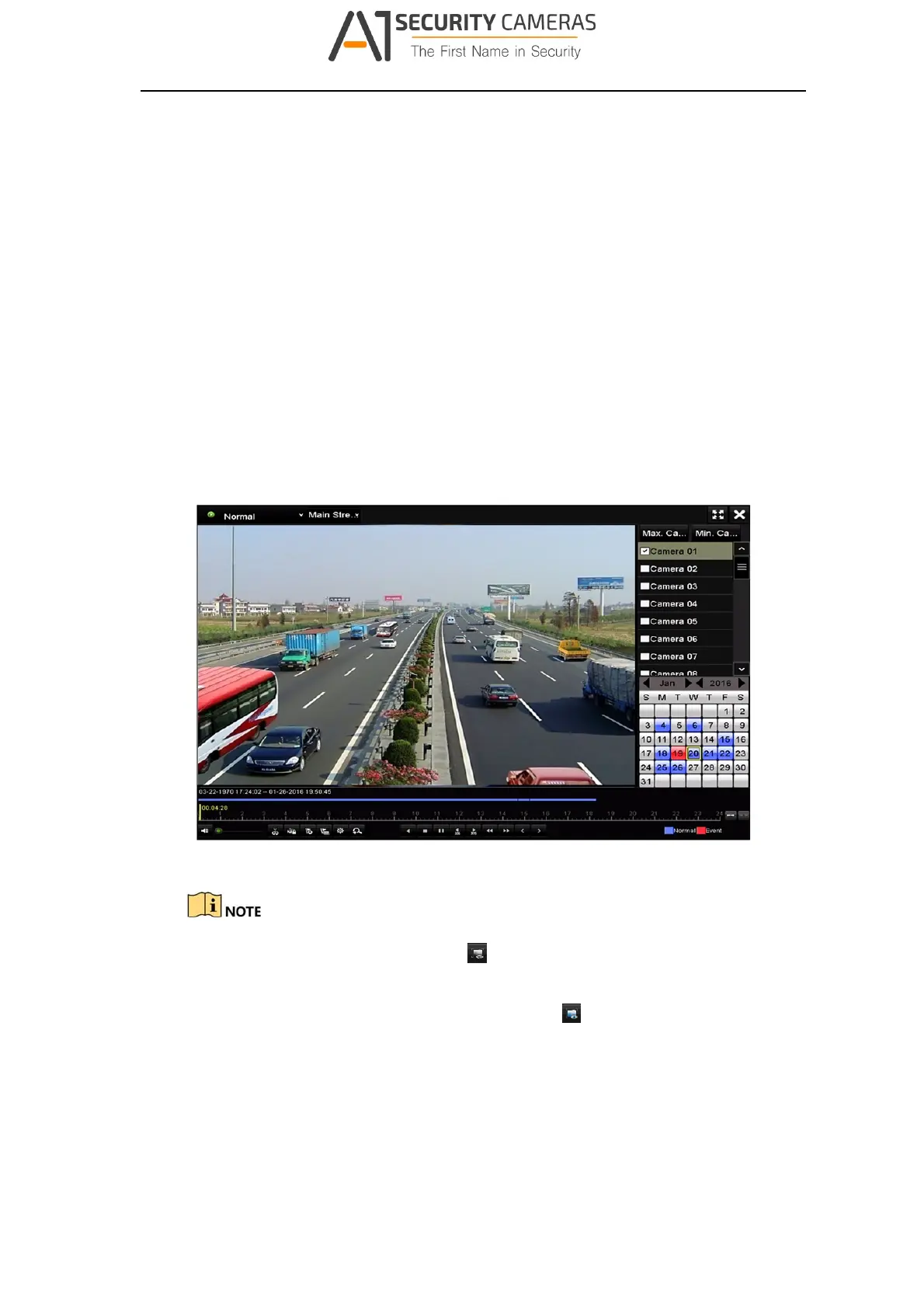
Step 2 Check the checkbox of channel(s) in the channel list and then double‐click to
select a date on the calendar.
Step 3 (Optional) Use the toolbar in the bottom part of Playback interface to control
playing progress.
Figure 3‐24 Playback Interf ace
For LTD85XXK‐ST series DVR, you can click
to show the VCA information in smart
playback. Then the configured line or quadrilateral in VCA configuration and target
frame(s) will be shown on the playback interface. Click
to hide the VCA
information.
28
Available from A1 Security Cameras
www.a1securitycameras.com email: sales@a1securitycameras.com








 To Next Page