EasyManua.ls Logo

Lumens VC-A31S - Page 27

Lumens VC-A31S
38 pages
Print Icon
To Next Page IconTo Next Page
To Previous Page IconTo Previous Page
Loading...
English - 27
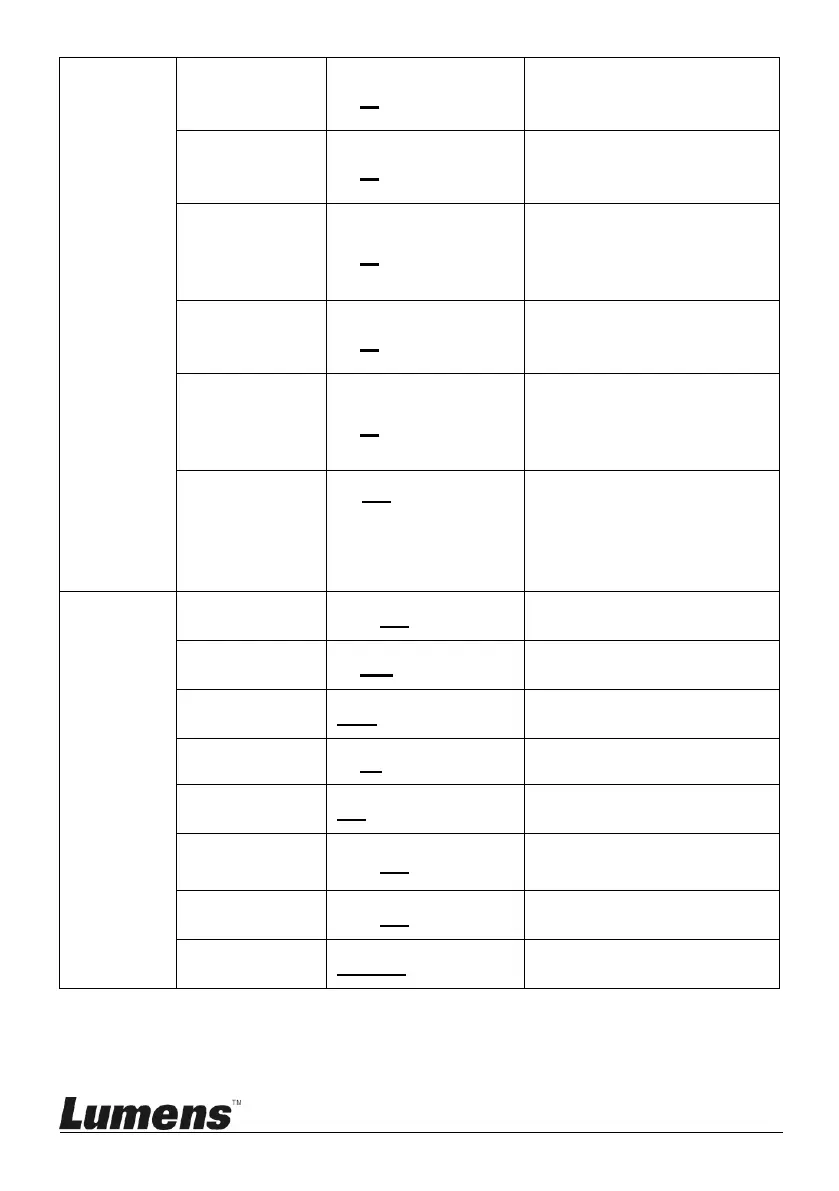
Hue
0~ A ~14
Adjustable when the
Image mode is set to
Custom mode
Gamma
0~ A ~3
Adjustable when the
Image mode is set to
Custom mode
Skin Tone
1~ A ~5
Skin tone settings;
adjustable when Image
mode is set to Custom
mode
Brightness
0~ A ~14
Adjustable when the
Image mode is set to
Custom
Contrast
0~ A ~14
Contrast adjustment;
Adjustable when the
Image mode is set to
Custom
Black Level
1. Off
2. Type 1
3. Type 2
4. Type 3
Shadow details and
transparency adjustment,
adjustable when the
Image mode is set to
Custom
Pan Tilt
Zoom
Pan/Tilt Limit
On / Off
Turn on/off the angle limit
setting
Pan Right
Limit
0~170
Limit the right angle
Pan Left
Limit
-170~0
Limit the left angle
Tilt UP Limit
0~90
Limit the upward angle
Tilt Down
Limit
-30~0
Limit the downward angle
Pan Flip
On / Off
Activate the reverse Pan
command
Tilt Flip
On / Off
Activate the reverse Tilt
command
Pan/Tilt
Speed
Normal/Smooth
Adjust Pan/Tilt Speed

Related product manuals