EasyManua.ls Logo

Lumens VC-A51S - Page 29

Lumens VC-A51S
38 pages
Print Icon
To Next Page IconTo Next Page
To Previous Page IconTo Previous Page
Loading...
English - 29
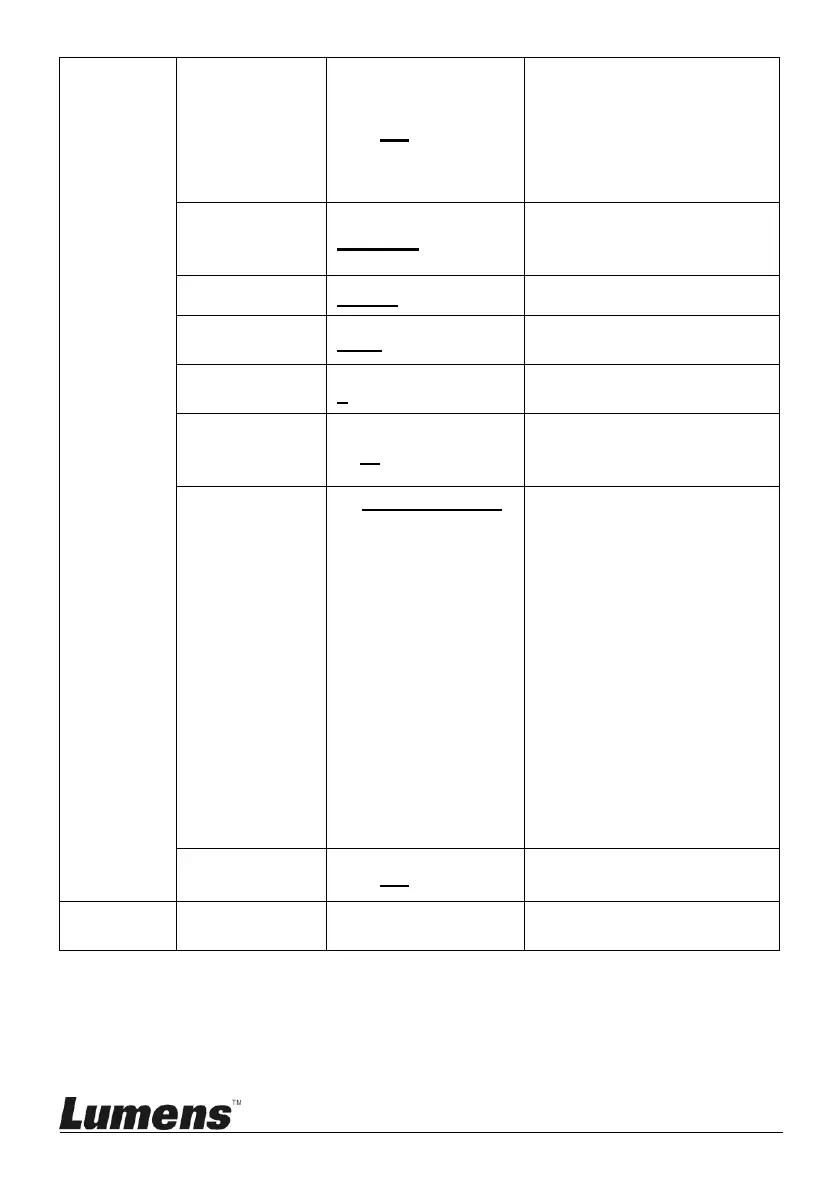
Motionless
Preset
On / Off
When the function is
enabled, the screen will
Freeze when Preset is
executed. Freeze will be
released after Preset is
completed.
Control Port
RS-232C/RS-422
Choose whether the
control interface used is
RS-232C or RS-422
Protocol
VISCA / Pelco D
Baud Rate
9600/38400
Choose the transmission
speed of the control signal
VISCA
Address
0~7
Pelco D
Address
1~ C~255
The Protocol set to Pelco
D allows the camera ID
address to be assigned
Output Mode
1. 1920x1080/60p
2. 1920x1080/50p
3. 1920x1080/30p
4. 1920x1080/25p
5. 1920x1080/60i
6. 1920x1080/50i
7. 1280x720/60p
8. 1280x720/50p
9. 1280x720/30p
10. 1280x720/25p
11. 1080/59.94p
12. 1080/59.94i
13. 1080/29.97p
14. 720/59.94p
15. 720/29.97p
Choose the output
resolution
Factory
Reset
On / Off
Resume the factory
default setting
Status
Display the current setting
status

Other manuals for Lumens VC-A51S

Related product manuals