EasyManua.ls Logo

Lumens VC-A51S - Chapter 3 Product Overview; Overview; Description of LED Indicator

Lumens VC-A51S
38 pages
Print Icon
To Next Page IconTo Next Page
To Previous Page IconTo Previous Page
Loading...
English - 8
Chapter 3 Product Overview
3.1 Overview
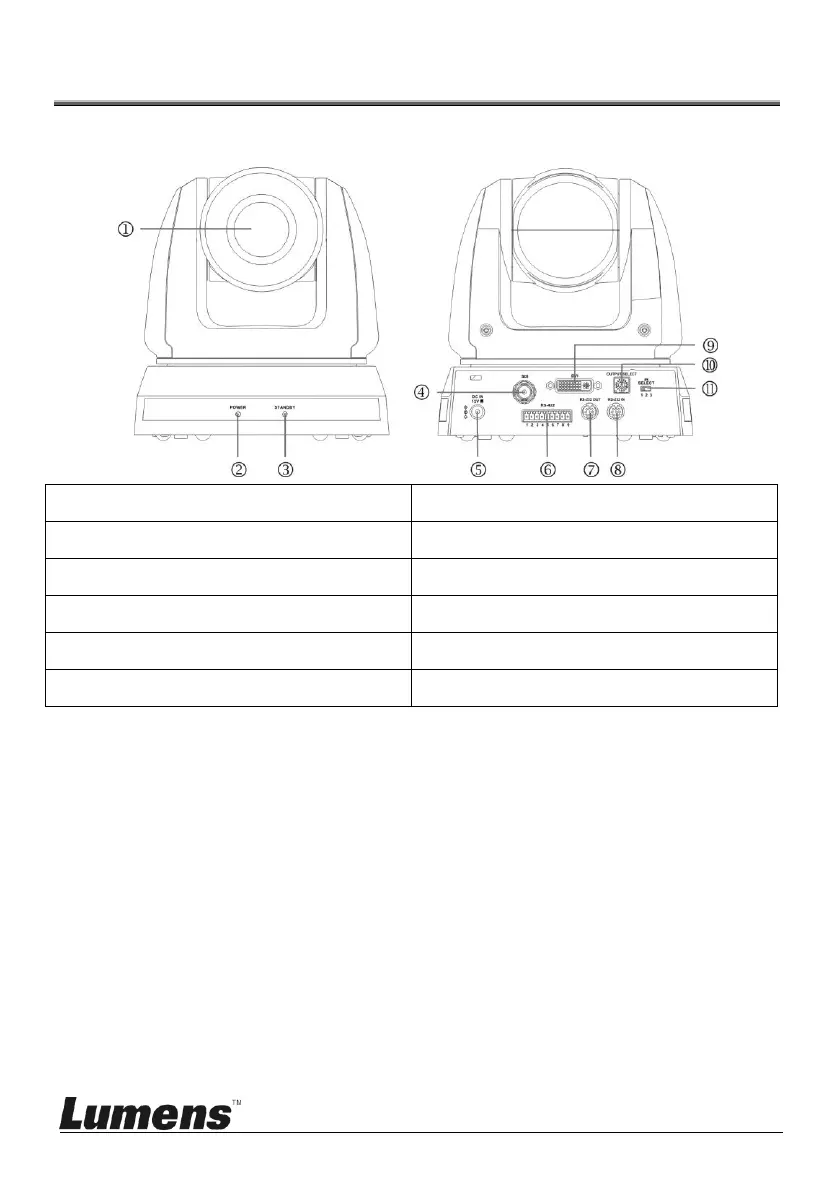
1. Camera Lens
2. Power LED Indicator
3. Standby LED Indicator
4. 3G-SDI Output
5. Power Input
6. RS-422 Connection
7. RS-232 Output
8. RS-232 Input
9. DVI Output
10. OUTPUT Switch
11. IR SELECT
3.2 Description of LED indicator
3.2.1 Power
3.2.1.1 No Light: Power off
3.2.1.2 Green light: In use
3.2.1.3 Flickering green: Signal from the remote control is received;
the indicator flickers every 0.5 second
3.2.2 Standby
3.2.2.1 Orange: In standby mode
3.2.2.2 No Light: Power on

Front View
Back View

Other manuals for Lumens VC-A51S

Related product manuals