EasyManua.ls Logo

Lumens VC-A61P - Page 48

Lumens VC-A61P
52 pages
Print Icon
To Next Page IconTo Next Page
To Previous Page IconTo Previous Page
Loading...
English - 47
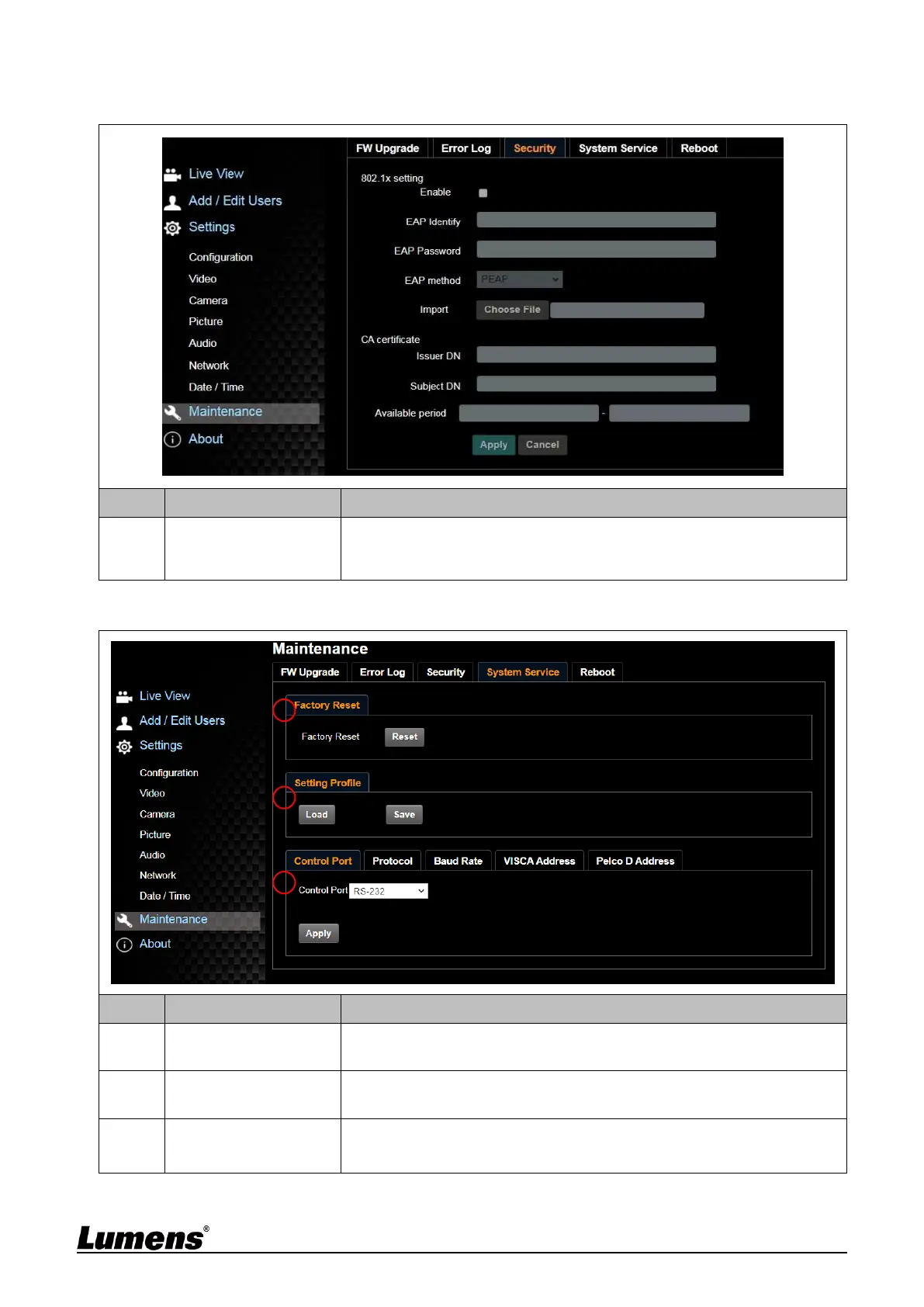
6.2.13 Settings – Maintenance - Security
<Remark> For VC-A61P only; VC-A61PN does not support this feature
No
Item
Function Descriptions
1
802.1x Setting
Enable/Disable 802.1x Protocol. Setting can be made after enabling.
<Remark> In order to enable this function, the router must support
802.1x Protocol.
6.2.14 Settings - Maintenance - System Service
No
Item
Function Descriptions
1
Factory Reset
Select the reset button to resume the factory default setting as the web
page setting
2
Setting Profile
The web page setting parameters can be exported from the computer
and imported/applied to another camera
3
Communication
protocol related
settings
Communication protocol related settings for the use of connecting
RS-232/ RS-422 communication
1
2
3

Other manuals for Lumens VC-A61P

Related product manuals