EasyManua.ls Logo

Lumens VC-A61P - Page 49

Lumens VC-A61P
52 pages
Print Icon
To Next Page IconTo Next Page
To Previous Page IconTo Previous Page
Loading...
English - 48
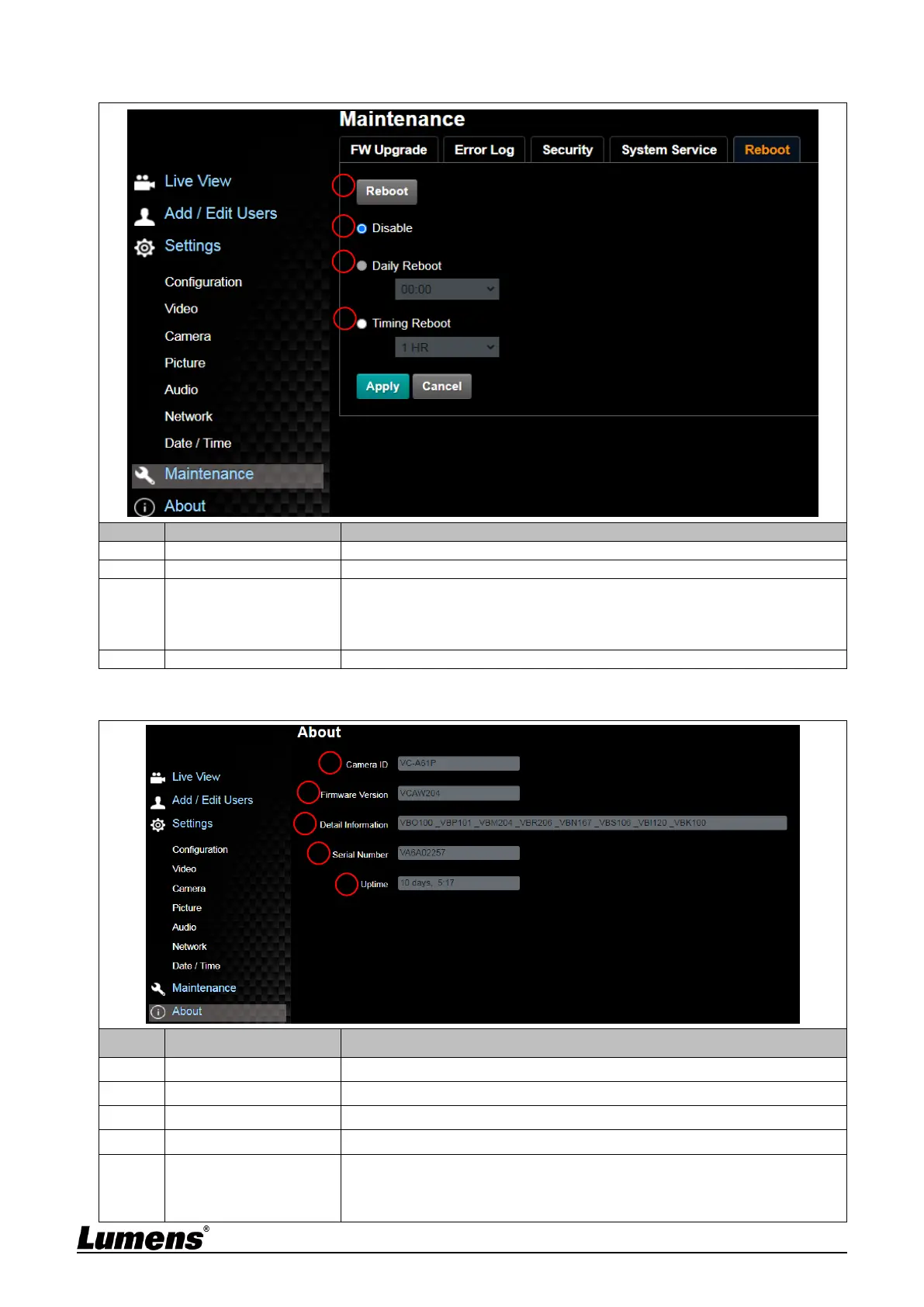
6.2.15 Settings Maintenance - Reboot
No
Item
Function Descriptions
1
Reboot
Reboot immediately
2
Disable
Disable the reboot settings
3
Daily reboot
Set the daily reboot time
<Remark> Please go to Settings Date / Time to complete the SNTP
server synchronization to set daily reboot
4
Timing Reboot
Set the timing reboot time
6.2.16 About
No
Item
Function Descriptions
1
Camera ID
Display the camera name
2
Firmware Version
Display the firmware version of the camera
3
Detail Information
Display firmware version-related information
4
Serial No.
Display the camera serial No.
5
Uptime
Displaying the running time of the camera (the timing of standby
continues; the time will be reset when the camera is rebooted or turned
off)
1
2
3
4
1
2
3
4
5

Other manuals for Lumens VC-A61P

Related product manuals