Luowice Wireless Security Camera User ManualLuowice Wireless Security Camera User Manual
3635
2.3.4 Action with Alarm
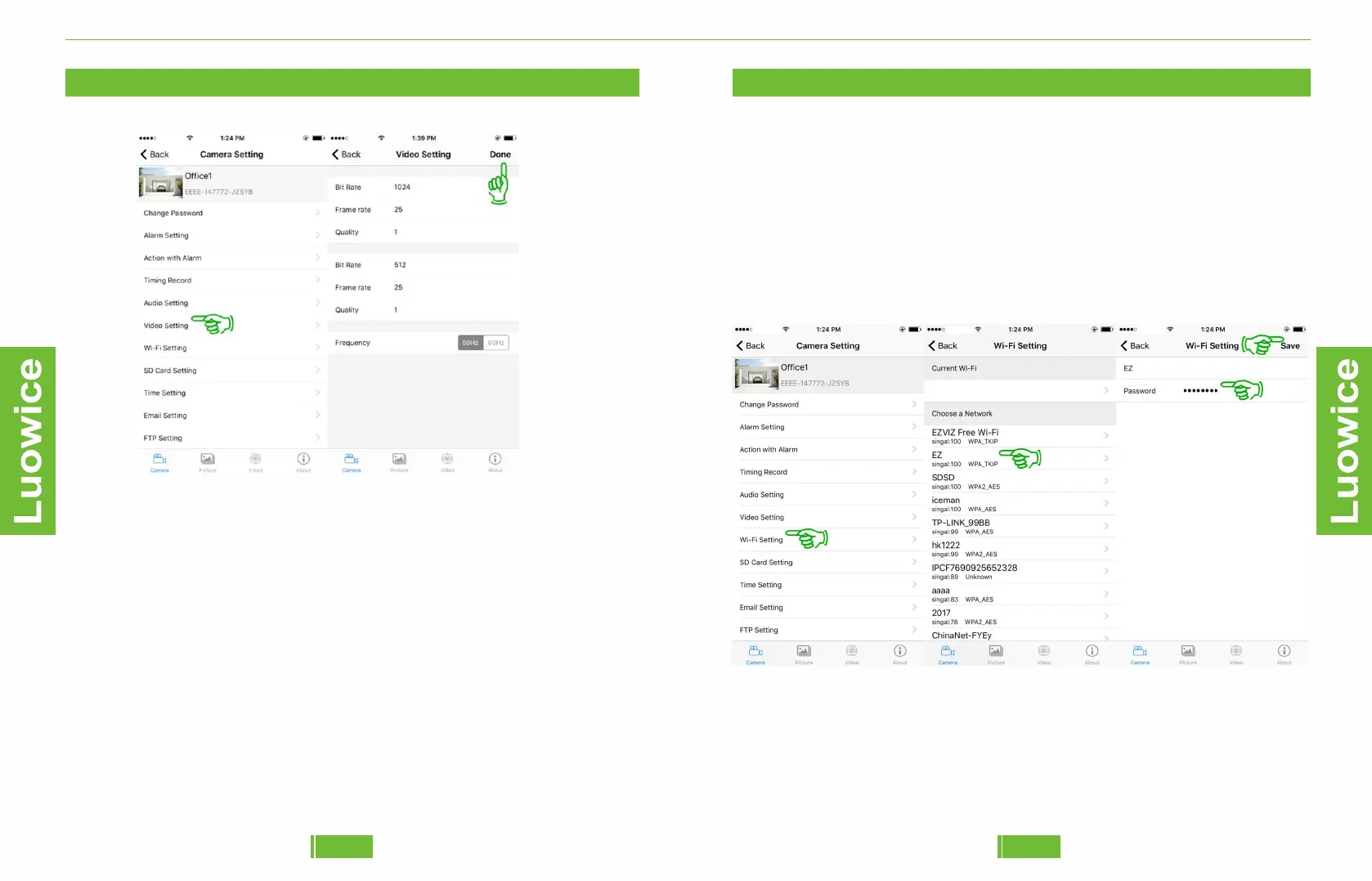
2.3.9 Wi-Fi Setting
Same as the 1.3.4 Remote View Setup.
The camera has to be connected to your local Wi-Fi network for remote
view.
To have remote view, please enter the main menu, and click 'Wi-Fi
Setting' - Choose your local Wi-Fi network - Insert the password of your
local Wi-Fi network - Click 'Save'. Waiting for around one minute, and
remote view shall be applicable.
2.3.4 Action with Alarm
2.3.8 Video Setting
Operation: Please click 'Video Setting' on the main menu interface. And
the camera will gain the proper video setting based on your network
environment automatically. Please do not change the default setting. If
the screen splashes, please choose from 50Hz/60Hz to fix the problem.
And click 'Done' to save the settings.


 To Next Page