Luowice Wireless Security Camera User ManualLuowice Wireless Security Camera User Manual
Operation:
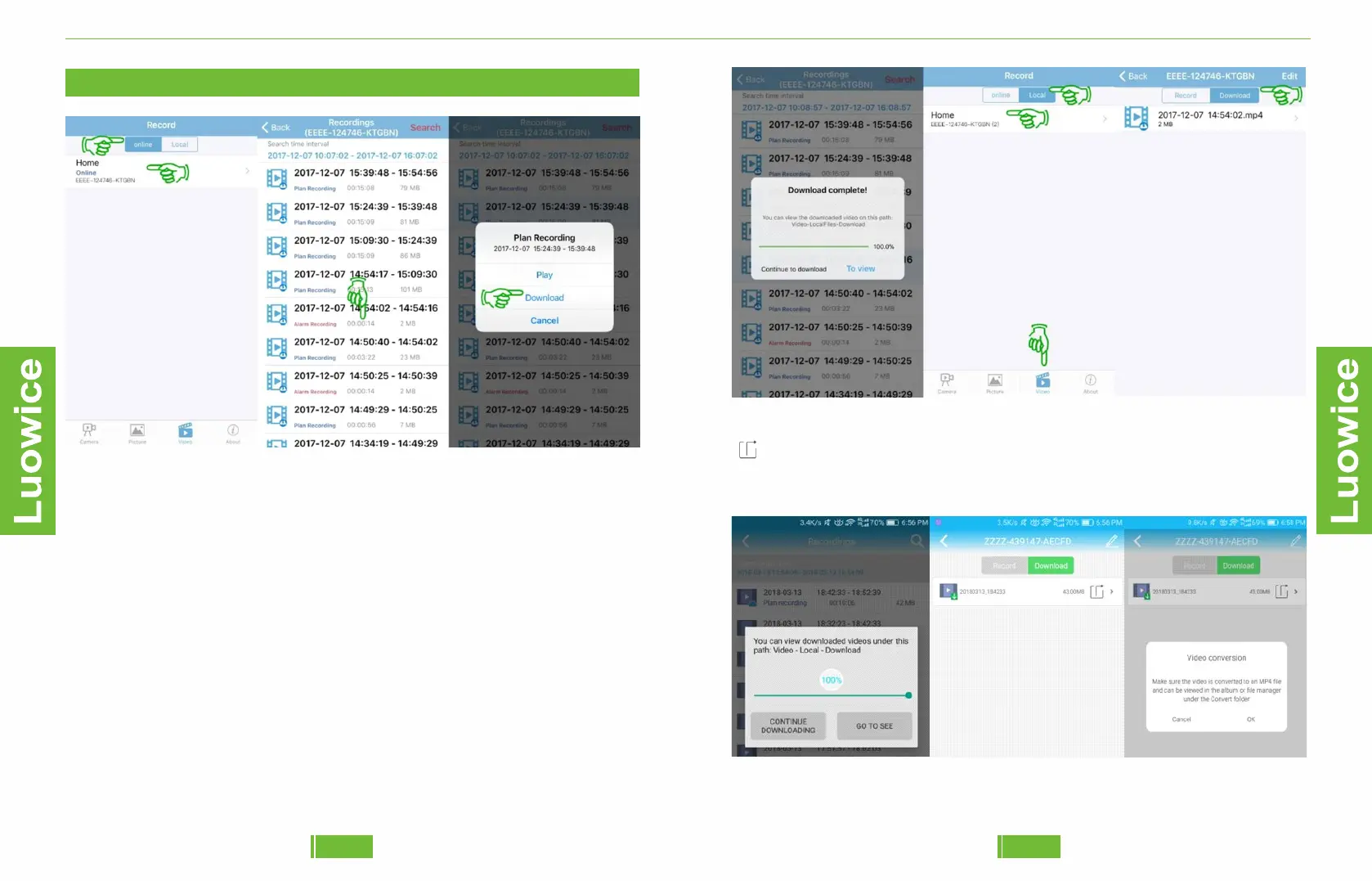
To backup recorded videos stored on the SD Card to Your Phone, please
click 'Video' at the bottom, and click 'Online' on the top, and then click
the name of the camera you want to backup videos. And the recordings
list will show.
Then Choose a time period and click it, the 'Plan Recording' interface
will pop out and click 'Download' to start backup automatically.
And the video will be stored on your phone then. To view the video,
please click 'Video' – ''Local', and then click the name of the camera you
chose to back up videos. Then click 'Download' and you will see the
backup videos.
2.3.4 Action with Alarm
2.3.16 Backup Videos Recorded on the SD Card to Your Phone
If you want to converted the video format as MP4 file you can click the
icon and click the 'OK' after a pop-out page indicate 'Make sure the
video is converted to anMP4 file and can be viewed in the album or file
manager under the Convert folder'.
4443


 To Next Page