KEYPAD KP200
1 Using the KEYPAD KP200
1-4
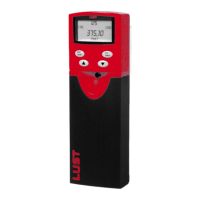
1.2 Control keys and display
Figure 2.3 Controls on the K
EY
P
AD
KP200
Figure 2.4 Display of the K
EY
P
AD
KP200
(1) •SMARTCARD chipcard to
back-up and transfer settings
to other drives
• Call up menu branches or
parameters
• Save changes
• Start in "Control drive" mode
• Quit menu branches
• Cancel changes
• Stop in "Control drive" mode
• Select menu, subject area or
parameter
• Increase setting
• Select menu, subject area or
parameter
• Reduce setting
(1) 3-digit display, e.g. for para-
meter number, see section
1.9
(2) Current menu
(3) 5-digit display for parameter
name and value
(4) Physical unit for (3)
(5) Meaning of the bar graph
display
(6) Bar graph display, 10-digit,
see section 1.9
(7) Direction indicator
(8) Acceleration or braking
ramp active
SMART
C A R D
start
enter
stop
return
VAL
Hz
(1)
start
enter
stop
return
(1)
(4)
(6)
(3)
(5)
(2)
VAL
Hz
(8)
(7)


 To Next Page