Form # 147083 Issue 01/07
57
MAINTENANCE/SERVICE
REEL AND REEL DRIVE
Plastic Finger Installation and Removal
WARNING: To avoid eye injury caused by
broken pieces, wear eye protection when
installing or removing plastic fingers.
To install finger:
1. Finger saddle has two pins that snap into holes in finger
tube. Install by positioning finger as shown and pushing
straight up.
NOTE: Applying loads to finger before tightening
hardware may cause finger to break. To avoid shearing
off the pins, do not flex finger back and forth after the
pins are engaged.
2. Insert nut into recessed pocket (A) in finger. Install screw
and tighten to 25 to 30 in.lbs. (2.8 to 3.4 N·m).
NOTE: Tighten screw to specified torque. Under
tightening will allow finger to move at mount
when flexed sideways. Over tightening will strip
hardware and may cause finger to crack.
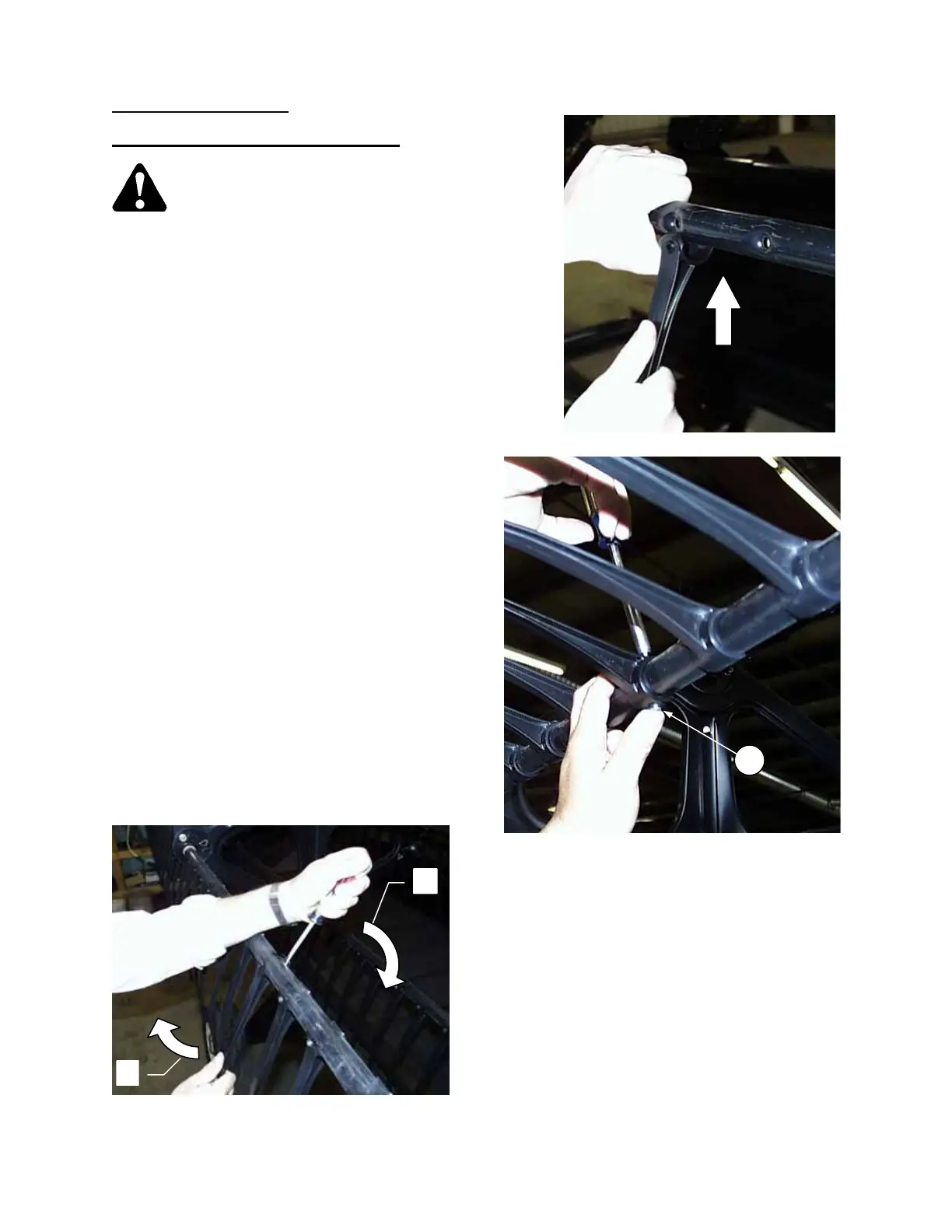
To remove finger:
1. Insert screwdriver at back of finger saddle and
pry back until rear pin clears finger tube.
2. Rotate finger tip forward to remove finger.
1
2
REMOVING PLASTIC FINGERS
INSTALLING PLASTIC FINGERS
A



 To Next Page