17
www.rbcbioscience.com
Instrument can help you record the User Name as
well as the Sample, Elution Tubes and Kit Lot No.
used in the extraction for LIMS integration data.
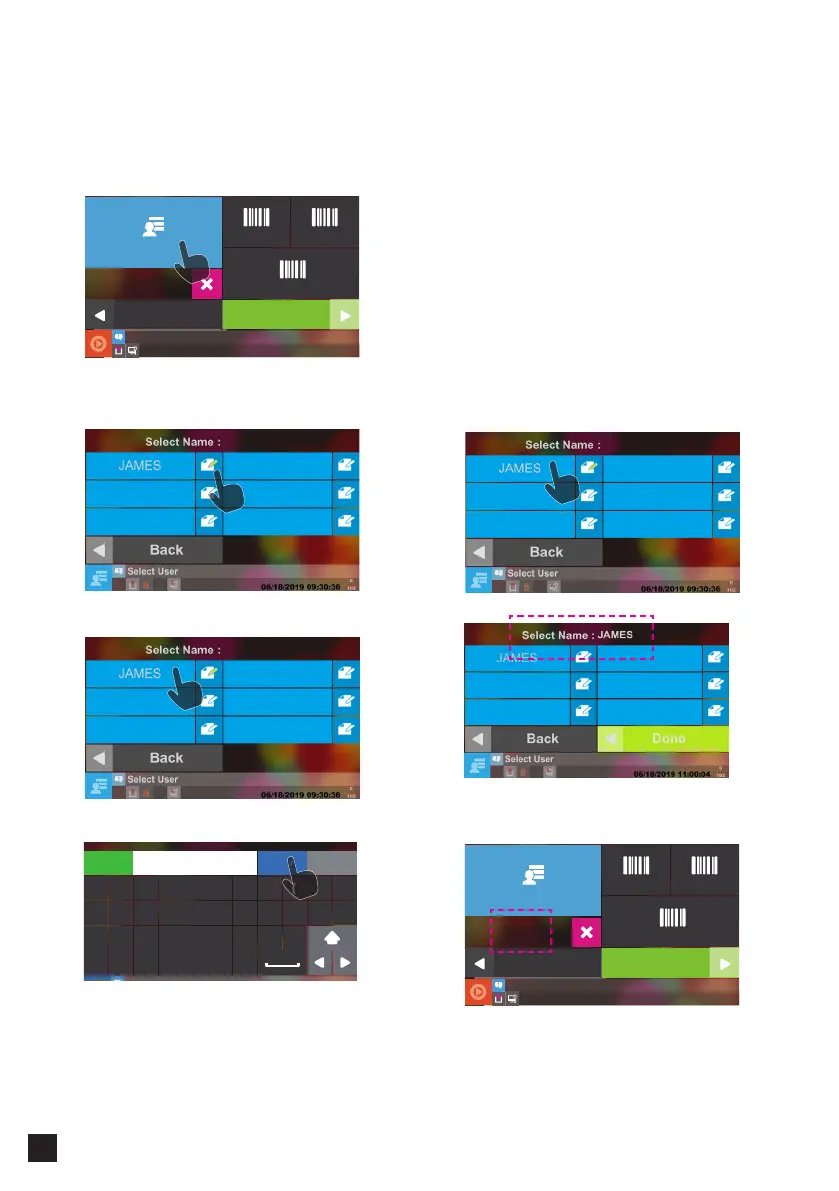
Select this icon if you want to add or edit an user´s
information. Instrument provides up to six records.
Edit name on the name block as shown in the
figure.
Press Enter when finish editing.
Press the name block you want to select
After displaying of the selected name, press Done
to finish.
━ Set and Select Users
━ Set User ━ Select User Name
Select User
Select
Scan Sample Scan Elution Tube
Scan Kit LOT
Back
Next
Jemes
01/31/2019 13:15:47
Select User
Select
Scan Sample Scan Elution Tube
Scan Kit LOT
Back
Next
Jemes
01/31/2019 13:15:47
A S D F G H J K L
Z X C V B N M
Q W E R T Y U I O P
Enter BackspaceEsc
!
@
# $ % ^ & * ( )
.
,
JAMES



 To Next Page