8
MagCore® Plus II
━ Install Tube, Tip
Warning :
Please do not use the Tips and Tubes which are not provided by the original manufacturer.
The test result may be not correct and the machine may be damaged due to different Tips
and Tubes usage.
━ Install Reagent Cartridge
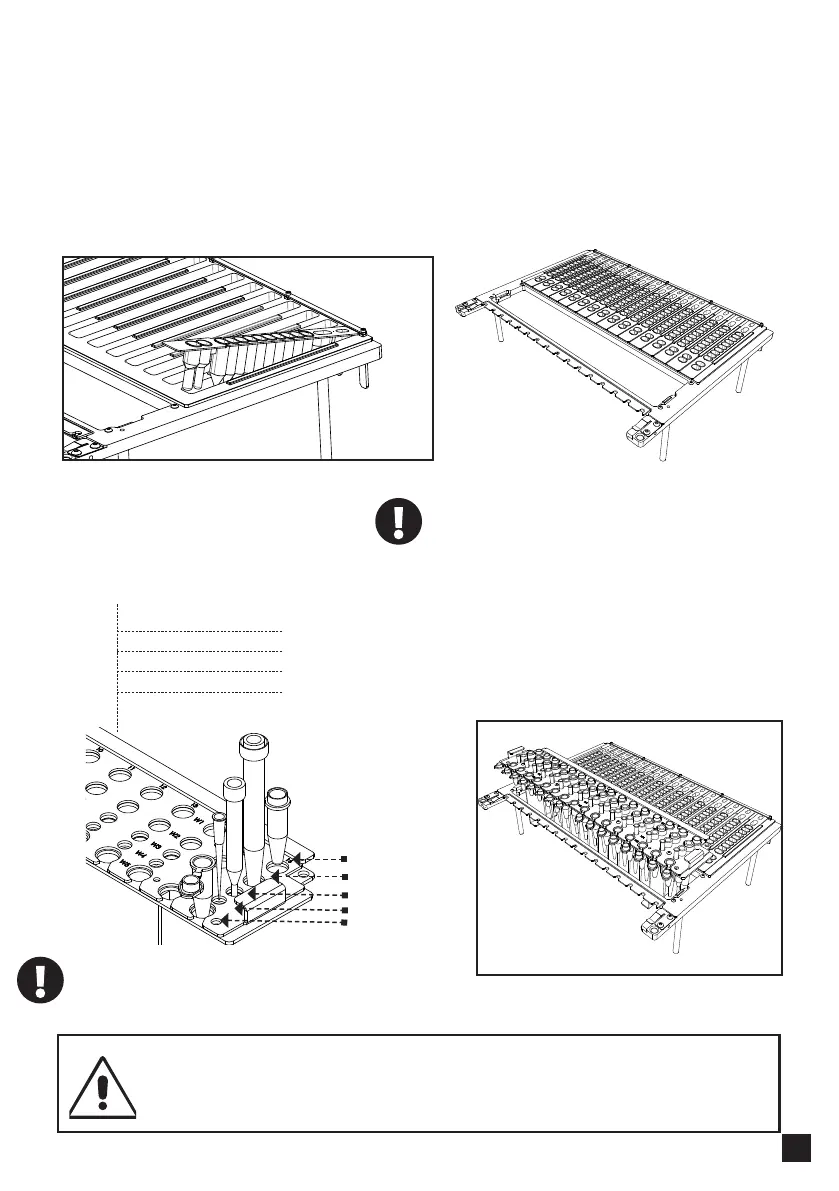
1. Put consumables and tips into the
corresponding wells according to the left figure
2. Put T-Rack on cartridge rack, then install and
push cartridge rack to the innermost gently
Please install the Tip and Tube according to
the instructions of extraction kit user manual.
Pull cartridge rack outward (toward user), take it out and
place consumables accordingly, please insert cartridges
before T-rack, then install and push the cartridge rack to the
innermost gently
Please insert the front end of the cartridge into the
space below the fixing plate of the Cartridge Rack.
W5 Elution Tube
W1
W2
W3
W4
W5
W4 200μl SP Tip
W3 Pipette Tip
W2 DNase / Tip Holder set
W1 Sample Tube - FS Tip



 To Next Page