32
MagCore® Plus II
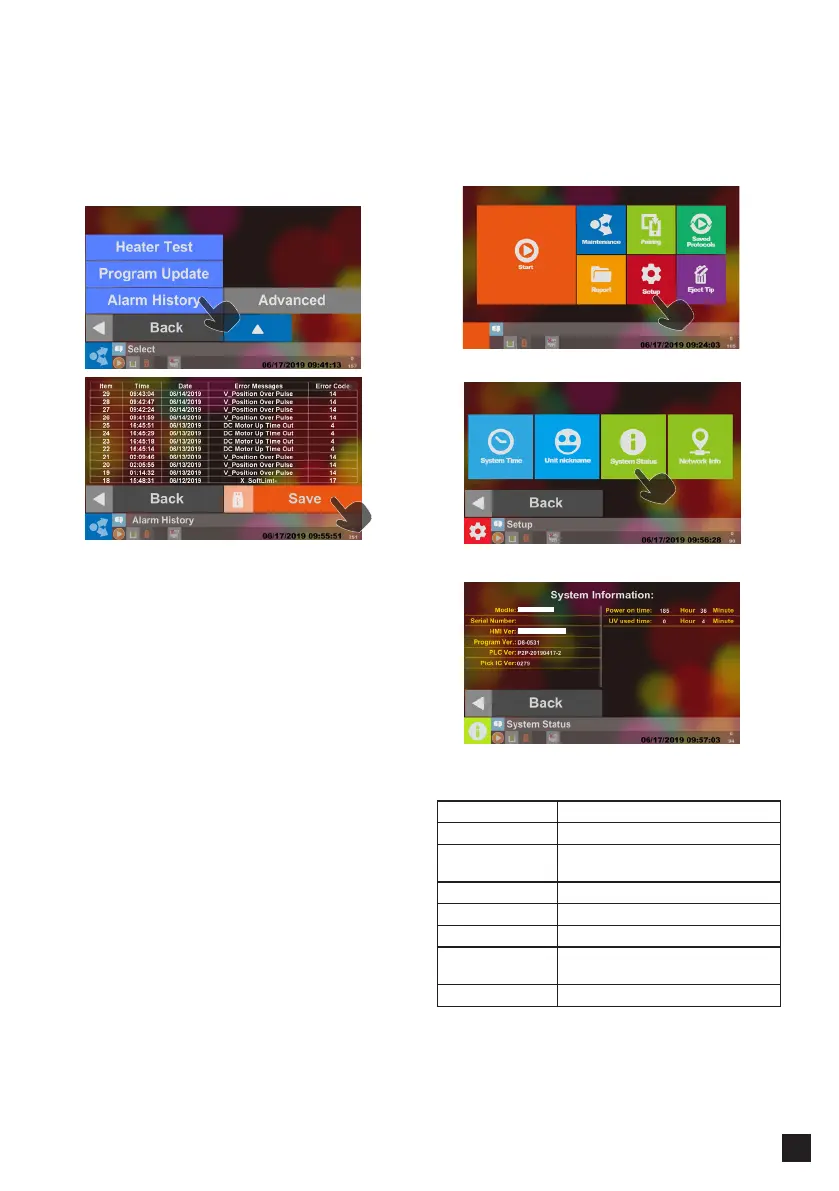
━ Alarm History
━ System Status
If the machine malfunctions or the following
messages appear, the engineers may ask you to
download the error records for them to diagnose
the machine in advance.
Save Files
Insert the USB Flash Drive and then press the Save
button to store the current data after the USB icon
shows in the status bar. Please take out the USB
Flash Drive and you can perform other operations
after the icon of USB Flash Drive disappears.
Please save the data in the USB Flash Drive and
transfer to computer, or the data in the USB Flash
Drive may be overwritten later.
File Path :
USB Flash Drive:\AlarmLog\datalog\*.CSV
* Format USB Flash Drive to FAT32
* USB Flash Drive available capacities <= 32GB
You can check the system status and set up the
system time in the menu.
Please Select System Status.
Information
Model System Model
Serial Number System Serial Number
HMI Ver. Human-Machine Interface
Version
Program Ver.
PLC Ver. PLC Version
Pick IC Ver.
Power On Time : The total time the machine has
been on
UV Used Time : The used time of the UV lamp



 To Next Page