12
MagCore® Plus II
Touch Panel and User Interface
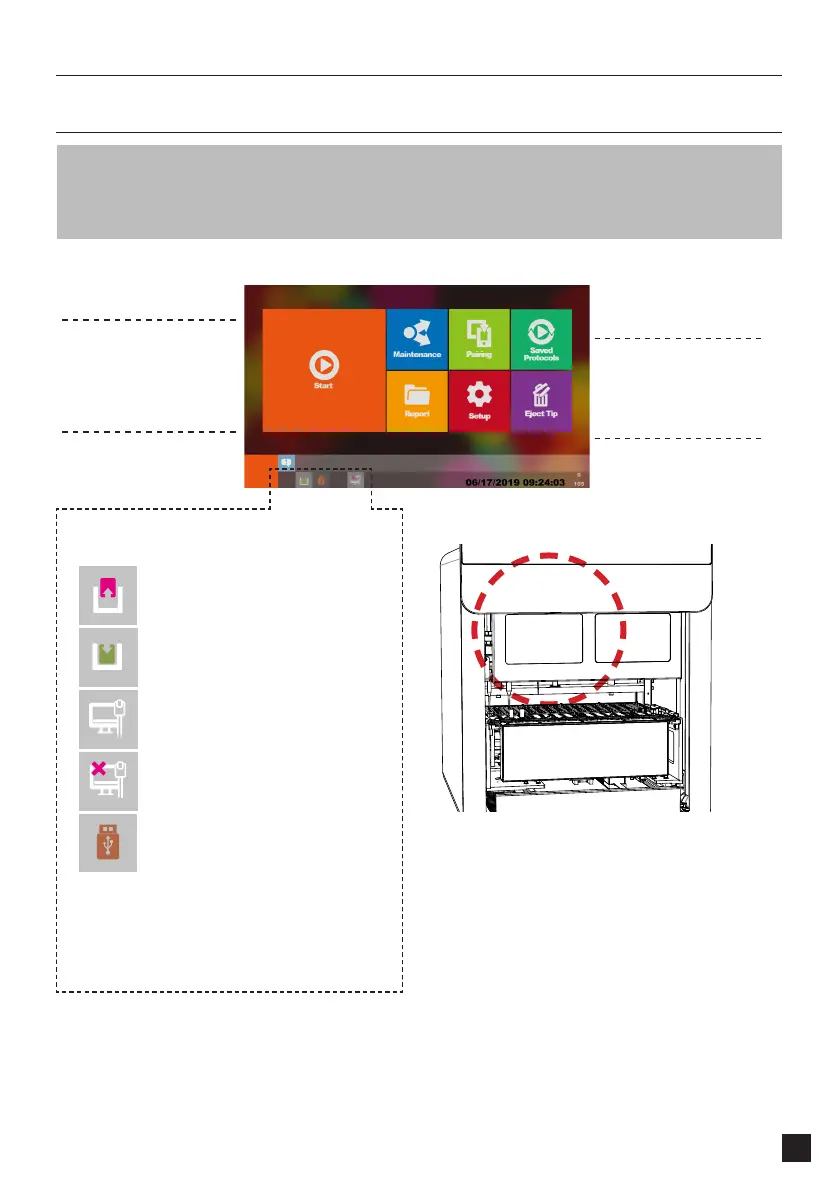
MagCore® Plus II provides 7-inches full-color touch panel and easy-to-use user interface.
Operator only needs to pay attention to the panel to know the current status, ending time and
test report of the machine. The figure below shows the function list of the operation screen and
the description of the status icons.
Start
Report
Setup
Saved Protocols
Maintenance
Eject Tip
Execute Extraction
Execute quick run with
selection of pre-saved
protocols
System Maintenance
Functions
Overview of the latest
runs with barcodes
System Settings
Status Column Icons
Panel Board Lighting
Front Door is Open
Front Door is Closed
Machine Connected to Network
Machine is not Connected to
Network
USB Flash Drive Plugged In
* Format USB Flash Drive to FAT32
The Panel will light up the following lights when the
instrument is in operation:
Blue Light: The Instrument is on Stand-by
Green Light: The Instrument is in Operation
Red Light: The Instrument Gives a Warning Alert



 To Next Page