Operation Manual easyTone
5.4 Android
TM
Navigation
Navigate the Android
TM
tablet in the navigation bar of the tablet:
Move backward through the history of screens previously visited.
Return to main screen of tablet.
Display all recently opened apps. Launch or close an app running in
the background.
NOTE: The navigation bar is an Android
TM
setting option. It is recommended to leave
the setting as all manual and training materials utilize this view.
5.5 Managing Protocols
Manage Protocols allows the test seen to be adapted to the specific screening
guidelines of the location. This is one of the first functions that should be completed
when easyTone is received to utilize the full benefit of the device.
5.5.1 Entering the Manage Protocols Screen
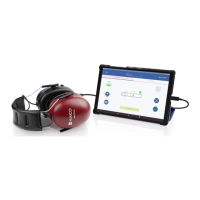
To enter the Manage Protocols screen, press:
to open the Manage Protocols screen (Figure 7).
Figure 7


 To Next Page