23
How to use the Carrying Strap
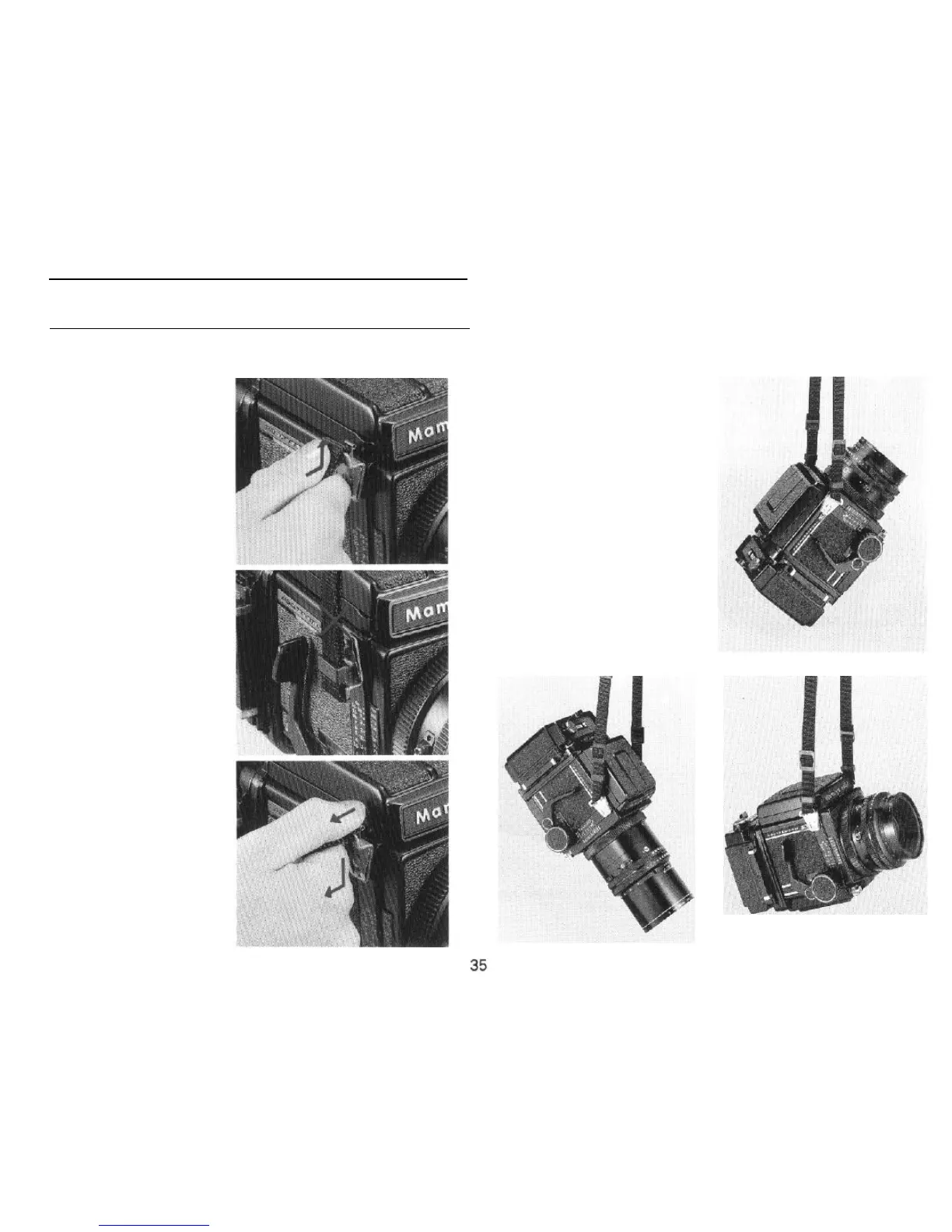
Attaching the Strap
Hold the metal clamp of the strap
so that the key-hole shaped open-
ing faces the Carrying Strap Lug on
the camera body. Gently fit the
upper
part
of the key-hole opening
over the lug. Next, gently push the
bottom of the metal clamp upwards
and it will lock in place with a click.
If the clamp is attached to
Accessory-shoe side of the camera
upside-down, it will be difficult to
remove, so be careful to attach the
clamp rightside-up.
Removing the Strap
Reach behind the strap and while
gently squeezing the top of the pro-
truding front plate (leaf spring), slide
the clamp downward and off the lug.
Three Carrying Positions
Depending upon the way the
strap is attached to the camera,
there are three ways of
carrying
the
camera as shown in the accom
panying
illustrations
Since the Car-
rying Strap Lug is not rotary, the car-
rying strap will not become twisted.



 To Next Page