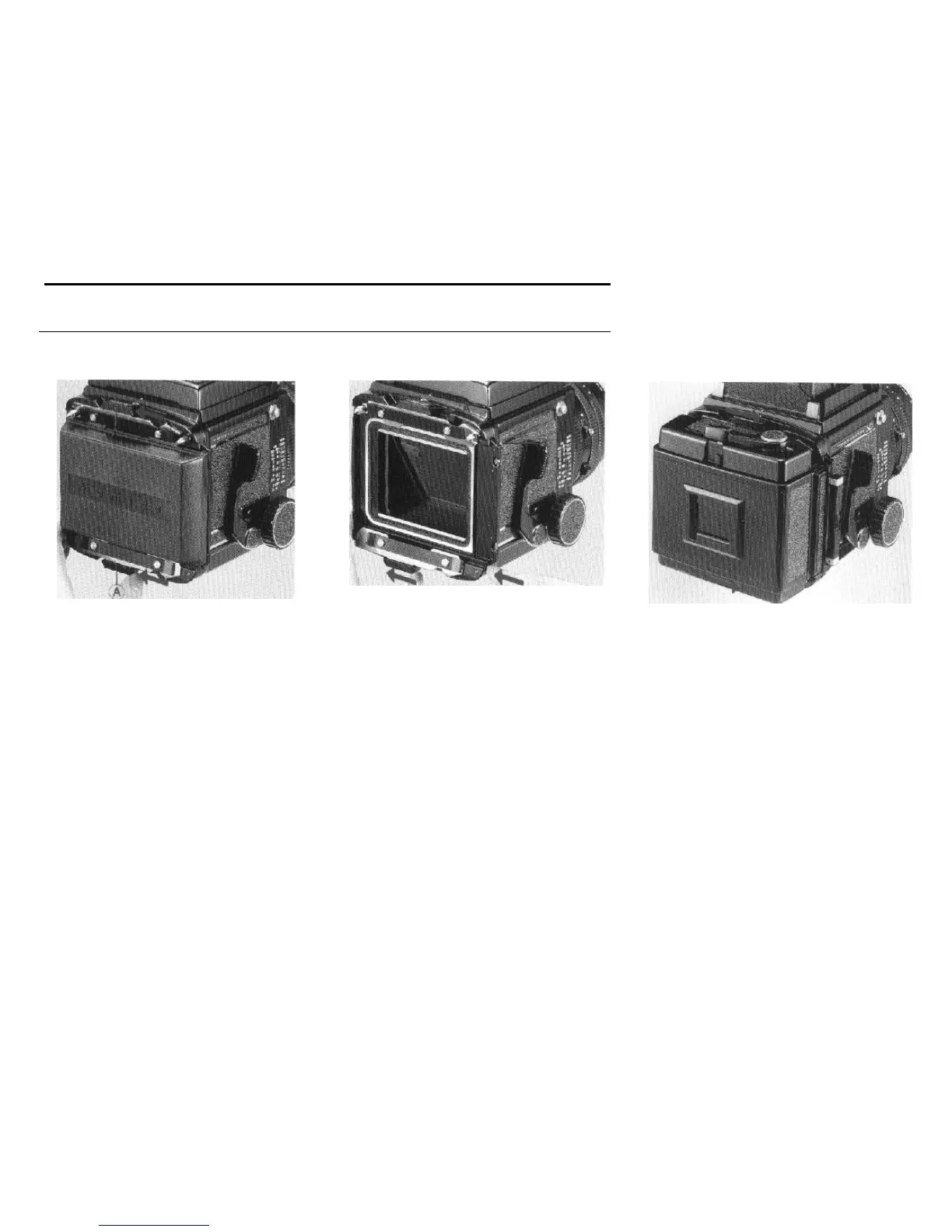
7.
Attaching and Detaching the
Roll
Film Holder
Removing the rear body cap
By moving the slide locks (A) on both sides
all the way to the left, the cap be removed.
l Never push the light baffle on the camera
back after removing the rear body cap. If
the light baffle is forced, light leakage or
other malfunctions may occur.
Attaching the roll film holder
1.
Slide the upper and lower slide locks (A) on
the back the body completely to the left of the
indentation.
NOTE:
Should either slide lock be moved to the
right while nothing is attached to the
revolving adapter, the slide lock release
lever (B) will engaged and the slide lock
will not move. If this happens, press the
release lever (B) and
return
the slide lock
to the open position.
14
2.
Attach the
roll film holder to the body and
slide both slide locks firmly in the direction of
the arrow. (lock)
l If the revolving adapter slide lock is not
completely pushed in or pulled out, the
shutter safety lock will not release the shut-
ter. Always make sure the slide lock is
properly engaged or disengaged.
l The shutter release button can not be
depressed if the dark slide is completely
inserted or if here is no film in the camera.
In addition the Pro-SD roll film coupler pre-
vents multiple exposures. (See pages 16
and 25 for the shutter release test.)



 To Next Page