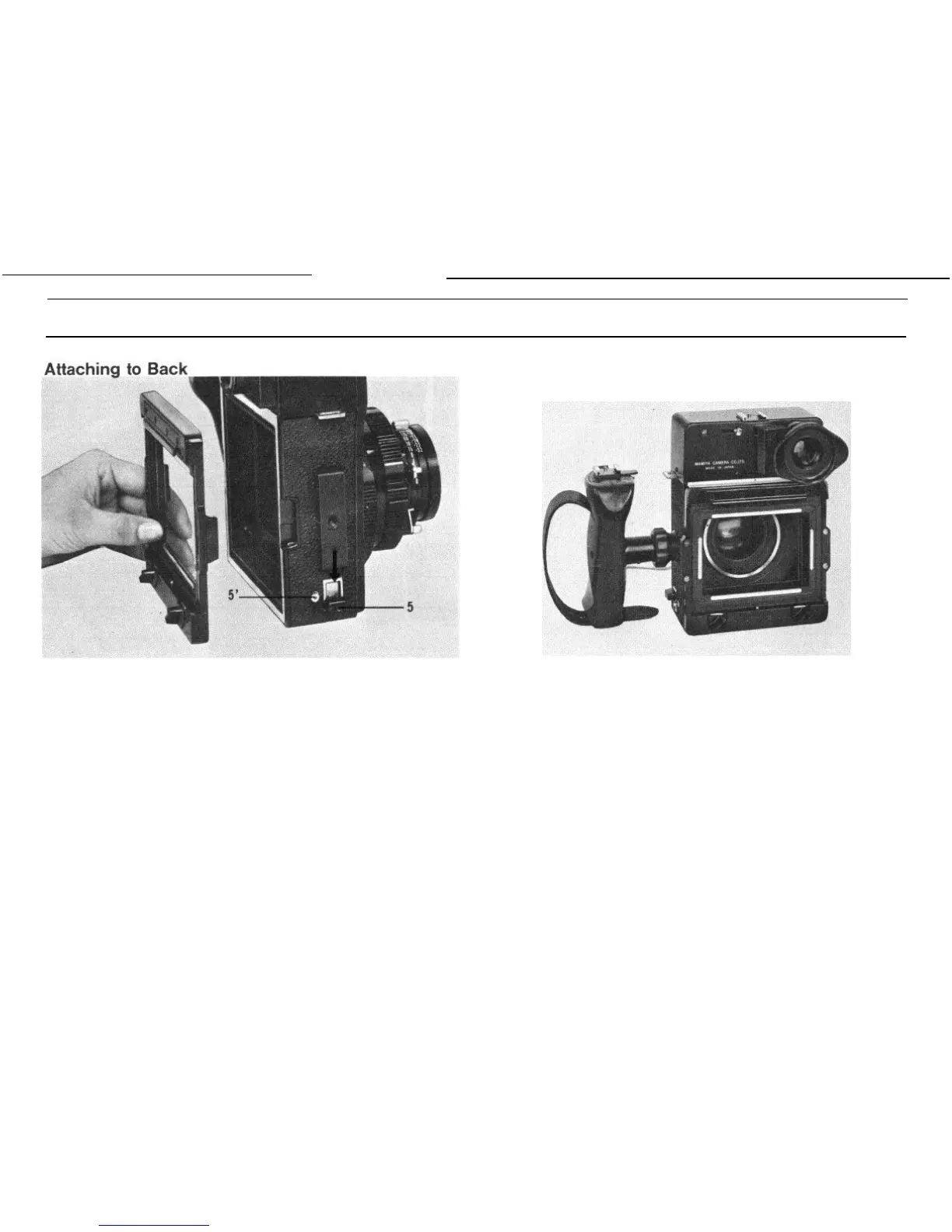
Assembling
Before attaching the back, confirm that both side locking slides (5)
are kept at their lowest position. If not, push down the locking slide
while pushing in the lock button (5’).
Align the red point on the M adapter, G adapter, or Polaroid Land
camera back (Polaroid Land pack film holder and focusing hood model
P) with the red point on the camera body, inserting both sides of the
protruded portions to the indented portions on the camera body.
Securely push up the locking slide on both sides. While pushing
up the slide, the lock button will spring out automatically. The lock button
functions to prevent the back from being detached unexpectedly from
the camera body.
Secure both sides of the back by using the locking slides (5). Do
not raise the camera by holding the back in a condition that only one
side is secured.
To remove the back, depress both side locking slides (5) while the
lock buttons (5’) are pushed in.
M Adapter
When installing the M adapter on the camera back, the roll film
holder for Mamiya Press, focusing screen holder, and so on can be
used.
To attach the above-mentioned accessories to the adapter, keep the
flattened edges of the two locking knobs of the M adapter parallel with
the bottom line of the picture format, insert the top of the holder in the
upper groove, and push in the bottom: then rotate the two knobs 90
degrees either to the right or left.
9


 To Next Page