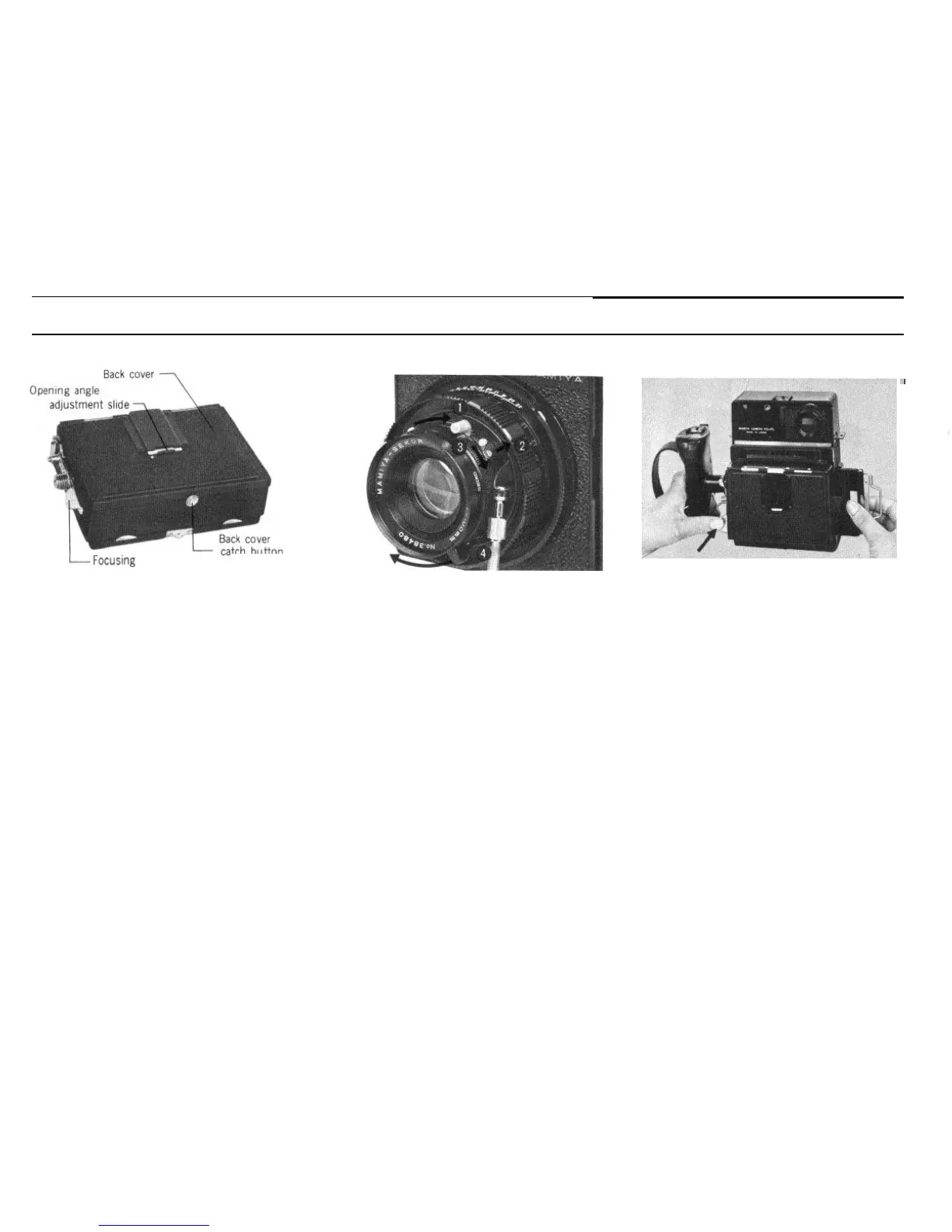
Focusing Screen Holder
screen screen
release lever
Immediately after focusing with the focus-
ing screen, a cut film/plate holder can be
inserted from one side of the focusing screen
holder.
How to Open the Back Cover
By moving the back cover catch button at
the bottom of the back cover in the direction
of the arrow, the back cover will open. With
the opening angle adjustment slide kept UP,
the back cover will open horizontally; and
with the opening angle adjustment slide kept
DOWN, the cover will open upward.
Focusing
.*
To focus with the ground glass image,
keep the shutter open and the lens at its
fullest aperture, focusing by rotating the
focusing ring.
(When keeping the shutter open, follow
the instructions on Page 16.)
Depth of field can be observed on the
ground glass screen through stopping down
the diaphragm by turning the aperture control
lever.
Full size of the focusing ground glass is
for 6 x 9cm format, the light vertical lines
indicating the 6
x
7cm format.
After focusing, press the focusing screen
release lever to permit the screen to retract,
and insert the cut film/plate holder from one
side of the focusing screen holder
To remove the film holder, press the
focusing screen release lever with your left
hand, hold the film holder and draw it out by
pulling it toward you.
Be sure to close the shutter before attach-
ing the film holder. Pull out the dark slide
before photographing. Insert the dark slide
before removing the film holder.
27


 To Next Page