dmc1
M&S Systems | 2861 Congressman Lane | Dallas, Texas 75220 | 800.877.6631 | www.mssystems.com 10
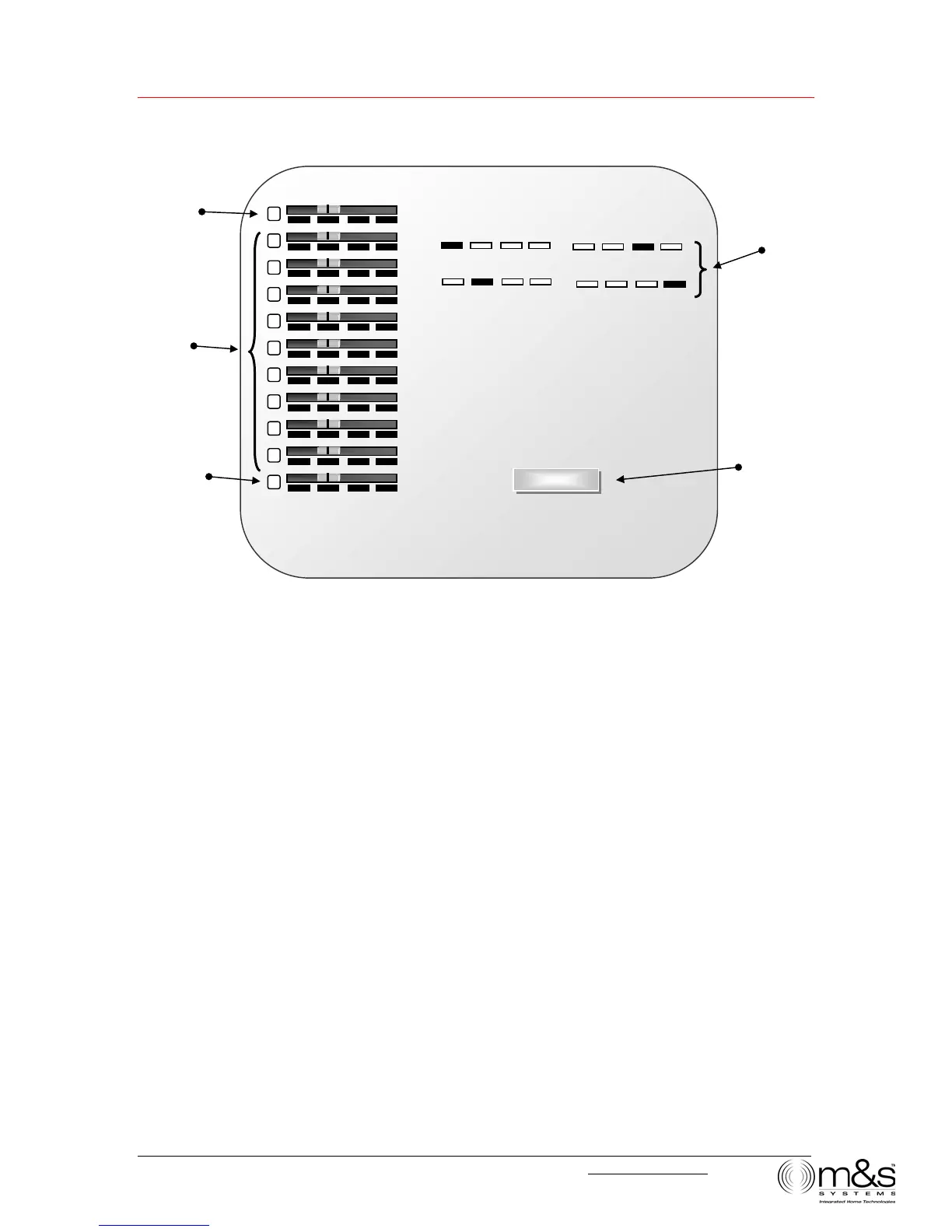
Figure 8—Intercom Settings
Intercom
When a station is set to Intercom (Intercom only):
• Users can talk and listen from this station.
• The room does not receive music.
• The room cannot be monitored.
• The room cannot hear other rooms that are set to Monitor.
Note: When a station is set to Intercom, the sound and activity in that room can be
heard by a user at another station who presses the LISTEN button.
• The station hears the door chime and users can talk and listen to the Door Station.
Radio and Intercom
When a station is set to Radio/INT (Music source and Intercom):
• Users can talk and listen from this station.
• The room can receive music.
• The station can monitor any other station that is set to Monitor.
Note: When music is on, the audio from a monitored room is heard in addition to
the music.
• The station itself cannot be monitored.
RADIO/INT
MONITOR
PRIVACY
INTERCOM
OFF
m
m
&
&
&
s
s
s
M
1
2
3
4
5
6
7
8
9
P
Key to Intercom
selector switch settings
Privacy button
Selector
switches for
Room Stations
Selector switch for
Master Station
Selector switch for
Patio Station



 To Next Page