__
4li'a"
.~
•
~
~270
dZu.a-
~~2,.(J~A14/~
•
grr
....
~
co.
~
..
ooscrc
¥5
M
"""",,
~
• •
"':;
)-
'
";;'
.
~
D
~
.
~
1
'
~ ::::
;
-
,,'':;
'
.
-
'
~'
~
"
l
".
'
Tarc
''''''''
.. O
Ol.
.
...
~
l
~
:lJ
#10
'"
I
~
""
~ .
_
·
~
CO
Dr:
..
-
I '
.~
·n
.
..
.r:-J
I'nDn
"or
doll."
••
I • .::l o r
~.,.,
.
d ' .....
enwio"
DIMENSION
The
DIMENSION
control
is operative
only
when
the
MODE
Switch is set to the
VARI-MATRIX
position. This control optimizes
the
4-channel
VARI
-MATRIX
effect.
SO DECODER
With the MODE Switch on
sa
DECODER, any
rear
input
signals
to
the
4270
are
internally
dis-
connected. The rear channel
outputs
are, in-
stead, derived
from
front
channel signals which
have been processed by the plug-in decoder. The
characteristics
of
these derived rear channel
out
-
puts are determined by the
type
of
plug-in
decoder.
Use SO DECODER position
only
with
an optional
plug-in decoder installed.
Without
this
opt
ional
decoder, there
will
be no
output
when the
MODE
Switch is set
to
the
SO DECODER position.
BALANCE
CONTROLS
The Model
4270
has three
BALANCE
controls:
FRONT
L-R,
REAR
L-R and
FRONT-REAR.
The
FRONT
L-R slide knob adjusts the balance
between the
front
channels. The
REAR
L-R
slide
knob
adjusts the balance between
the
rear
channels. The
FRONT-REAR
slide knob adjusts
the balance between the rear and
front
pairs
of
channels. Balance adjustments
must
be carried
out
in
the
MONO mode. To balance the
front
channels,
first
set
the
FRONT-REAR
control
all
the way
to
the
FRONT
to
silence the rear speakers
while you adjust the
FRONT
L-R
BALANCE
control. To balance the rear channels, move the
FRONT-REAR
control
all the way
to
REAR,
and then adjust
REAR
L-R
BALANCE.
Now
you
are ready
to
adjust the
FRONT-REAR
control
for
the most pleasing overall balance.
_
~
"'
'1
_~
~
I.
..
....
t'n.d
'r.b'.
...01
........
p
.........
•
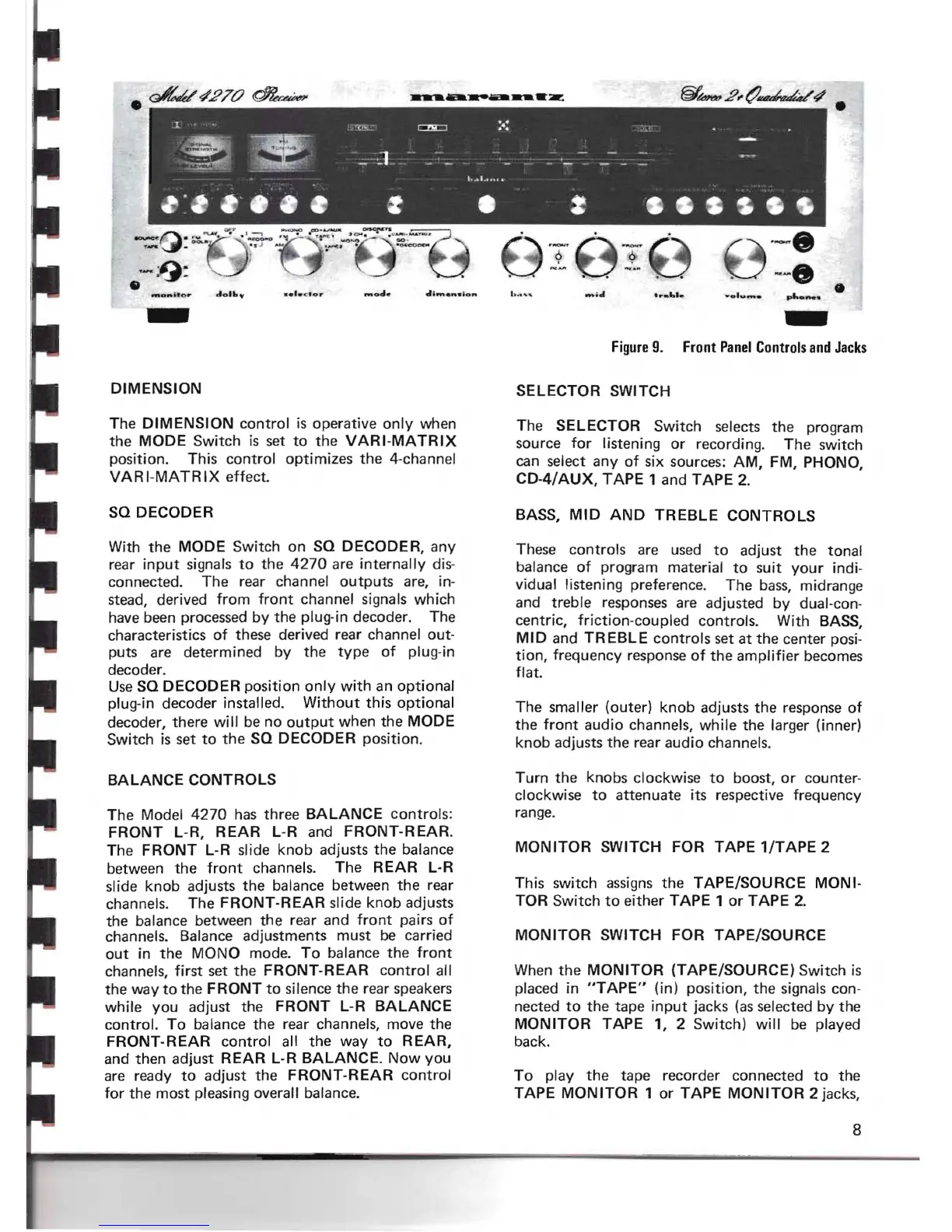
Figure
9. Front
Panel
Controls
-
and
Jacks
SELECTOR SWITCH
The SELECTOR Switch selects the program
source
for
listening or recording. The switch
can select any
of
six sources:
AM,
FM, PHONO,
CD-4/
AUX,
TAPE
1 and
TAPE
2.
BASS,
MID
AND
TREBLE
CONTROLS
These controls are used
to
adjust
the
tonal
balance
of
program material
to
suit
your
indi-
vidual listen ing preference. The
bass,
midrange
and treble responses are adjusted by dual-con-
centric,
friction
-coupled controls. With BASS,
MID
and
TREBLE
controls
set at the center posi-
tion,
frequency response
of
the
amplifier
becomes
flat.
The smaller (outer)
knob
adjusts the response
of
the
front
audio channels, while the larger (inner)
knob adjusts the rear audio channels.
Turn the knobs clockwise
to
boost, or counter-
clockwise
to
attenuate its respective frequency
range.
MON
ITOR
SWITCH FOR TAPE
1/TAPE
2
This switch
assigns
the TAPE/SOURCE
MONI·
TOR Switch
to
either TAPE 1 or TAPE 2.
MONITOR
SWITCH FOR TAPE/SOURCE
When
the
MONITOR
(TAPE/SOURCE) Switch is
placed in
"TAPE"
(in) position, the signals con-
nected
to
the tape
input
jacks (as selected by the
MONITOR
TAPE 1, 2 Switch)
will
be played
back.
To play
the
tape recorder connected
to
the
TAPE
MONITOR
1 or TAPE
MONITOR
2 jacks,
8


 To Next Page