o
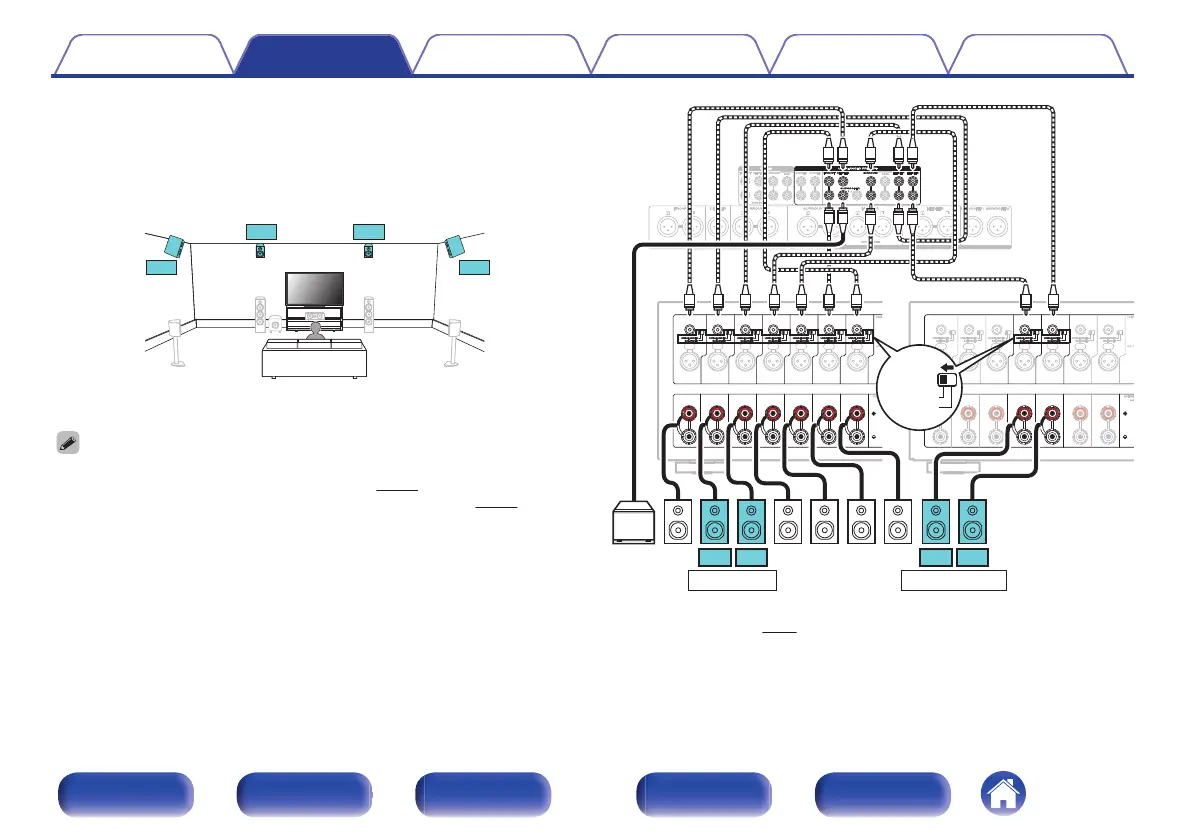
Example connection for the Auro-3D 9.1-
channel system
This speaker configuration is optimized for Auro-3D playback.
.
FL FR
SW
SL SR
C
FHL FHR
SHL SHR
0
Set “Floor” - “Layout” to “5ch” or set “5ch & SB” and “Height Sp” to “4ch” in the
menu when connecting in this configuration. (v p. 219)
Next, set “Height” - “Layout” to “Front Height & Surr. Height”. (v
p. 220)
.
CHANNEL1
(FL)
CHANNEL2
(FR)
CHANNEL3
(SL)
CHANNEL4
(SR)
CHANNEL7
(C)
CHANNEL1
(FL)
CHANNEL2
(FR)
CHANNEL3
(SL)
CHANNEL4
(SR)
CHANNEL7
(C)
CHANNEL5
(SBL)
CHANNEL6
(SBR)
CHANNEL5
(SBL)
CHANNEL6
(SBR)
CHANNEL7
(C)
CHANNEL7
(C)
CHANNEL1
(FL)
CHANNEL2
(FR)
CHANNEL3
(SL)
CHANNEL4
(SR)
CHANNEL1
(FL)
CHANNEL2
(FR)
CHANNEL3
(SL)
CHANNEL4
(SR)
CHANNEL5
(SBL)
CHANNEL6
(SBR)
CHANNEL5
(SBL)
CHANNEL6
(SBR)
SW SR SL FR FLC
SHLSHR
【
MM8077
】
FHLFHR
HEIGHT 1
z
1
HEIGHT 2
z
1
z
2
BALANCED
z1
You can change the combination of the HEIGHT1 and HEIGHT2 channels in
the settings. (v
p. 67)
z2
For the best Auro-3D experience Surround Height speakers are
recommended, however you may substitute Rear Height speakers from a
Dolby Atmos speaker setup in place of Surround Height speakers.
Contents
Connections Playback Settings Tips Appendix
61
Front panel Display Rear panel Remote Index


 To Next Page