6
ENGLISH
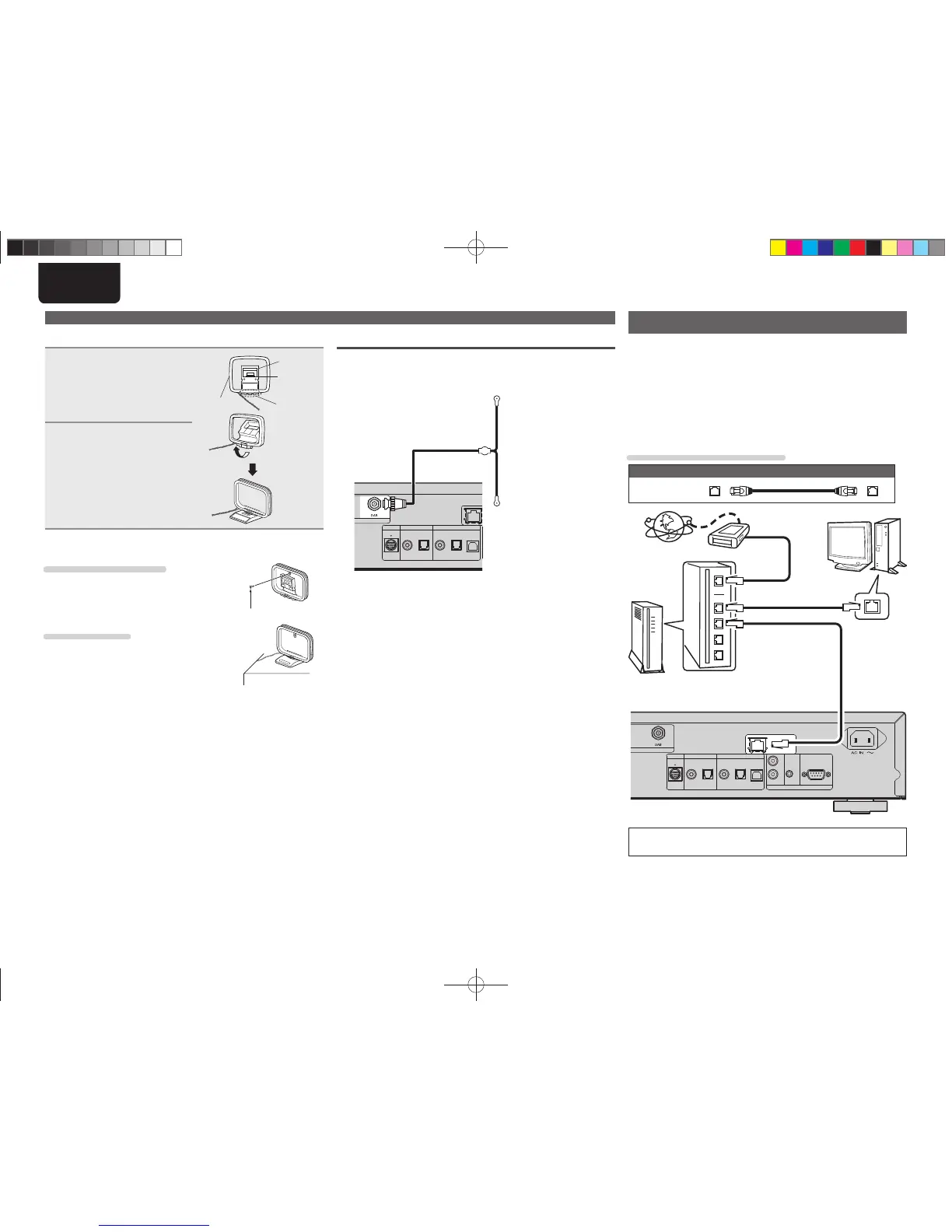
n AM loop antenna assembly
1
Put the stand section
through the bottom of
the loop antenna from
the rear and bend it
forward.
Loop
antenna
Stand
Square
hole
Projecting
part
2
Insert the projecting part
into the square hole in
the stand.
n Using the AM loop antenna
Suspending on a wall
Suspend directly on a wall without assembling.
Nail, tack, etc.
Standing alone
Use the procedure shown upper to assemble.
DAB
n Connecting the DAB indoor antenna
“Tuning in DAB stations” (vpage13).
M-XPort
DIGITAL OUT DIGITAL IN
COAXIAL OPTICAL OPTICALCOAXIAL USB
DAB indoor antenna
(Supplied)
Connecting to a home network (LAN)
• This unit lets you play via your home network (LAN) music fi les
stored on a computer and music content such as that from Internet
radio.
You can also operate this unit from a computer using the Web
control function.
• You can update by downloading the latest fi rmware from the
Marantz website.
• See “Setting the network [Network]” (vpage24) on the menu for
more information on network setting.
Cables used for connections
Cable (sold separately)
Ethernet
cable
M-XPort
DIGITAL OUT DIGITAL IN
COAXIAL OPTICAL OPTICALCOAXIAL USB
FLASHER
RS232C
IN
OUT
IN
REMOTE CONTROL
NETWORK
Internet
To WAN side
Router
To LAN port
To LAN port
LAN port/
Ethernet
connector
Computer
Modem
For connections to the Internet, contact an ISP (Internet
Service Provider) or a computer shop.
Connecting an antenna
1.NA7004NENG30A0714.indd61.NA7004NENG30A0714.indd6 2011/07/1411:37:042011/07/1411:37:04



 To Next Page