35
ENGLISH
Getting Started Connections
Basic Operations Advanced Operations TroubleshootingExplanation termsInformationInformation Specifi cations Index
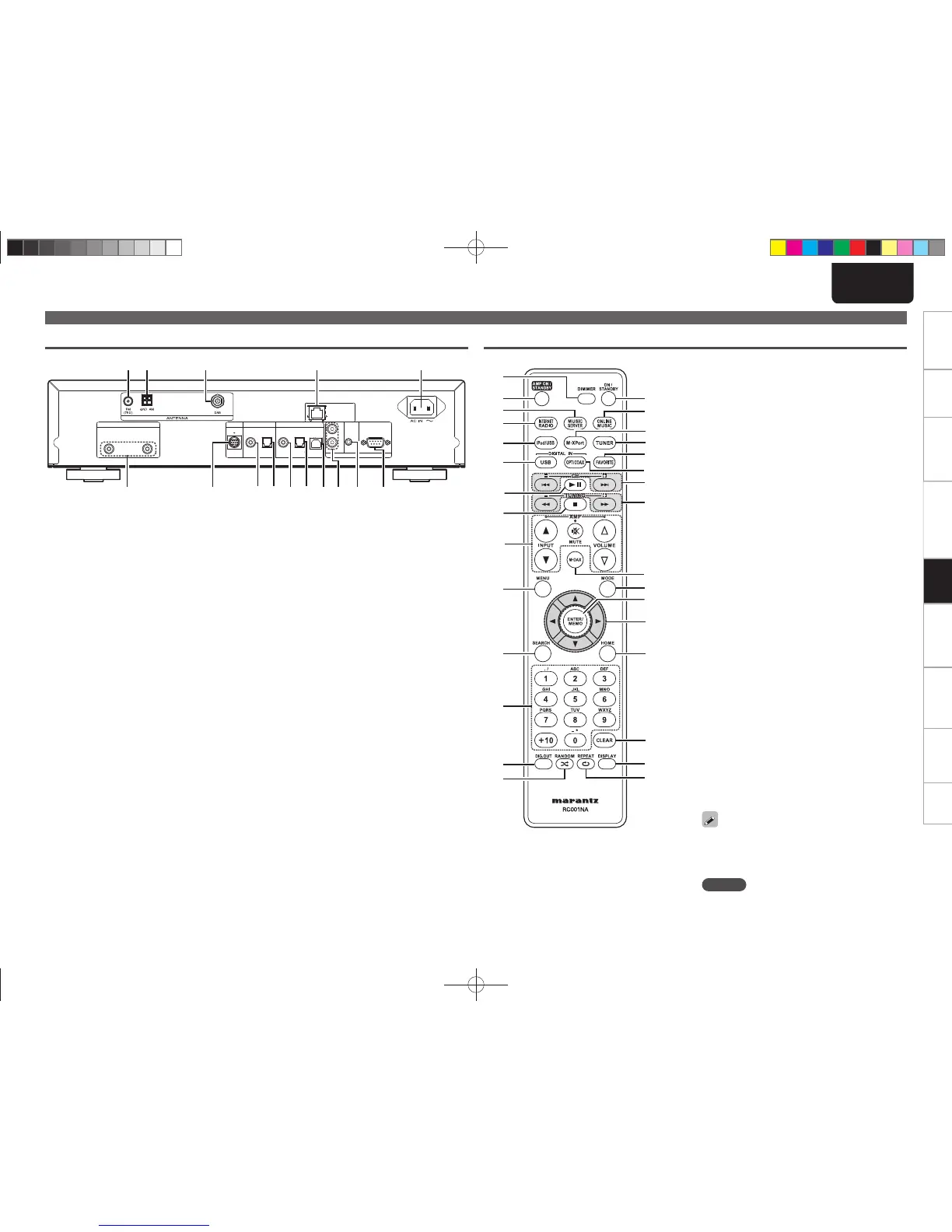
q ANALOG OUT connectors ··························· (4)
w M-XPort ······················································· (23)
Connect to RX101 wireless receiver
e DIGITAL OUT COAXIAL connector ············· (4)
r DIGITAL OUT OPTICAL connector ·············· (4)
t DIGITAL IN COAXIAL connector ················· (5)
y DIGITAL IN OPTICAL connector ·················· (5)
u USB port (Type B) ········································ (5)
i
REMOTE CONTROL IN /
OUT connectors
············································ (23)
o FLASHER IN connector ································ (9)
Q0 RS-232C terminal ·········································· (9)
Part names and functions
Rear panel
M-XPort
ANALOG OUT
RL
DIGITAL OUT DIGITAL IN
COAXIAL OPTICAL OPTICALCOAXIAL USB
FLASHER
RS232C
IN
OUT
IN
REMOTE CONTROL
NETWORK
qwertyuioQ0
Q1Q2Q4Q5 Q3
Q1 AC inlet (AC IN) ············································· (9)
Q2 NETWORK connector ··································· (6)
Q3 DAB antenna terminal ································· (6)
Q4 AM antenna terminal ··································· (5)
Q5 FM antenna terminal ···································· (5)
q
w
e
r
t
y
u
i
o
Q0
Q1
Q2
Q3
Q4
E0
W9
W7
W8
W6
W5
W4
W3
W2
W1
W0
Q9
Q8
Q7
Q6
Q5
q DIMMER button ·········································· (11)
w AMP ON/STANDBY button
(Amplifi er operation buttons)
e MUSIC SERVER button ······························ (17)
r INTERNET RADIO button ··························· (16)
t iPod/USB button ········································ (14)
y DIGITAL IN USB button ····························· (19)
u Play/Pause button (13) ···························· (14)
i Stop button (2) ·········································· (12)
o Amplifi er operation buttons
INPUT button (df)
VOLUME button (ui)
MUTE button
Q0 MENU button ·············································· (17)
Q1 SEARCH buttons ········································ (12)
Q2 Number buttons ········································· (12)
Q3 Digital out button (DIG. OUT) ··················· (11)
Q4 RANDOM button ········································ (15)
Q5 ON/STANDBY button ································ (10)
Q6 ONLINE MUSIC button ······························ (17)
Q7 M-XPort button ·········································· (10)
Q8 TUNER button ············································ (11)
Q9 FAVORITE button ······································· (20)
W0 DIGITAL IN OPT/COAX button ·················· (19)
W1 Skip buttons (8, 9) ··························· (14)
W2 Search buttons (6, 7) ························· (14)
W3 M-DAX button ············································ (11)
W4 MODE button ·············································· (11)
W5 ENTER/MEMO button ································ (12)
W6 Cursor buttons (uio p) ··························· (12)
W7 HOME button ·············································· (14)
W8 CLEAR button ············································· (32)
W9 DISPLAY button ·········································· (13)
E0 REPEAT button ··········································· (14)
• The supplied remote control can operate Marantz
amplifi ers.
• When using it, also refer to the operating
instructions of the other devices.
NOTE
The remote control may not operate some devices.
Remote control
1.NA7004NENG30A0714.indd351.NA7004NENG30A0714.indd35 2011/07/1411:37:272011/07/1411:37:27



 To Next Page