SPECIAL MODE
Special mode setting button
b
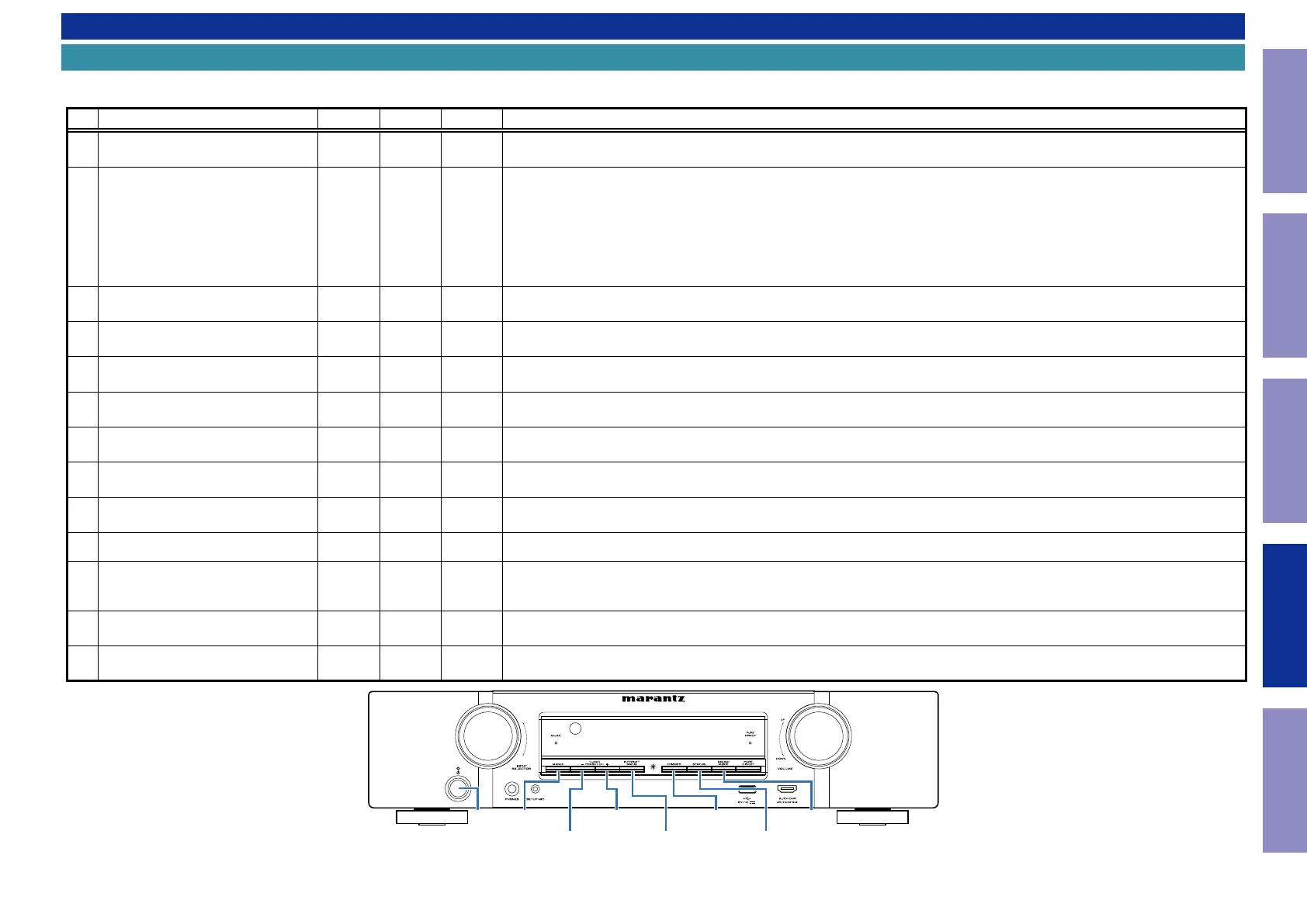
No. 1 - 4, 6 - 8 : While holding down buttons "
A
", "
B
" and "
C
" simultaneously, press the power button to turn on the power.
b
No. 5, 9 : While the power is on, hold down buttons "
A
" and "
B
" for at least 3 seconds .
No. Mode Button A Button B Button C Descriptions
1
Version Display
(u-COM / DSP Error Display)
DIMMER STATUS -
Displays the version of rmware such as the main rmware or DSP. Errors that have occurred are displayed.
(See 1. Version Display Mode)
2
PANEL / REMOTE LOCK Selection
Mode
M-DAX DIMMER -
Start this unit in the PANEL/REMOTE LOCK selection mode so that PANEL LOCK and Remote Lock can be switched between On and
Off. (See 2. PANEL / REMOTE LOCK Selection Mode)
·PANEL LOCK Mode (with Volume)
Disables reception from all keys and encoders on the front panel except the power button (including the volume).
·PANEL LOCK Mode (without Volume)
Disables reception from all keys and encoders on the front panel except the power button and volume encoder.
·PANEL LOCK mode is turned off
Releases the PANEL LOCK.
3 Selecting the Mode for Service-related
TUNER
PRESET CH +
STATUS -
This is a display for turning on each service-related mode.
Service-related modes: No. 3-1 - No. 3-4 (See 3-1. Selecting the Mode for Service-related)
3-1 Check the Video/Audio path Mode
↑ ↑ -
This is a special mode for service conrmation used during repair work to simplify the conrmation work for the Audio channel /
video channel. (See Service Path Check Mode)
3-2 Protection history display mode
↑ ↑ -
Displays the protection occurrence history.
(See 3-2. Protection History Display Mode)
3-3 Operation Info Mode
↑ ↑ -
Displays the accumulated operating time of the unit, the number of times the power was switched on, and the number of occur-
rences of each protection. (See 3-3. Operation Info Mode)
3-4
TUNER STEP Mode
(U and N model only)
↑ ↑ -
Enables reception STEP of the ANALOG TUNER to be changed.
(See 3-4. TUNER STEP mode (U / N only))
4 Protection Pass Mode
DIMMER STATUS
SOUND
MODE
Enables the power to be turned on when protection detection is disabled.
(See 4. Protection Pass Mode)
5 Network Initialization Mode
TUNER
PRESET CH +
DIMMER -
Network module backup data is initialized.
(See 5. Network Initialization Mode)
6 User Initialization Mode
M-DAX
TUNER
PRESET CH +
-
Initialize the backup data for the MCU and network module. (Settings for the Installer Setup are not initialized.)
7 Factory Initialization Mode
TUNER
PRESET CH +
INTERNET
RADIO
-
Initialize the backup data only for MCU.
(Settings for the Installer Setup are initialized) (Network function settings are not initialized.)
(See CAUTION IN SERVICING.)
8 Clearing the Operation Info
DIMMER
INTERNET
RADIO
-
Clear the accumulated operating time of the unit, the number of times the power was switched on, and the number of occurrences
of each protection. (See 6. Clearing the Operation Info)
9 HDMI Diagnostics Mode
M-DAX DIMMER -
This mode is used to identify and solve the cause when there is a connectivity issue with this unit and an HDMI device.
For details on the operating methods and diagnosis procedures, see the HDMI Diagnostics and Troubleshooting guide issued on SDI.
INTERNET
RADIO
SOUND
MODE
DIMMER
STATUS
M-DAX
X
TUNER
PRESET CH +
TUNER
PRESET CH -
108
Caution in
servicing
Electrical Mechanical Repair Information Updating



 To Next Page