2. Updating by DPMS
Download the latest rmware from the internet and update the rmware.
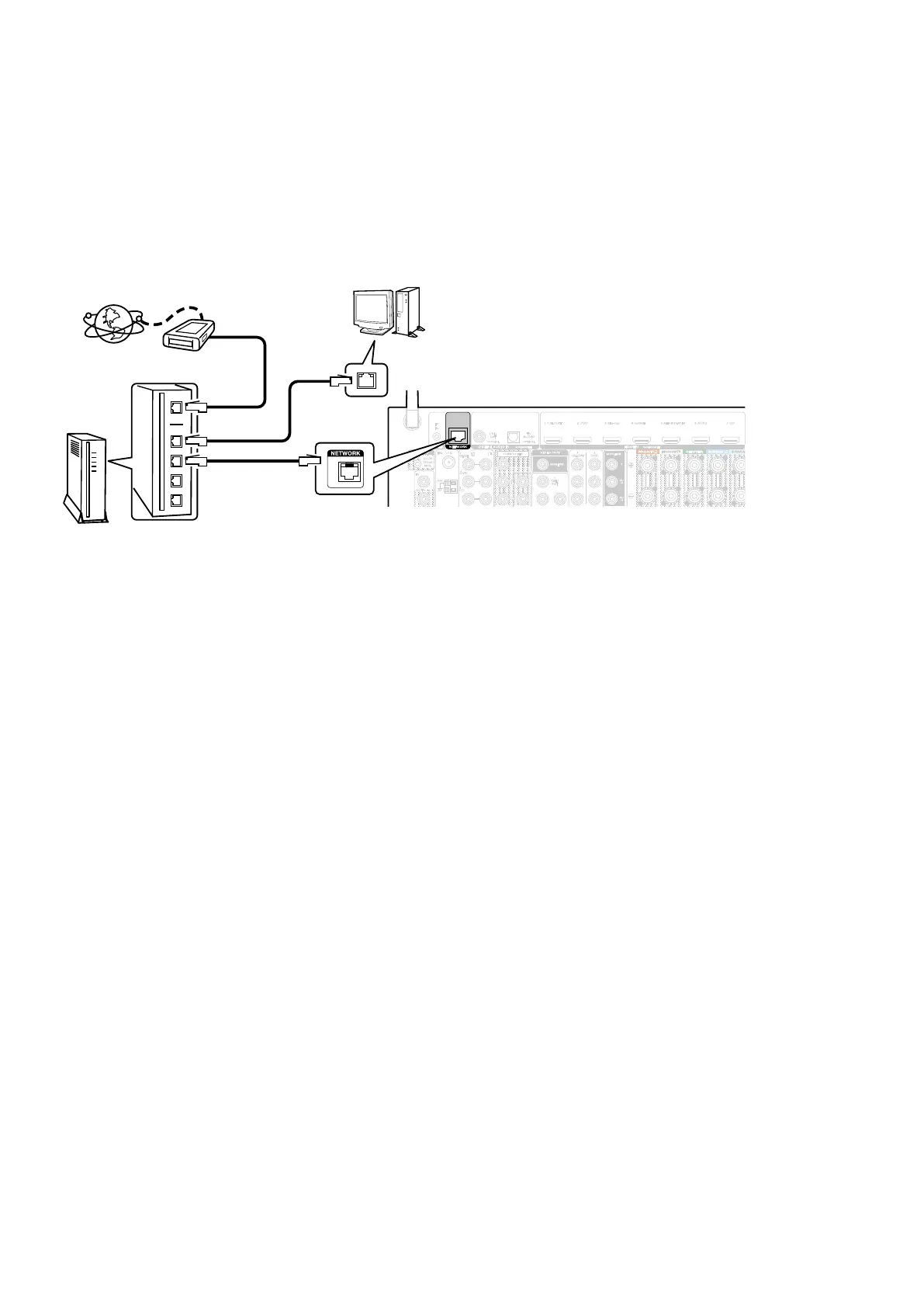
2.1. Network Connection
(1) System Requirements
• A broadband internet connection
• Modem
• Router
• Ethernet cable (CAT-5 or greater recommended)
(2) Settings
2.2. Checkandupdatethermware
Check whether new rmware is available. It is also possible to check approximately how long the update will take.
(1) Press the button "
SETUP
" on the remote control to display the GUI menu.
(2) Press the cursor button to select "
General
" → "
Firmware
" → "
Update
" → "
Check Update
".
(3) Press the button "
ENTER
".
• The latest rmware version uploaded to our website is displayed.
• Proceed to (4) if new rmware is available on our website.
• If the latest rmware is already installed, press the button "
SETUP
" to exit the menu.
(4) Select "
Start
" using the cursor buttons and then press "
ENTER
".
• The power display lights in red and the GUI screen display disappears during the update.
The remaining time of the update is shown on the display of the unit.
• The normal status resumes after the update is completed.
--- Precautions for Updates ---
• The environment and settings must allow connection to broadband Internet for updates.
• Never turn off the power before an update is completed.
• It takes around 1 hour to complete the update.
Once an update is started, normal operations cannot be performed until it is completed.
The GUI menu settings and image adjustment settings of this unit may be initialized.
Take note of your settings beforehand and recongure them after the update.
AM
COAXIAL
CBL/
SAT
IN
OUT
DIGITAL AUDIO IN
(
ASSIGNABLE
)
1
CBL/SAT
1
CBL/
SAT
2
DVD
2
DVD
PB/
CB
Y
MONITOR
PR/
CR
1 CBL/SAT 2 DVD 3 Blu-ray 4 GAME 5
MEDIA PLAYER
6 AUX2 7 CD
OPTICAL
TV
AUDIO
HDMI IN
(
ASSIGNABLE
)
FLASHER
IR
IN
1
CBL/SAT
MONITOR
VIDEO OUT
3
CD
DC OUT
DC12V
150mA
MAX.
SUBWOOFER
FM
75Ω
NETWORK
Modem
Internet
Computer
Computer LAN port / Ethernet connector
ETHERNET connector
Router
To WAN port
To LAN port
To LAN port
66



 To Next Page