EasyManua.ls Logo

Marantz SA-11S3 - Page 14

Marantz SA-11S3
37 pages
Print Icon
To Next Page IconTo Next Page
To Previous Page IconTo Previous Page
Loading...
ENGLISH
PC
connection
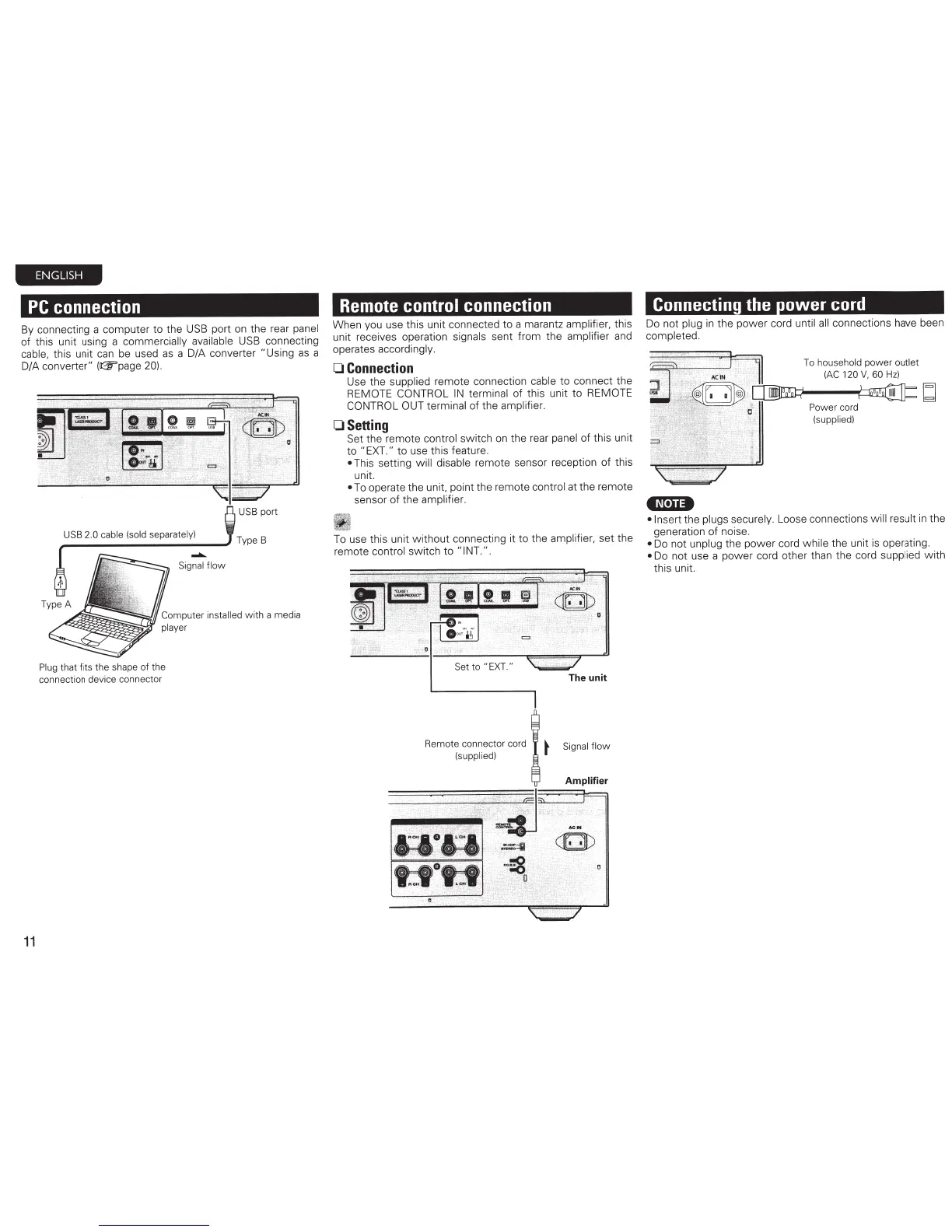
By connecting a computer
to
the
USB
port on the rear
panel
of
this unit using a commercially
available
USB
connecting
cable,
this unit
can
be used
as
a D/A converter "Using
as
a
D/A
converter"
(~page
20)
.
11
USB
2.0 cable (sold separately)
-.
Signal
flow
Computer
in
stalled with a media
player
Plug that fits
the
shape
of
the
connection device connector
Remote
control
connection
When you use this unit connected
to
a marantz
amplifi
er,
this
unit receives operation
signals
sent from the
amplifier
and
operates accordingly.
0
Connection
Use the
supplied
remote connection
cable
to
connect the
REMOTE CONTROL
IN
terminal
of this unit to
REMO
TE
CONTROL OUT terminal
of
the amplifier.
OSetting
Set the remote
control
switch on the rear
panel
of
this un
it
to
"EXT."
to use this feature.
This setting
will disable
remote sensor reception of this
unit.
To operate the
unit.
point the remote
control
at the remote
sensor
of
the amplifier.
To
use this unit w ithout connecti
ng
it
to
the
amplifier,
set the
remote
control
switch
to
"I NT.".
Remote connector co
rd
(supplied)
The unit
Signal flow
Connectin
the
ower
cord
Do not
plug in the
power
cord
unt
il
a
ll
connections
ha
ve been
completed.
•N·n•
To
household
power
ou
tlet
(
AC
120
V,
60
Hz)
•Insert
the
plugs securely.
Loose connections
will result in the
generation
of
noise.
Do not unpl
ug
the power cord
wh
ile
the unit is operating.
Do not use a
power
cord other than the cord
supplied
w ith
this unit.

Other manuals for Marantz SA-11S3

Related product manuals