USB
memor
device
I
iPod
connection
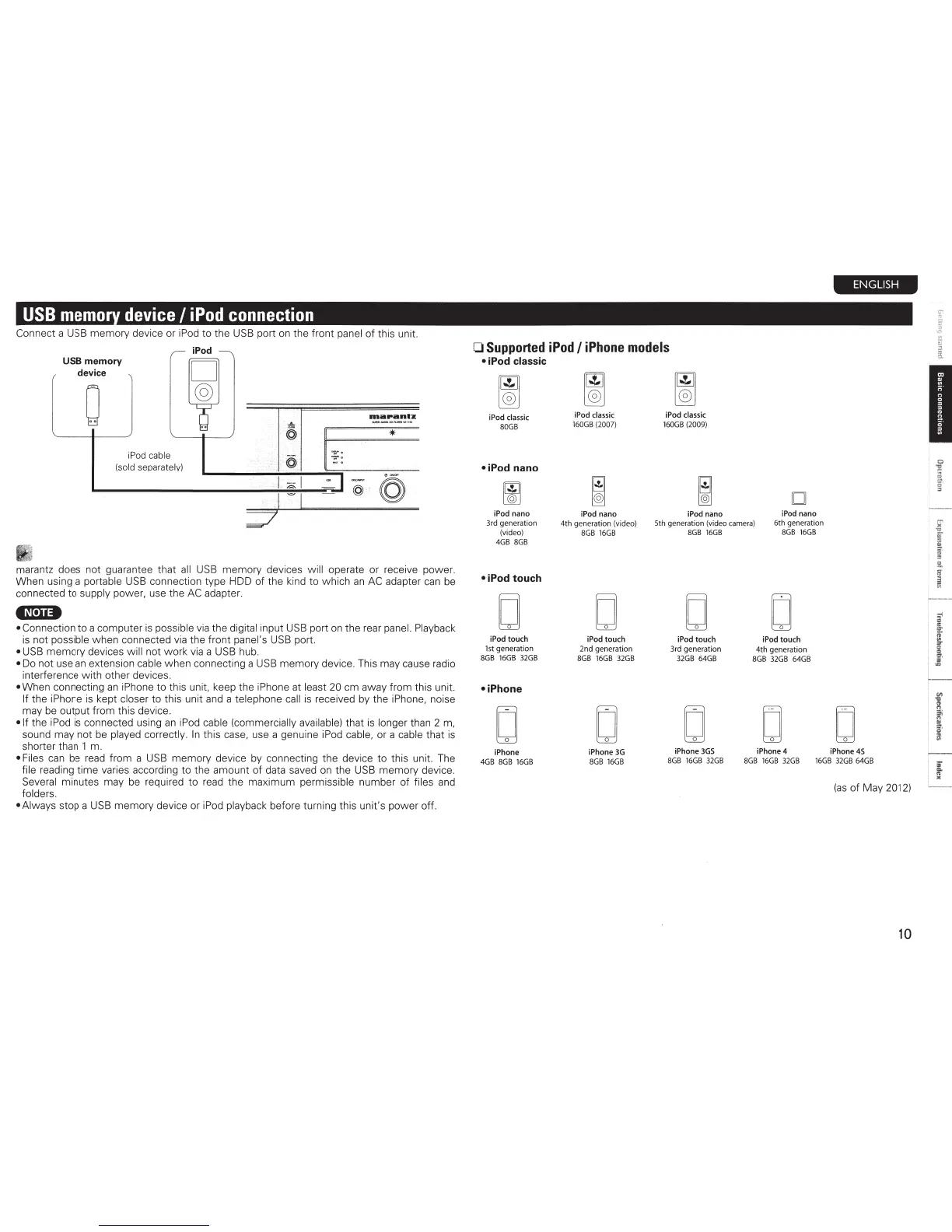
Connect a
USB
memory device or
iPod
to the
USB
port
on
the front panel of this unit.
·p d
I 0
USB memory
'
device
0
RlaPantz
.&.
-.owo;>(J).._ ...
,,
...
@
I"'
*
iPod cable
@
(sold separately)
I,
;;:.:;
I
~
I~
·-
~
@
II
marantz does not guarantee that
all
USB
memory devices will operate or receive power.
When using a portable
USB
connection type HDD of the kind to which
an
AC
adapter
can
be
connected to supply power, use the
AC
adapter.
•N•u•
• Connection to a computer
is
possible
via
the digital input
USB
port
on
the rear panel. Playback
is
not possible when connected
via
the front panel's
USB
port.
•
USB
memory devices will not work
via
a
USB
hub.
•
Do
not use
an
extension cable when connecting a
USB
memory device. This may cause radio
interference with other devices.
• When connecting
an
iPhone to this unit, keep the iPhone at least 20 em away from this unit.
If the iPhone
is
kept closer to this unit
and
a telephone
call
is
received
by
the iPhone, noise
may
be
output from this device.
•If
the iPod
is
connected using
an
iPod
cable (commercially available) that
is
longer than 2
m,
sound may not
be
played correctly.
In
this
case,
use a genui
ne
iPod cable, or a cable that
is
shorter than 1 m.
• Files
can
be
read
from a
USB
memory device by connecting the device to this unit. The
file reading time varies according to the amount
of
data saved
on
the
USB
memory device.
Several minutes may
be
required to
read
the maximum permissible number of files and
folders.
•Always
stop a
USB
memory device or iPod playback before turning this unit's power off.
0
Supported
iPod
I
iPhone
models
• iPod
classic
iPod classic
80GB
•iPod nano
iPod
nano
3rd generati
on
(video)
4GB
8GB
•iPod touch
D
iPod classic
160GB
(2007)
iPod
nano
4th generation (video)
8GB
16GB
D
iPod
touch
2nd generation
iPod classic
160GB
(2009)
iPod nano
5th generation (video camera)
8GB
16GB
D
iPod
touch
3rd generation
D
iPod
nano
6th generation
8GB
16GB
D
iPod
touch
4th generation
iPod
touch
1st
generation
8GB
16GB
32GB
8GB
16GB
32GB 32GB
64GB
8GB
32GB
64GB
•iPhone
D
D
D
iPhone
3G
iPhone
3GS
iPhone 4
ENGLISH
D
iPhone 45
iPhone
4GB
8GB
16GB
8GB
16GB
8GB
16GB
32GB
8GB
16GB
32GB
16GB
32GB
64GB
(as
of
May 2012)
10



 To Next Page