ENGLISH
Pia
back
iPod®
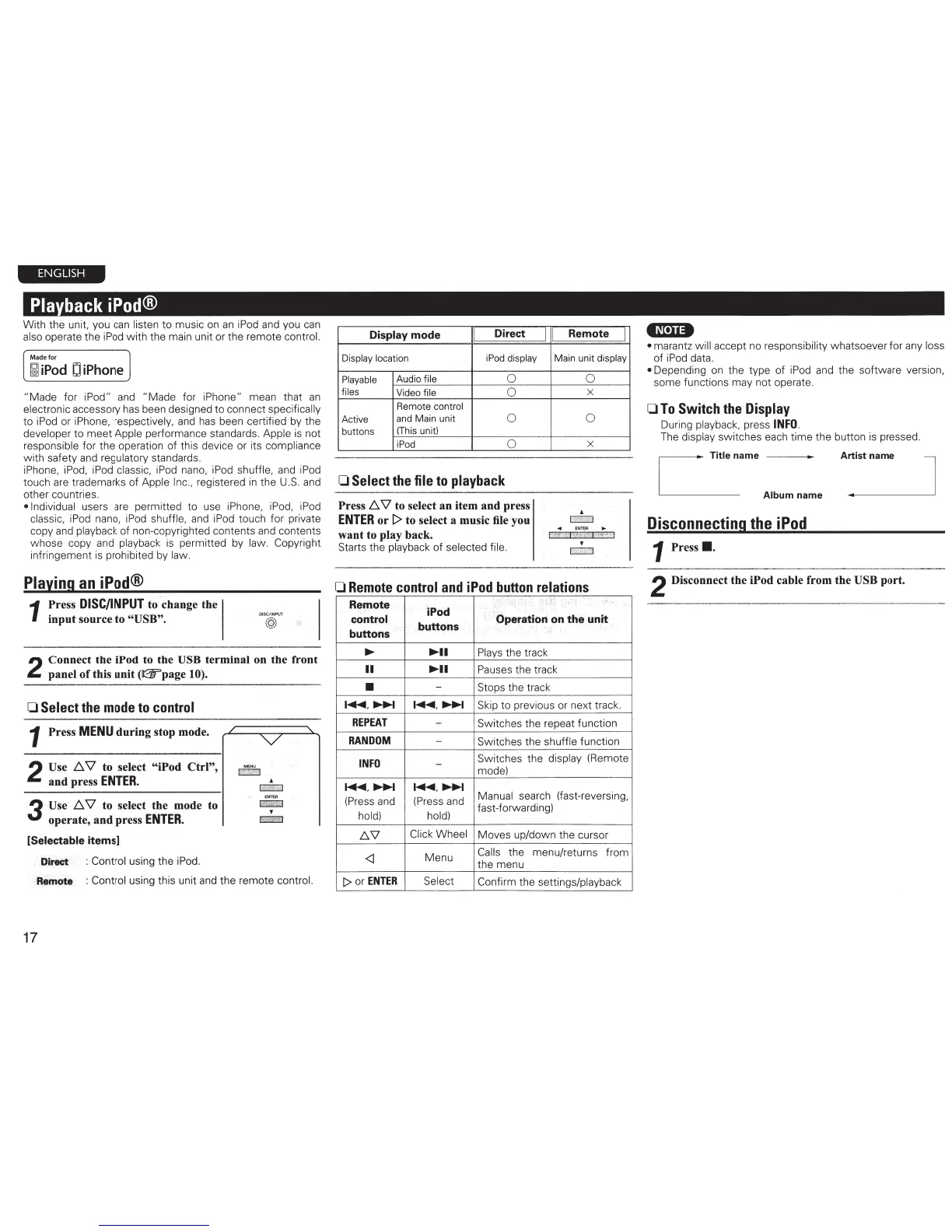
With the unit, you can listen
to
music on
an
iPod and you can
also operate the iPod with the main unit or the remote control.
Made
for
~
iPod
D
iPhone
"Made
for iPod" and "Made for iPhone" mean that
an
electronic accessory has been designed
to
connect specifically
to iPod or iPhone, respectively, and has been certified by the
developer
to
meet
Apple performance standards. Apple is not
responsible for the operation of this device or its compliance
with
safety
and
regulatory standards.
iPhone, iPod, iPod classic,
iPod
nano, iPod shuffle, and iPod
touch are trademarks
of
Apple Inc., registered
in
the U.S. and
other countries.
•Individual users are permitted
to
use
iP
hone, iPod, iPod
classic, iPod nano, iPod shuffle, and iPod touch for private
copy and playback of non-copyrighted contents and contents
whose copy and playback
is
permitted by law. Copyright
infringement
is
prohibited by law.
Playing
an
iPod®
1
Press
DISC/INPUT
to change the
input source to "USB".
DISC/INPUT
@
2
Connect the iPod to the USB terminal on the front
panel
of
this unit
(11:25"page
1 0).
0
Select
the
mode
to
control
1 Press
MENU
during stop mode.
2
Use
!:::..
\1
to select "iPod Ctrl",
and press
ENTER.
3
Use
!:::..
\1
to select the mode to
operate, and press
ENTER.
[Selectable items]
:
-jjitect
· : Control using the iPod.
ME
NU
E!!iil
:
fllemote
: Control using this unit and the remote control.
17
Display mode
Direct
I
Remote
I
Display location iPod display Main
unit
display
Playable
Audio file
0
files
Video file
0
Remote control
Active
and Main unit
0
buttons
(Th
is
un
it)
iPod
0
0
Select
the
file
to
playback
Press
!:::..
\1
to select an item and press
ENTER
or
t>
to select a music file you
want to play back.
Starts the playback
of
selected file.
0
X
0
X
•
p:.,
,
,
f~<e
l
0
Remote
control
and
iPod
button
relations
"
Be
mote
'"~""
..._,
«:qntr~
iPod
; : :operation
c;m
the unit
buttons.
..
bQJlP!1S
; •
•-
;
•,
>
-
-·
....
....
..
Plays the track
II
......
Pau
ses the track
•
-
Stops the track
~.~
~.~
Sk
ip
to
previous
or
next
tr
ack.
REPEAT
-
Switches the repeat function
RANDOM
-
Sw
itches the shuffle function
..
INFO
-
Switches the display (Remote
mode)
~.~ ~.~
Manual search
(fast-reversing,
(Press and (Press and
hold) hold)
fast-fo
rw
arding)
.6.\l
Cl
ick Wheel
Moves up/down the cursor
<I
Menu
Ca
l
ls
the
menu/returns from
the menu
I>
or
ENTER
Select
Confirm the settings/playback
4N•U•
• marantz will accept no responsibili
ty
w hatsoever for any loss
of
iPod data.
• Depending on
th
e type of iPod and the software ve
rs
io
n,
some functions may not operate.
OTo
Switch
the
Display
During playback, press
INFO.
The display
sw
itches each time the button
is
pressed.
~
Titlename
I__
Album name
Disconnecting
the
iPod
1 Press
•.
Artist name
..
2 Disconnect the iPod cable from the USB port.
J



 To Next Page