Playback
of
MP3
and
WMA
files
There
are
many music distribution sites
on
the
Internet
allowing
you to
download
music
files
in
MP3
or
WMA
(Windows Media® Audio)
formats.
The
music (files) downloaded
from such sites
can
be
stored
on
CD-R
or
CD-RW
discs
and
played
on
the unit.
"Windows Media"
and
"Windows"
are
registered
trademarks or trademarks of Microsoft Corporation
in
the
United States
and
other countries.
MP3
and
WMA
formats
CD-R
and
CD-RW
discs created
in
the format described
below
can
be
played.
Cl
Writing
software
format
IS09660 level 1,
2
Expansion format
(Juliet.
Romeo)
•
When written
in
other formats, it may not
be
possible
to
play
the disc
properly.
Cl
Maximum
number
of
playable
files
and
folders
Total
number of
folders
and
files: 1000
Number of
folders:
255
Cl
File
formats
MP3
(MPEG-1
Audio Layer-3)
WMA
(Windows Media Audio)
~
l
.
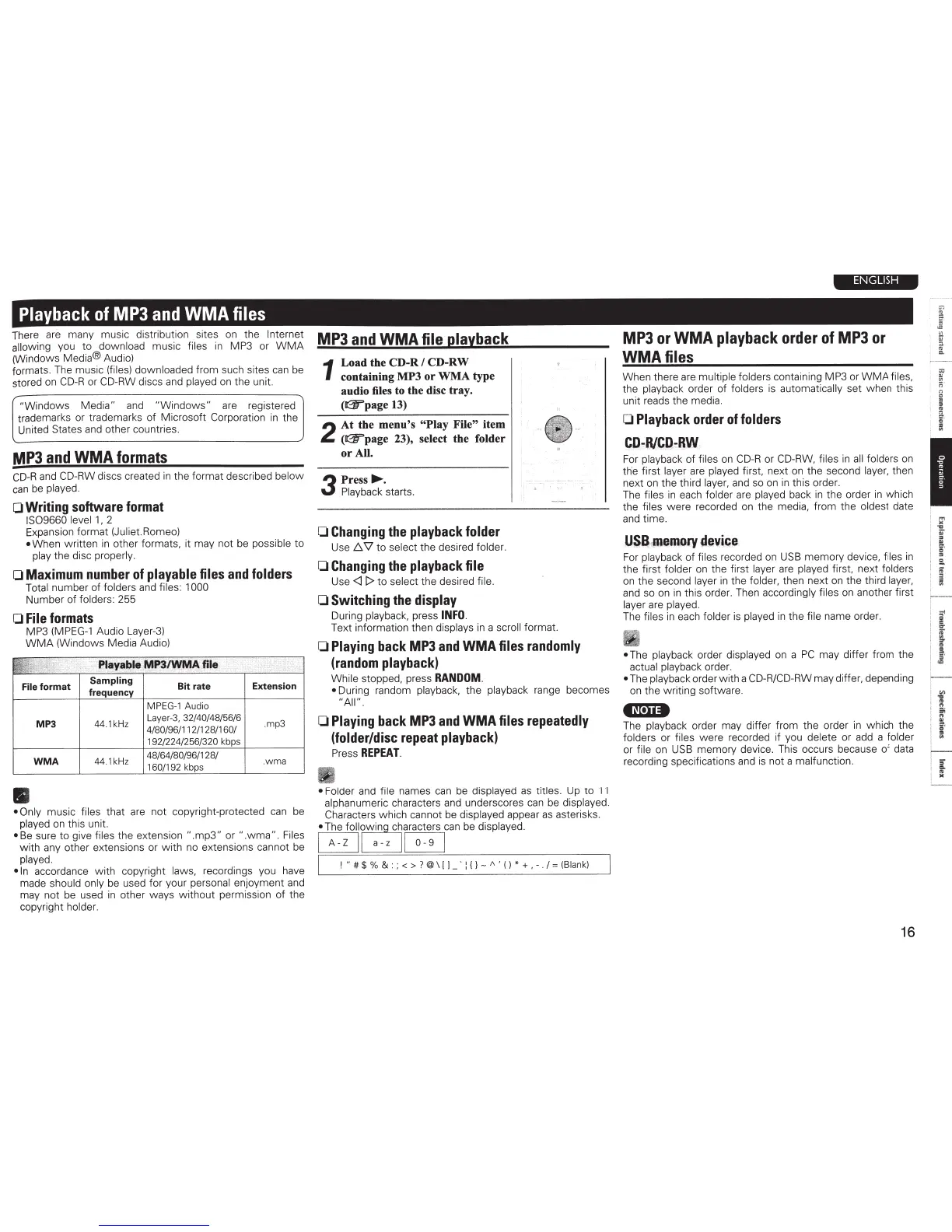
Playa~le
MP3/WMA
file
File format
Sampling
Bit rate
frequency
MPEG-1
Audio
MP3
44.1
kH
z
Laye
r-
3,
3214014815616
4180196111
211
281160
1
19212241256
1320 kbps
WMA
44.1kHz
4816418019611281
1601192
kbps
•
Extension
.mp3
. wma
• Only
music
files
that
are
not copyright-protected
can
be
played
on
this unit.
•
Be
sure to give files
the extension
".mp3"
or
".wma" . Files
with
any
other extensions or with
no
extensions cannot
be
played.
•In
accordance with copyright
laws,
recordings you
have
made
should only
be
used for your personal
enjoyment
and
may not
be
used
in
other ways without permission of the
copyright
holder.
MP3
and
WMA
file
playback
1
Load the CD-R
I
CD-RW
containing MP3 or WMA type
audio files to the disc tray.
(IGT'page
13)
2
At the menu's "Play File"
item
(IGT'page
23), select the folder
or All.
3
Press~.
Playback starts.
0
Changing
the
playback
folder
Use
./::,.
\1
to
select
the desired
folder.
0
Changing
the
playback
file
Use
<ll>
to
select
the desired
file.
0
Switching
the
display
During
playback,
press
INFO.
Text information then
displays
in
a
scroll
format.
0
Playing
back
MP3
and
WMA
files
randomly
(random
playback)
While
stopped, press
RANDOM
.
•
During random
playback,
the
playback
range becomes
"All"
.
0
Playing
back
MP3
and
WMA
files
repeatedly
(folder/disc
repeat
playback)
Press
REPEAT.
• Folder
and
file
names
can
be
displayed
as
titles.
Up
to
11
alphanumeric
characters
and
underscores
can
be
displayed.
Characters which cannot
be
displayed
appear
as
asterisks.
•
The
foll~wing
c~aracters
can
be
displayed.
B
a-z
B
I
! "
#
$
%
& : ; < >
?
@\ I
l
_
·
:
{}
-
A
'
( )
* +
,
-
.
I=
(Blank)
ENGLISH
MP3
or
WMA
playback
order
of
MP3
or
WMA
files
When there
are
multiple folders
containing
MP3
or
WMA
files,
the
playback
order of
folders
is
automatically set when this
unit reads the media.
0
Playback
order
of
folders
CD-R/CQ
::-
RW
For
playback of
files
on
CD-R
or CD-RW, files
in
all
folders
on
the first layer
are
played
first. next
on
the second
layer,
then
next
on
the third
layer,
and
so
on
in
this order.
The
files
in
each folder
are
played
back
in
the order
in
which
the
files were recorded
on
the media, from the
oldest
date
and
time.
USB
,
fllemory
device
For
playback
of
files
recorded
on
USB
memory device,
files
in
the first
folder
on
the first
layer
are played
first.
ne
xt folders
on
the second
layer
in
the folder,
then
ne
xt
on
the third
layer,
and
so
on
in
this order. Then
accordingly files
on
another first
layer
are
played.
The files
in
each
folder
is
played
in
the
file
name order.
•
The
playback order
displayed
on
a
PC
may differ from the
actual playback
order.
•
The
playback
order with a
CD-R/CD-RW
may differ, depending
on
the writing software.
•N•u•
The
playback
order may differ from the order
in
which the
folders
or
files were recorded if you
delete
or
add
a
folder
or
file
on
USB
memory device. This occurs because of
data
recording specifications
and
is
not a malfunction
.
16
r-
·- ·-
=
"'
"'
;:;
·
"
"
=
=
"'
ll
<r
a
I
~
'
...
'
iii
=
..
...
.
"
=
s.
..
a
a'
=
...
i
,.
I
~
·
i
"'
,_1_
'
If
I
~
I
~-
~
l i
~



 To Next Page