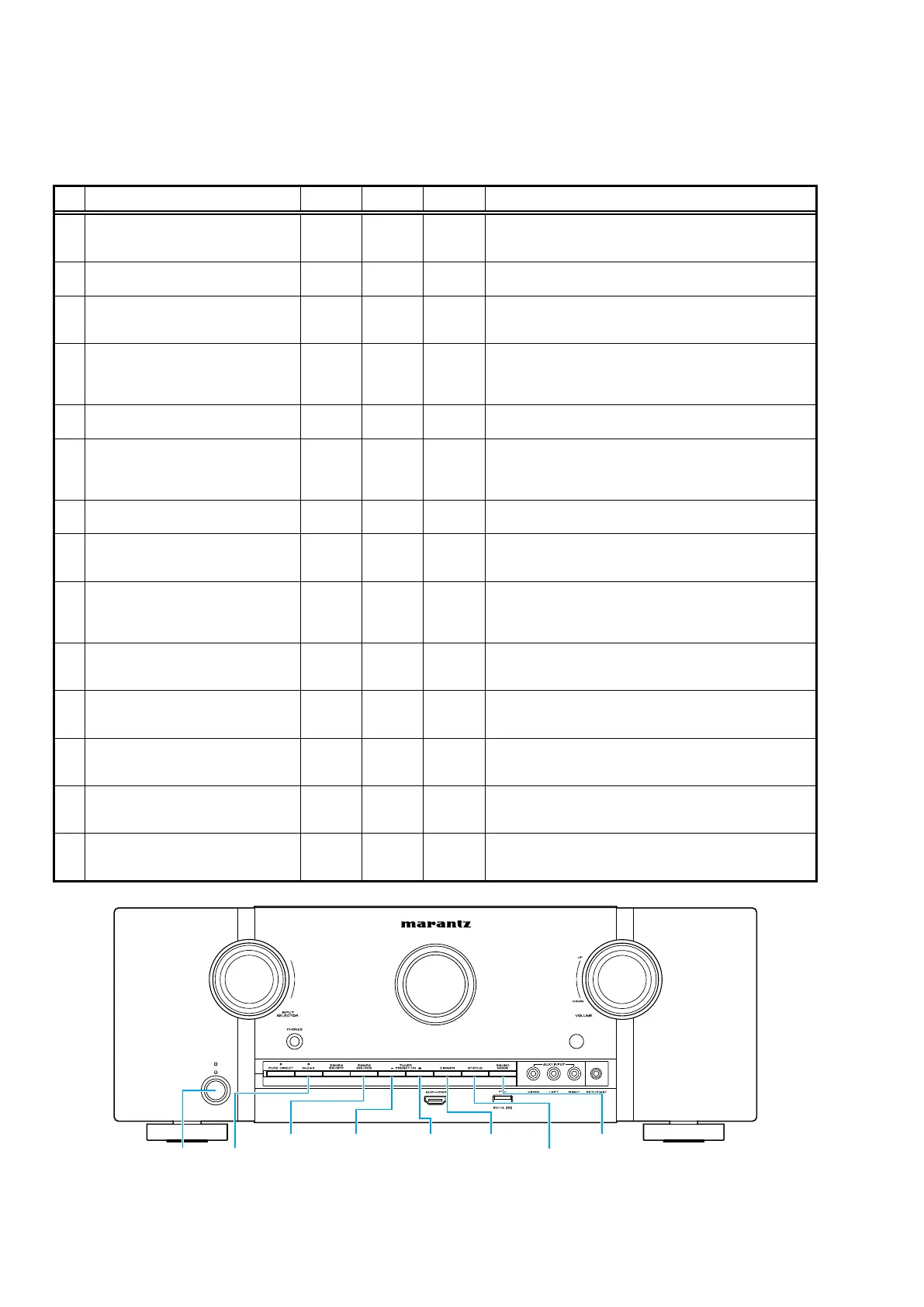
SPECIAL MODE
Special mode setting button
b
No. 1 - 6, 9 : While holding down buttons "
A
", "
B
" and "
C
" simultaneously, press the power button to turn on the power.
b
No. 7, 8 : While the power is on, hold down buttons "
A
" and "
B
" for at least 3 seconds .
b
No. 10 : While holding down buttons "
A
" and "
B
" simultaneously, insert the AC plug into the wall outlet to turn on the power.
No. Mode Button A Button B Button C Descriptions
1
Version Display
(u-COM / DSP Error Display)
DIMMER STATUS -
Displays the version of rmware such as the main rmware or DSP.
Errors that have occurred are displayed.
(See page 19)
2
Selecting the Mode for Service-related
ZONE2
SOURCE
STATUS -
This is a display for turning on each service-related mode.
Service-related modes: No. 2-1 - No. 2-5
2-1
Protection history display mode
TUNER
PRESET CH
+
- -
Displays the protection occurrence history.
(See page 44)
2-2
Check the Video/Audio path Mode ↑ - -
This is a special mode for service conrmation used during repair
work to simplify the conrmation work for the Audio channel /
video channel.
(See page 24)
2-3
TUNER STEP Mode
(U and N model only)
↑ - -
Enables reception STEP of the ANALOG TUNER to be changed.
(See page 47)
2-4
Operation Info Mode ↑ - -
Displays the accumulated operating time of the unit, the number
of times the power was switched on, and the number of occur-
rences of each protection.
(See page 46)
3
User Initialization Mode M-DAX
ZONE2
SOURCE
-
Initializes backup data.
(Settings for the Installer Setup are not initialized.)
4
Factory Initialization Mode
TUNER
PRESET CH
-
TUNER
PRESET CH
+
-
Initializes backup data.
(The settings for the Installer Setup is also initialized.)
5
PANEL / REMOTE LOCK Selection Mode M-DAX DIMMER -
Start this unit in the PANEL/REMOTE LOCK selection mode so that
PANEL LOCK and Remote Lock can be switched between ON and
OFF.
(See page 22)
6
Protection Pass Mode DIMMER STATUS
SOUND
MODE
Enables the power to be turned on when protection detection is
disabled.
(See page 48)
7
CY920 Reboot Mode
TUNER
PRESET CH
+
STATUS - The CY920 is restarted after CY920 hang up.
8
CY920 Initialization Mode
TUNER
PRESET CH
-
DIMMER -
Enter this mode only after replacing Flash for CY920 and rewriting
the rmware.
9
USB Update Mode
TUNER
PRESET CH
+
STATUS - Switches this unit to USB Update mode.
10
Forced USB All Device Write Mode
TUNER
PRESET CH
+
STATUS -
Mode used when this unit cannot be recovered.
Forcibly switches this unit to USB update mode.
(See page 55)
TUNER
PRESET CH +
DIMMER
STATUS
SOUND
MODE
TUNER
PRESET CH -
ZONE2
SOURCEM-DAXX
18



 To Next Page