135
General
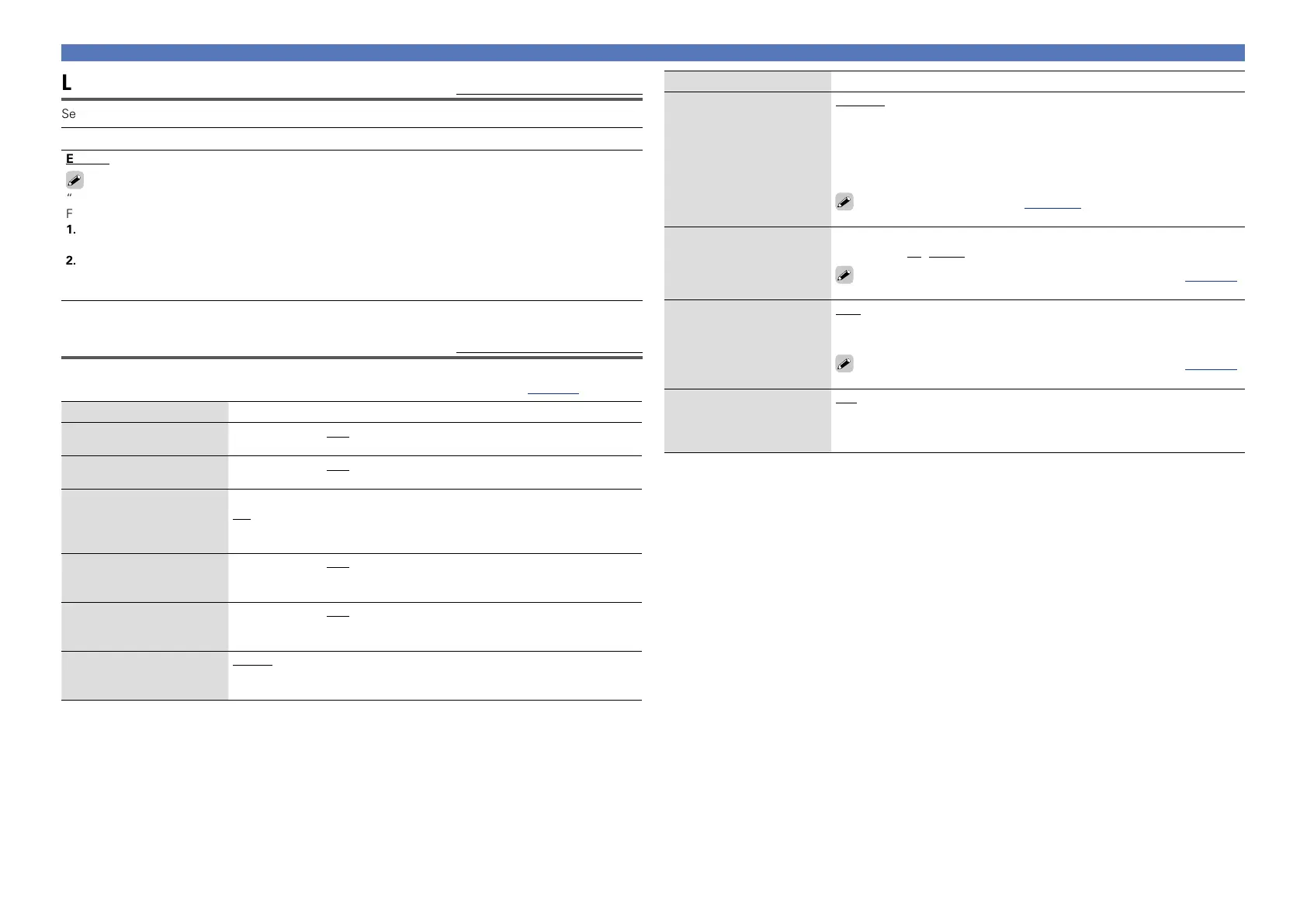
Language
Default settings are underlined.
Set the language for display on the menu screen.
Setting details
English / Français / Español
“Language” can also be set by the following procedure. However, the menu screen is not displayed.
Following the display content to make the setting.
1. Press and hold the main unit’s STATUS and ZONE2 SOURCE for at least 3 seconds.
“Video Format < NTSC >” appears on the display.
2. Press the main unit’s DISPLAY and set “GUI Language ENGLISH”.
3. Use the main unit’s PRESET CH +, – and set the language.
4. Press the main unit’s STATUS to complete the setting.
ZONE2 Setup
Default settings are underlined.
Set the audio to play back with ZONE2.
•“ZONE2 Setup” is displayed when “ZONE2” is selected with “Assign Mode” (vpage126).
Setting items Setting details
Bass
Adjust bass tones.
–10dB – +10dB (0dB)
Treble
Adjust treble tones.
–10dB – +10dB (0dB)
High Pass Filter
Make settings for cutting
the low range to reduce
distortion in the bass.
On : The low range is attenuated.
Off : The low range is not attenuated.
Lch Level
Adjust the left channel
output level.
–12dB – +12dB (0dB)
Rch Level
Adjust the right channel
output level.
–12dB – +12dB (0dB)
Channel
Set the signal output from
multi-zone.
Stereo : Select stereo output.
Mono : Select monaural output.
Setting items Setting details
Volume Level
Set the volume output level.
Variable : Volume adjustment is enabled by main unit and remote control
unit.
40 (–40dB) : Fix volume at –40 dB. Set when adjusting volume by external
amplifier.
80 (0dB) : Fix volume at 0 dB. Set when adjusting volume by external
amplifier.
When “Assign Mode” (vpage 126) is set to “ZONE2”, the
“Volume Level” setting is automatically set to “Variable”.
Volume Limit
Make a setting for
maximum volume.
Off : Do not set a maximum volume.
60 (–20dB) / 70 (–10dB) / 80 (0dB)
This is displayed from –79 dB to 18 dB when “Scale” (vpage113)
is set to “–79.5dB – 18.0dB”.
Power On Volume
Define the volume setting
that is active when the
power is turned on.
Last : Use the memorized setting from the last session.
Mute : Always mute when power is turned on.
1 – 98 (–79dB – 18dB) : The volume is adjusted to the set level.
This is displayed from –79 dB to 18 dB when “Scale” (vpage113)
is set to “–79.5dB – 18.0dB”.
Mute Level
Set the amount of
attenuation when muting
is on.
Full : The sound is muted entirely.
–40dB : The sound is attenuated by 40 dB down.
–20dB : The sound is attenuated by 20 dB down.



 To Next Page