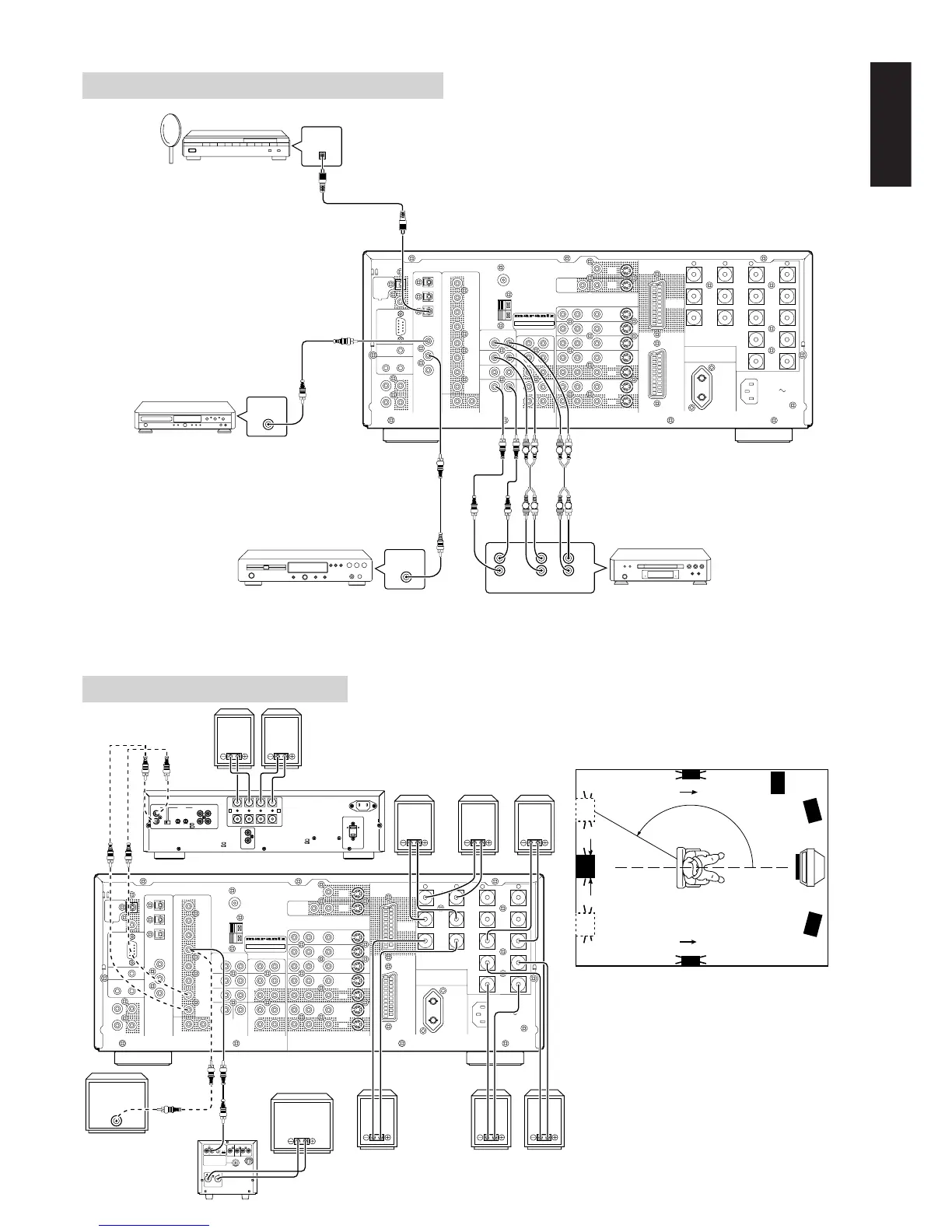
• Surround back speaker
• To connect two surround back speakers,
connect a 2 channel power amplifierto the
PRE OUT SBL and SBR terminals on the
SR8200, and connect the surround back left
& right speakers to that power amplifier.
• You will also need to make the appropriate
setting in the OSD Menu: SPEAKER
SETUP → SPEAKER SIZE → SURR
BACK=2CH (see page 29).
SATELLITE TUNER
DVD PLAYER
DVD PLAYER
CD PLAYER
FRONT RIGHT
SPEAKER
FRONT LEFT
SPEAKER
CENTER
SPEAKER
SURROUND
RIGHT
SPEAKER
SURROUND
LEFT
SPEAKER
SURROUND
BACK RIGHT
SPEAKER
SURROUND
BACK LEFT
SPEAKER
PASSIVE
SUBWOOFER
ACTIVE
SUBWOOFER
POWER AMPRIFIR
MA700
Front
Right
Front
Left
Front
Center
Surround
Right
Surround
Left
Surround
Back
Right
Surround
Back
Left
Subwoofer
SURROUND
BACK
SPEAKER
POWER AMPRIFIR
SM6100
Surround
Back
150°
degrees


 To Next Page